
Hear 1.3.1
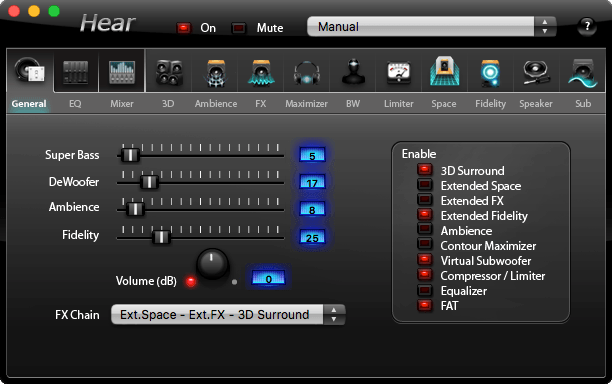
Hear greatly improves audio quality in movies and music throughout all of your Mac OS X applications. With Hear, music is richer, movie sound and dialog is clearer and games will blow you out of your chair!
- 3D Sound - Like movies? like'em more with virtual cinema quality sound experience. Sound will approach you from all angles, even from behind. You are there with Hear.
- Equalizer - Perfect your sound with Hear's studio quality N-band equalizer with built-in peak limiter. You've got control.
- Speaker Correction - Control speaker resonance to increase frequency range and enhance sound.
- Center Channel Control - Control the volume and width of the sound coming from your own virtual center-stage for performance-grade audio effects. A concert in your house.
- Virtual Subwoofer - No Sub? No problem. Let Hear use your existing speakers to boost your bass. Don't you need more thump in your life?
- Ambience - Fine tune reverb to emulate any venue from phone booth to concert hall. Either way, it's music to your ears.
- Fidelity control - Music the way it was meant to be heard. Restore frequency, coloring and intensity lost during the recording process. Put more "hi" in your "fi".
- Much more - Hear can control the volume and quality of each application independently. You can control enable and disable each effect independently. You can apply the effects in any order for dramatic results. You can define and recall presets at any time. You can enjoy Hear's effects through your computer's speakers, headphones and external speakers. And you can do it all in an easy-to-understand user interface.
WHAT’S NEW
Version 1.3.1:
- Fix hang-on-launch on OS X 10.9 and earlier
Screenshots


Frequently asked questions
How do I install the app?
Mount the image, drag the app into the "Applications" folder and launch it. If the system blocks the launch, allow it in "System Settings → Privacy & Security".
The app is damaged or won't launch
Reinstalling from a fresh image usually helps. Make sure your macOS version matches the one listed in the compatibility specs.
How do I update?
Download the new version from the site and install it over the current one — your settings will be preserved.
The download link doesn't work
Try a mirror or a download manager. For large files the browser often drops the connection.
How do I completely remove the app?
Use an uninstaller utility — it cleans up the service files that remain after moving the app to the trash.
VersionHear 1.3.1
DeveloperJoeSoft
CompatibilityOS X 10.8 or later, 64-bit processor
LanguageEnglish
IncludesPre-K'ed



Information
Visitors in the group Guests cannot leave comments on this publication.
Choose a download source
Hear 1.3.1 · 6.44 MB