
Disk Map Analyzer 2.1
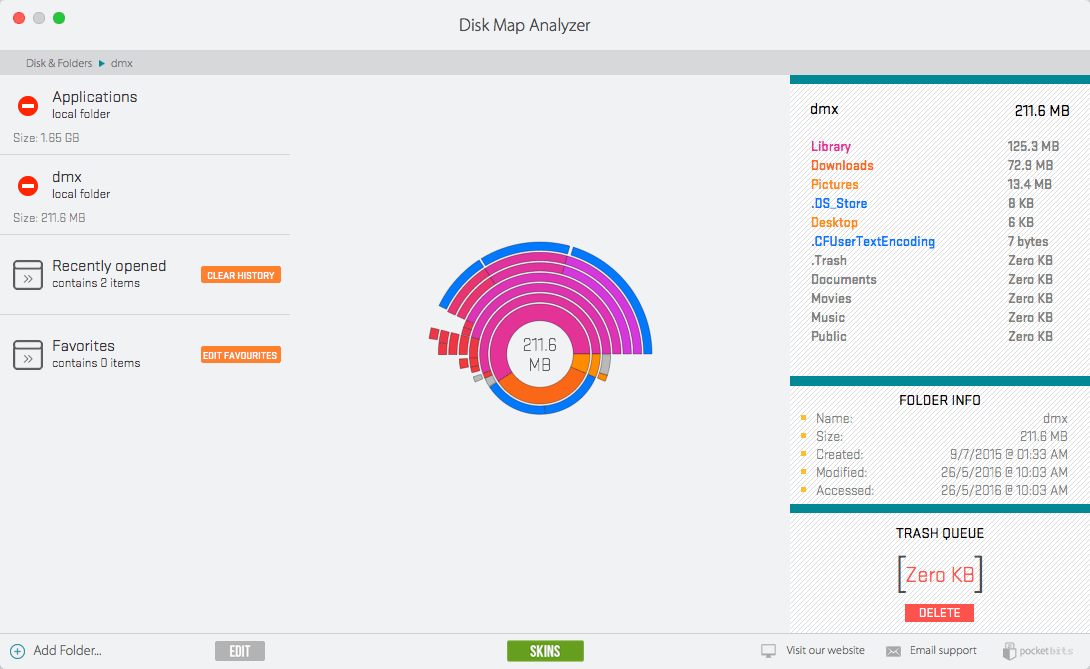
Disk Map Analyzer was designed by users just like you, who are trying to free up valuable disk space in the easiest and fastest way possible. We’ve meticulously spent countless hours creating our disk mapping algorithm and optimized our app exclusively for Mac OSX. Our beautiful sunburst disk map is visually intuitive and feels natural. Navigating our app will feel familiar and easy.
We’ve done all the work for you. Just scan your drive and easily view which files are taking up the most space. Drag & drop your large files to the trash queue. Say goodbye to the days of “low disk space”. Stop wasting your precious disk space and clean up your drive with Disk Map Analyzer.
Features
- The ONLY disk mapping app with 2 skins to choose from!
- Beautiful sunburst visual disk map
- Easy drag & drop scanning
- Convenient access to recently opened items
- Save to your Favorites for frequently accessed folders
- Video instructions
- Supports all types of drives (internal, external, dropbox, etc)
- #1 fastest and most effective scanning algorithm
- Easy preview of files and metadata
- Real-time display
- Retina display support
WHAT’S NEW
Version 2.1
- We've added our award winning 1-Click Disk Clean feature for easy cleaning!
- More optimization.
- Squashed a few more minor bugs.
- FASTER loading and scanning.
- Optimized "Recently Opened" to easily access your history.
- Fixed "Favorites" to bookmark your favorite locations.
- Improved our last free update with two beautifully designed skins to choose from!
- Customizability makes it even easier to find large files eating up valuable disk space.
Screenshots
Frequently asked questions
How do I install the app?
Mount the image, drag the app into the "Applications" folder and launch it. If the system blocks the launch, allow it in "System Settings → Privacy & Security".
The app is damaged or won't launch
Reinstalling from a fresh image usually helps. Make sure your macOS version matches the one listed in the compatibility specs.
How do I update?
Download the new version from the site and install it over the current one — your settings will be preserved.
The download link doesn't work
Try a mirror or a download manager. For large files the browser often drops the connection.
How do I completely remove the app?
Use an uninstaller utility — it cleans up the service files that remain after moving the app to the trash.
VersionDisk Map Analyzer 2.1
Developerocket Bits LLC
CompatibilityOS X 10.10 or later, 64-bit processor
LanguageEnglish
IncludesPre-K'ed


Information
Visitors in the group Guests cannot leave comments on this publication.
Choose a download source
Disk Map Analyzer 2.1 · 17.7 MB
Previous versions
Disk Map Analyzer 2.1
Previous versions are available to registered users.