
BusinessTasks 1.0.3
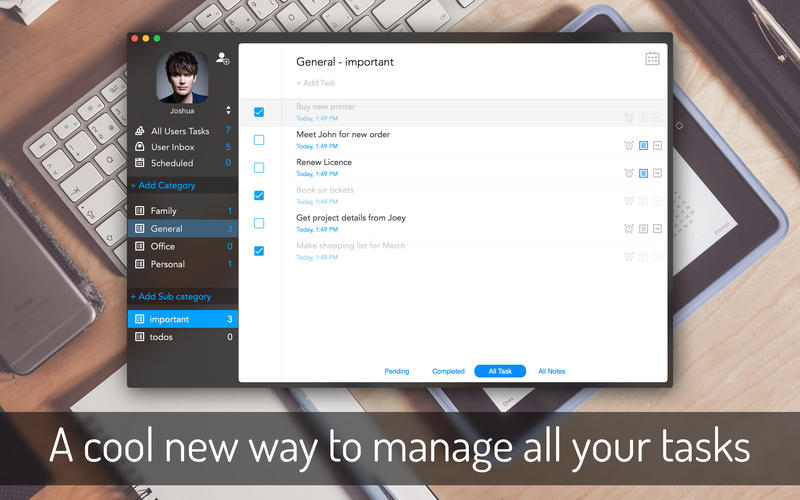
BusinessTasks is an all in one Mac application for effortless task management. It provides you with an intuitive app interface from where users can add task or todos one by one for any given day. Stay up to date with what you have to accomplish through out the day by taking a quick look at the app. Mark tasks as complete one by one after they are done. Set priority for each task and keep a close track on what is important.
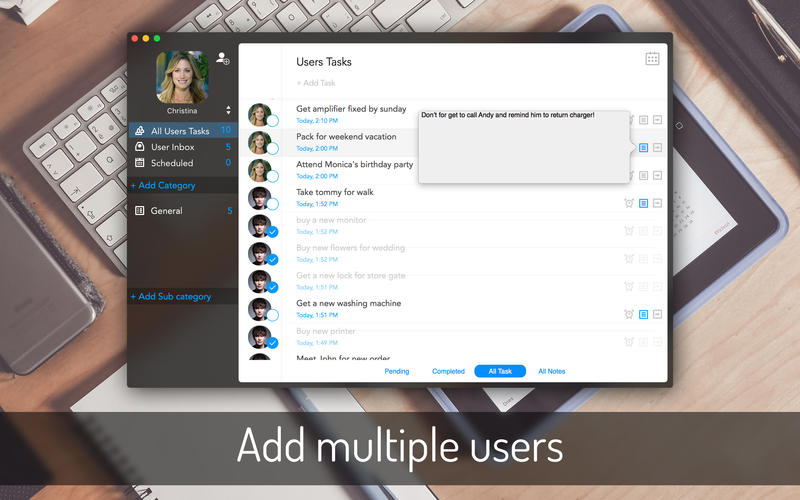
Tasks and todos can be kept into different categories and sub-categories. Create your preferable task categories and organize yours tasks constructively. Also add multiple users and define tasks for each user. This app is a complete solution to all your need when it comes to task management.
App Highlights:
- Add tasks into the app using simple app functions. Write and press Return.
- Mark tasks as Done, as and when you complete them one by one.
- Create task categories and sub-categories to organize tasks in an effective way.
- Add multiple users and define tasks for each of them separately.
- Set password for each user. Log in into the app using the User’s name and password.
- Back up your data in the system hard drive and restore it anytime.
- Add a small note with each task or to-do entry and browse it in one place.
- Set reminder for each task to get reminded of the deadline.
WHAT’S NEW
Version 1.0.3
- Bugs fixes...
Screenshots

Frequently asked questions
How do I install the app?
Mount the image, drag the app into the "Applications" folder and launch it. If the system blocks the launch, allow it in "System Settings → Privacy & Security".
The app is damaged or won't launch
Reinstalling from a fresh image usually helps. Make sure your macOS version matches the one listed in the compatibility specs.
How do I update?
Download the new version from the site and install it over the current one — your settings will be preserved.
The download link doesn't work
Try a mirror or a download manager. For large files the browser often drops the connection.
How do I completely remove the app?
Use an uninstaller utility — it cleans up the service files that remain after moving the app to the trash.
VersionBusinessTasks 1.0.3
DeveloperRaj Kumar Shaw
CompatibilityOS X 10.10 or later, 64-bit processor
LanguageEnglish
IncludesPre-K'ed




Information
Visitors in the group Guests cannot leave comments on this publication.
Choose a download source
BusinessTasks 1.0.3 · 4.36 MB