Deckset 2.1.0
The Markdown presentation app that designs your slides for you
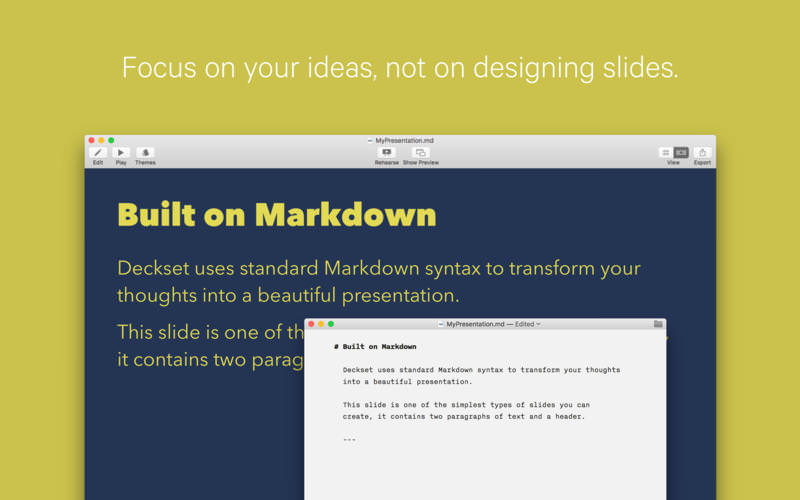

You write the talk as a plain text file in the editor you already use. Deckset is a Markdown presentation app that turns that file into slides. A floating preview window shows them next to your text as you work.
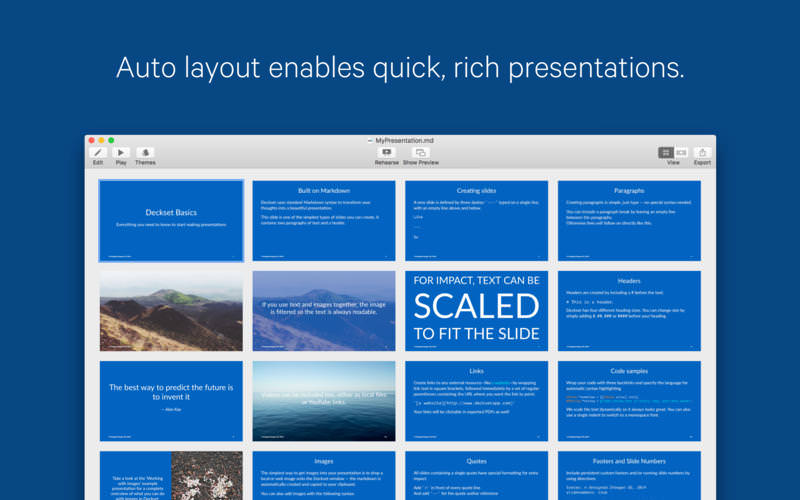
Your time goes into the ideas, not into moving text boxes around. Headings, lists, images and code go into the text, and Deckset takes care of layout and typography. Pick one of ten themes, from playful to serious, to fit a business meeting or a tech conference.
Code is where plain-text slides pay off. Samples get syntax highlighting and scale to fit the slide, so a long snippet stays on screen without manual resizing. Images and videos go in with a line of Markdown, and image filters change how a photo looks on the slide.
Before the talk, add speaker notes and practice in rehearsal mode. If the room's projector needs a different shape, switch the aspect ratio. When you're done, export the deck to PDF to share it.
Version 2.1.0:
Frequently asked questions
How do I install the app?
Mount the image, drag the app into the "Applications" folder and launch it. If the system blocks the launch, allow it in "System Settings → Privacy & Security".
The app is damaged or won't launch
Reinstalling from a fresh image usually helps. Make sure your macOS version matches the one listed in the compatibility specs.
How do I update?
Download the new version from the site and install it over the current one — your settings will be preserved.
The download link doesn't work
Try a mirror or a download manager. For large files the browser often drops the connection.
How do I completely remove the app?
Use an uninstaller utility — it cleans up the service files that remain after moving the app to the trash.


Choose a download source
Deckset 2.1.0 · 119.36 MB
Previous versions
Deckset 2.1.0
Previous versions are available to registered users.