Beauty Retouch Panel v 3.0, 3.1 and Pixel Juggler v2 for Photoshop
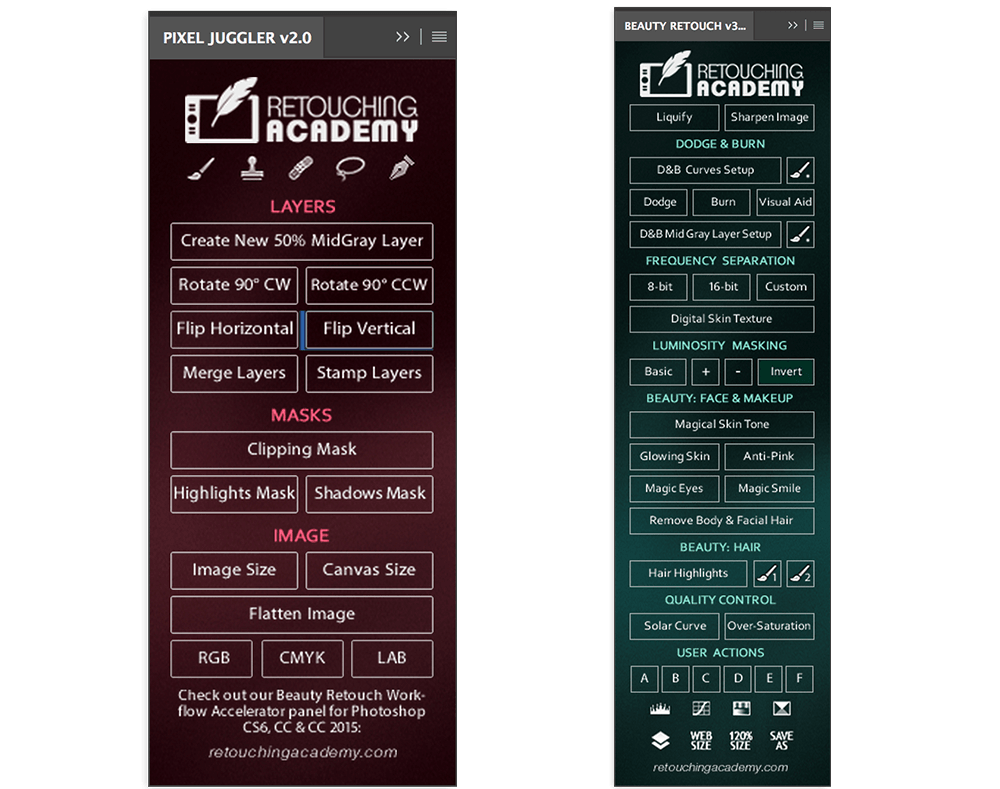
The Beauty Retouch Workflow Accelerator is a Photoshop extension panel created by a team of Retouching Academy experts to help photographers and retouchers speed up their Beauty, Fashion & Portrait retouching workflow and increase the quality of the outcome.
The Workflow Accelerator combines basic Beauty retouching scripts, tool and adjustment layer shortcuts, which will add simplicity to and speed up your workflow by performing the tedious and repetitive parts of your routine. Utilizing a few advanced and extremely helpful scripts, this extension panel will also save you hours of work in the short and long term as well as help you achieve accurate, repeatable and top-quality results.
Screenshots
Frequently asked questions
How do I install the app?
Mount the image, drag the app into the "Applications" folder and launch it. If the system blocks the launch, allow it in "System Settings → Privacy & Security".
The app is damaged or won't launch
Reinstalling from a fresh image usually helps. Make sure your macOS version matches the one listed in the compatibility specs.
How do I update?
Download the new version from the site and install it over the current one — your settings will be preserved.
The download link doesn't work
Try a mirror or a download manager. For large files the browser often drops the connection.
How do I completely remove the app?
Use an uninstaller utility — it cleans up the service files that remain after moving the app to the trash.
VersionBeauty Retouch Panel v 3.0, 3.1 and Pixel Juggler v2 for Photoshop
DeveloperRetouching Academy
CompatibilityPhotoshop CS6 - Photoshop CC 2015 • OS X / Windows
LanguageEnglish
IncludesPre-K'ed




Choose a download source
Beauty Retouch Panel v 3.0, 3.1 and Pixel Juggler v2 for Photoshop · 109.86 MB
Comments 1