iTools Pro 1.8.0.4
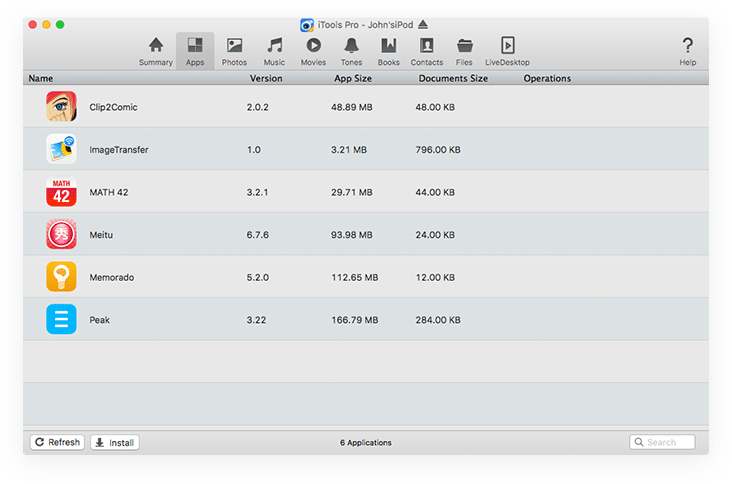

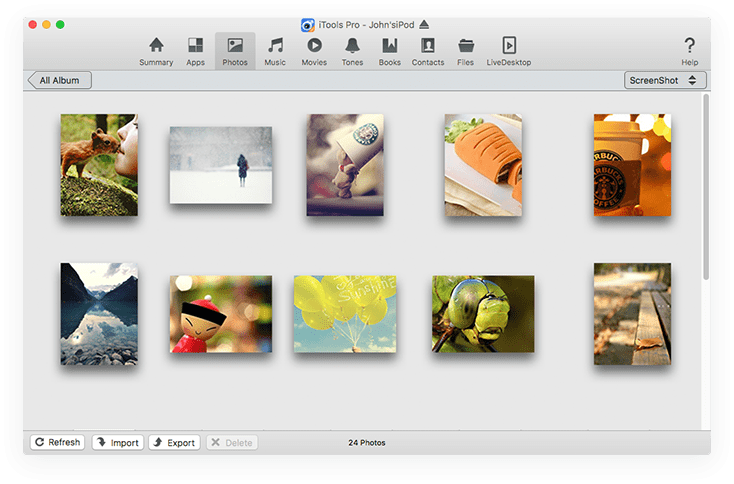
Managing the content of your iOS device using iTunes, the default OS X music player, is not always very intuitive. iTools is a simple Mac app that offers an alternative when you need to visualize, organize, or transfer data to and from your iPhone, iPad, or iPod touch.
Effortlessly browse the content of your iOS device via a well organized interface.
Right off the bat, you must make sure your iOS device is connected to your Mac: iTools automatically detects the available gadgets and then displays all the available information, organized into multiple tabs. As a result, you should be able to find what you are looking for in no time.
You can use the iTools app to view all installed applications, your photo / music / movies / ringtones / books / contacts library, all the available files, but also general details about the device, such as type, iOS version, or if it has been jailbroken or not.
Manage your iPhone’s or iPad’s data via user friendly tools
iTools offers you the possibility to import or export items without having to deal with complex tools. At the same time, you also have the option to delete certain elements. As far as applications are concerned, iTools enables you to delete, archive, or browse the content of the user installed utilities.
Within the iTools application, you should be able to visualize the activity of the iOS device in real time: the app installs an additional plug-in to handle this task, but during our test the screen loading procedure failed. Note that iTools downloads and installs this plug-in automatically without asking for confirmation.
Streamlined iOS device management solution featuring an user friendly workflow
iTools proposes simple solutions for transferring data from your iOS device to your Mac, and vice versa, in no time, without having to deal with complex tools. iTools can archive or browse the content of any installed app, enables you to browse and preview your media library, and so on. However, the developers do not provide any kind of documentation, so you will have to learn ho to use the app on your own
Version 1.8.0.4:
- Bug fixes and other improvements
Frequently asked questions
How do I install the app?
Mount the image, drag the app into the "Applications" folder and launch it. If the system blocks the launch, allow it in "System Settings → Privacy & Security".
The app is damaged or won't launch
Reinstalling from a fresh image usually helps. Make sure your macOS version matches the one listed in the compatibility specs.
How do I update?
Download the new version from the site and install it over the current one — your settings will be preserved.
The download link doesn't work
Try a mirror or a download manager. For large files the browser often drops the connection.
How do I completely remove the app?
Use an uninstaller utility — it cleans up the service files that remain after moving the app to the trash.
VersioniTools Pro 1.8.0.4
Developer©ThinkSky
CompatibilityOS X 10.8 or later
LanguageEnglish
IncludesK'ed by TNT





Information
Visitors in the group Guests cannot leave comments on this publication.
Choose a download source
iTools Pro 1.8.0.4 · 59.64 MB
Previous versions
iTools Pro 1.8.0.4
Previous versions are available to registered users.