Battery Indicator 2.20.2
Know your MacBook battery time remaining at a glance.

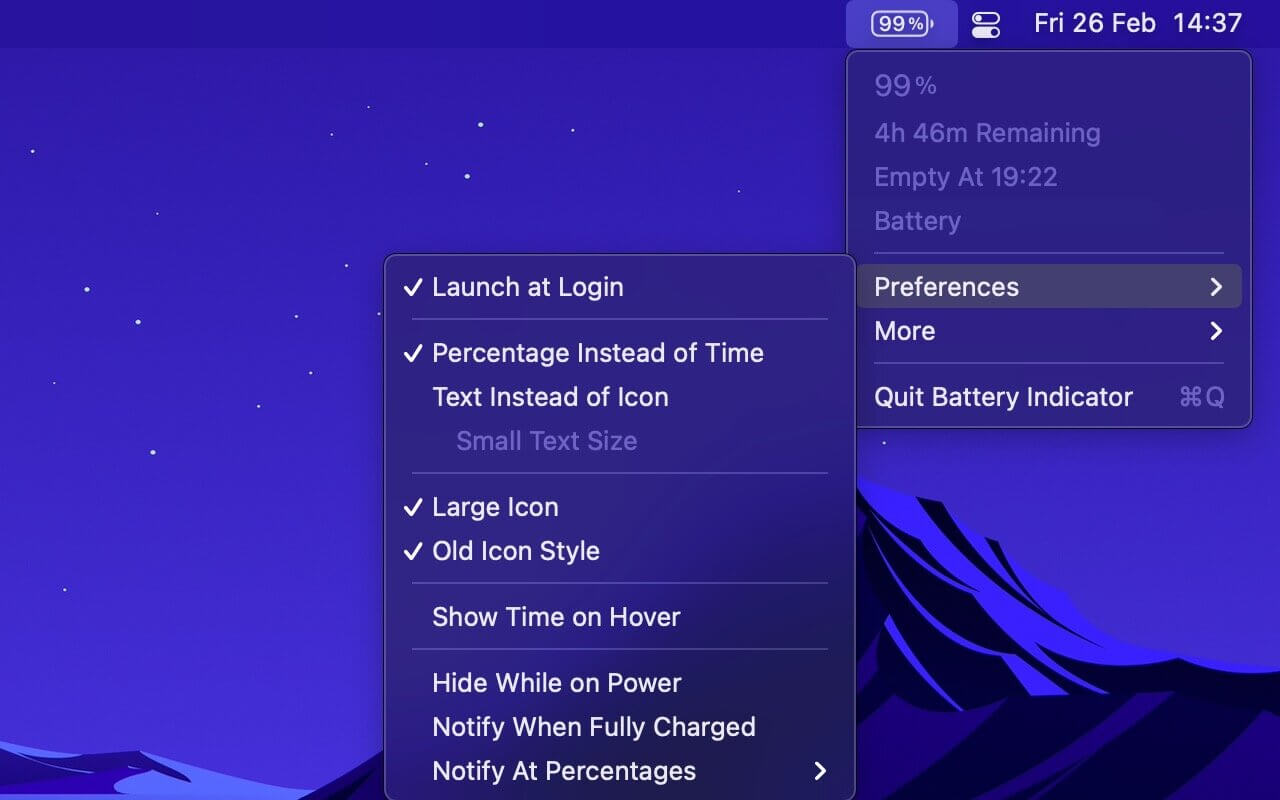

Always know how long your MacBook will last on battery. Battery Indicator 2 shows the remaining time and percentage right in your menu bar. You can see when to plug in without clicking anything.
Key features:
- Time and percentage in the menu bar. You see at a glance how much working time you have left.
- Hide the icon when plugged in. Your menu bar stays clean on power, and the indicator shows up when you switch to battery.
- Charge notifications. You get an alert when the battery is full or reaches the percentages you choose, so you know when to unplug.
- Battery health check. Hold the Option key while the menu is open to see your battery's condition and health.
- Takes the system indicator's place. Command-drag the system battery icon out of the menu bar, then Command-drag Battery Indicator 2 into the same spot.
- Text or icon mode. You can switch the menu bar item to text and use it alongside the system battery indicator.
Requirements: MacBook, MacBook Pro, or MacBook Air.
Limitations:
- There is no "Charge to Full Now" button.
- The app can't show "Apps Using Significant Energy" because of App Store restrictions. To see that list, keep the system battery indicator and set Battery Indicator 2 to text mode.
Version 2.20.2
- Bug Fixes
Frequently asked questions
How do I install the app?
Mount the image, drag the app into the "Applications" folder and launch it. If the system blocks the launch, allow it in "System Settings → Privacy & Security".
The app is damaged or won't launch
Reinstalling from a fresh image usually helps. Make sure your macOS version matches the one listed in the compatibility specs.
How do I update?
Download the new version from the site and install it over the current one — your settings will be preserved.
The download link doesn't work
Try a mirror or a download manager. For large files the browser often drops the connection.
How do I completely remove the app?
Use an uninstaller utility — it cleans up the service files that remain after moving the app to the trash.

Choose a download source
Battery Indicator 2.20.2 · 8.78 MB
Previous versions
Battery Indicator 2.20.2
Previous versions are available to registered users.