WiFi Explorer 3.6.6 - View WiFi networks
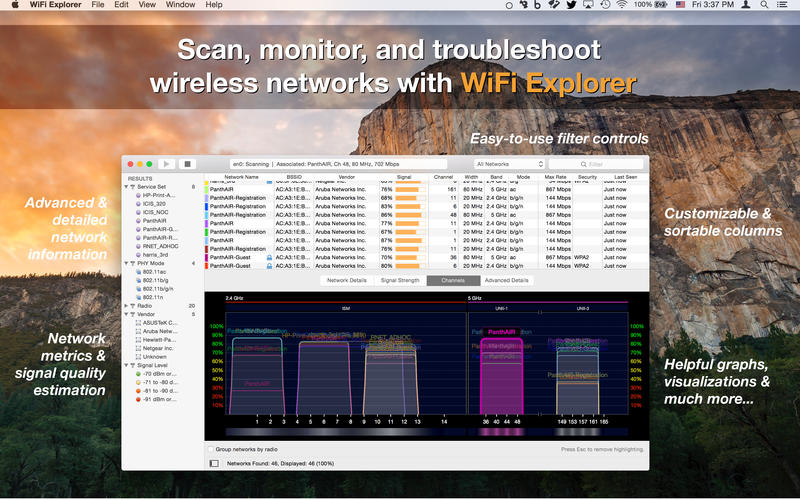

Scan, monitor, and troubleshoot wireless networks with WiFi Explorer.
Quickly identify channel conflicts, signal overlapping or configuration problems that may be affecting the connectivity and performance of your home, office or enterprise wireless network.
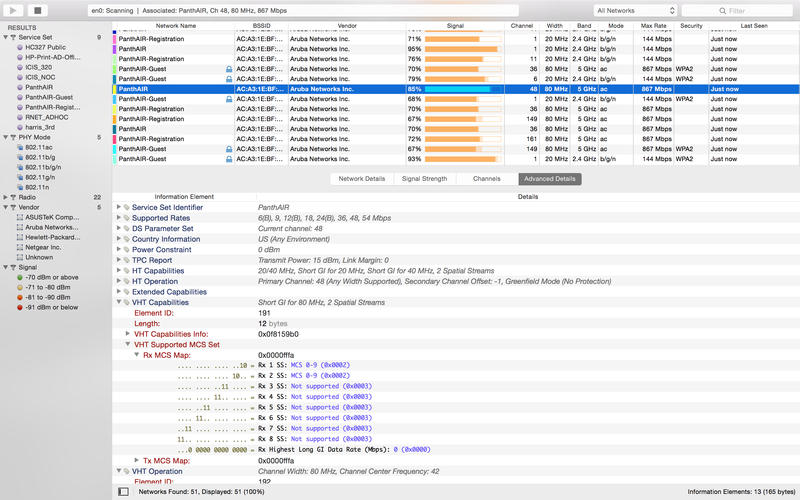
Get an insight into the network details: name (SSID), MAC address (BSSID), device manufacturer, signal strength (RSSI), noise, channel, band, security configuration, supported data rates, 802.11 information elements (IE), and much more.
- Suitable for home, small office, or enterprise networks
- Easy-to-use, intuitive user interface
- Graphical visualization of the Wi-Fi environment
- Supports 2.4 GHz and 5 GHz frequency bands as well as 20, 40, 80 and 160 MHz channels
- Works with 802.11a/b/g/n/ac networks
Also:
- Comprehensive app's help
- Signal quality ratings based on signal-to-noise ratio (SNR)
- Accurate conversion from dBm to percentage (%) for easier analysis and optimization
- Detailed description of information elements (IE) advertised by the access point for advanced troubleshooting
- Export metrics and network details to CSV file format
- Save results for later review and analysis
- Access point name discovery (if supported)
- Editable column for labels or annotations
- Selectable and sortable columns
- Adjustable graph timescales
- Quick filtering
- Customizable colors for easily tracking particular networks
- Full screen mode
Version 3.6.6
- Adds support for the Telecom Infra Project AP Name element.
- Adds support for the Wi-Fi Alliance Capabilities element.
- Fixes an issue where the AP name may not be displayed for nontransmitted networks.
- Fixes a crash that may occur when accessing the vendor database.
- Improves vendor name resolution.
Frequently asked questions
How do I install the app?
Mount the image, drag the app into the "Applications" folder and launch it. If the system blocks the launch, allow it in "System Settings → Privacy & Security".
The app is damaged or won't launch
Reinstalling from a fresh image usually helps. Make sure your macOS version matches the one listed in the compatibility specs.
How do I update?
Download the new version from the site and install it over the current one — your settings will be preserved.
The download link doesn't work
Try a mirror or a download manager. For large files the browser often drops the connection.
How do I completely remove the app?
Use an uninstaller utility — it cleans up the service files that remain after moving the app to the trash.



Choose a download source
WiFi Explorer 3.6.6 - View WiFi networks · 11.08 MB
Previous versions
WiFi Explorer 3.6.6 - View WiFi networks
Previous versions are available to registered users.