
DwellClick 2.2.4
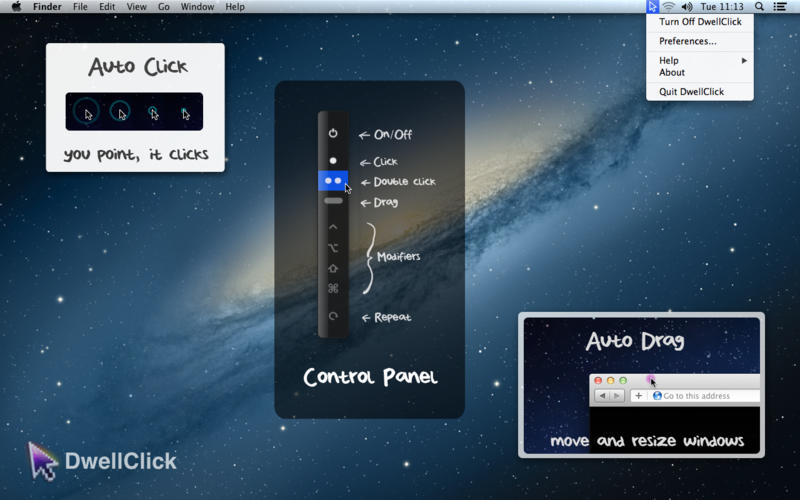
DwellClick is an app that clicks the mouse for you, and lets you give your fingers a rest!
- Click and drag with mouse movements only. No clicking required!
- Save thousands of clicks per day. No more tired and sore hands.
- Drag and resize windows so easily it's like magic!
- Works great with any trackpad or mouse.
It's a whole new way to use your Mac. You do the pointing, and DwellClick takes care of the clicks. And with the unique Auto Drag feature, dragging the mouse is effortless too.
DwellClick lets you adopt a totally relaxed posture and use your Mac with mouse movements only. Once you discover a world without clicking, you will find you can use your Mac more enjoyably and with less effort. Work or play more efficiently and for longer, without tired, sore hands.
You can work faster, because your hands actually spend less time on the mouse or trackpad. Or just lean back and browse, and enjoy Web surfing with minimal effort.
DwellClick works seamlessly with OS X and has multiple intelligent features which help it keep out of your way and do its job, while you do your job. It works great with multi-touch trackpads and the Magic Mouse too.
WHAT’S NEW
Version 2.2.4:
- Updated for compatbility with OS X 10.11.4
- The minimum system requirement is now OS X 10.9
Screenshots
Frequently asked questions
How do I install the app?
Mount the image, drag the app into the "Applications" folder and launch it. If the system blocks the launch, allow it in "System Settings → Privacy & Security".
The app is damaged or won't launch
Reinstalling from a fresh image usually helps. Make sure your macOS version matches the one listed in the compatibility specs.
How do I update?
Download the new version from the site and install it over the current one — your settings will be preserved.
The download link doesn't work
Try a mirror or a download manager. For large files the browser often drops the connection.
How do I completely remove the app?
Use an uninstaller utility — it cleans up the service files that remain after moving the app to the trash.
VersionDwellClick 2.2.4
DeveloperNicholas Moore
CompatibilityOS X 10.9 or later, 64-bit processor
LanguageEnglish
IncludesSpecial K


Information
Visitors in the group Guests cannot leave comments on this publication.
Choose a download source
DwellClick 2.2.4 · 4.21 MB