
HyperDock 1.8.0.10


HyperDock adds long awaited features to your Dock: Select individual application windows just by moving the mouse on a dock item, use mouse clicks to quickly open new windows and many more.
Window Previews
Ever wondered how to activate a single window instead of a whole application?
The Window Preview bubble shows you every single window of an application just by holding the mouse on a dock item!
It even shows minimized windows and windows from other spaces and is fully drag & drop aware.
Control iTunes
Hover the mouse over the iTunes dock item to view information about the current song, You can pause, skip, rate songs and even adjust volume just by scrolling on the itunes icon.
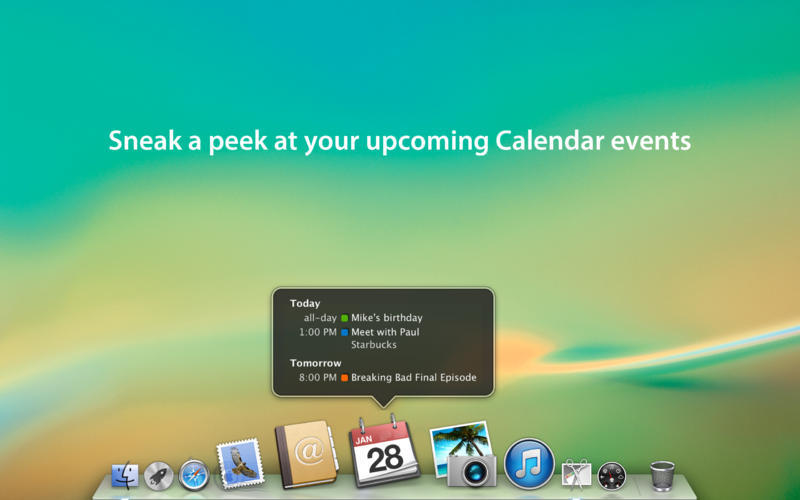
Calendar events
Sneak a peek at your upcoming events by hovering the Calendar dock item.
Window Management
HyperDock brings advanced window management features to Mac OS:
- Move & resize windows just by holding down keys and moving your mouse.
- Automatically resize windows when dragging to screen edges (Window Snapping).
- Scroll on a window's titlebar to quickly zoom or change its space.
Version 1.8.0:
- MacOS Mojave compatibility
- Various changes & tweaks
Frequently asked questions
How do I install the app?
Mount the image, drag the app into the "Applications" folder and launch it. If the system blocks the launch, allow it in "System Settings → Privacy & Security".
The app is damaged or won't launch
Reinstalling from a fresh image usually helps. Make sure your macOS version matches the one listed in the compatibility specs.
How do I update?
Download the new version from the site and install it over the current one — your settings will be preserved.
The download link doesn't work
Try a mirror or a download manager. For large files the browser often drops the connection.
How do I completely remove the app?
Use an uninstaller utility — it cleans up the service files that remain after moving the app to the trash.

Choose a download source
HyperDock 1.8.0.10 · 8.83 MB
Previous versions
HyperDock 1.8.0.10
Previous versions are available to registered users.
Comments 5