Image Editor 0.61
Image Editor - Brush, Text, Texture, Photo Effects
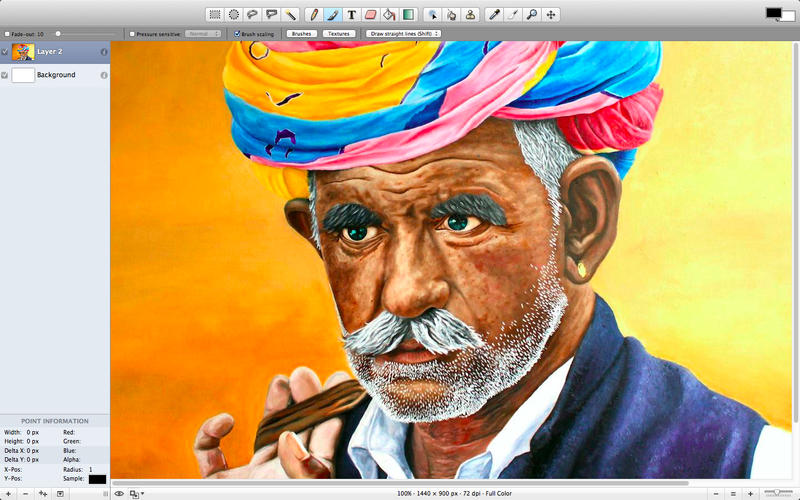
This App is a simple image editor. It features gradients, textures and anti-aliasing for both text and brush strokes. It also supports multiple layers, alpha channel editing and uses the same native file format as GIMP.
Key Features:
- Full support for the XCF file format
- Reading and writing TIFF, PNG, GIF, JPEG and JPEG 2000 file formats
- Reading BMP, PDF, PICT, and XBM file formats
- Layers and layer merging effects
- Individual editing of layer channels
- Transparency effects and transparency in gradients
- Arbitrary selection regions
- Anti-aliased paint brushes
- Gradient effects
- Graphics tablet support
- Plug-in filter effects
- Text tool
SCREENSHOTS
Frequently asked questions
How do I install the app?
Mount the image, drag the app into the "Applications" folder and launch it. If the system blocks the launch, allow it in "System Settings → Privacy & Security".
The app is damaged or won't launch
Reinstalling from a fresh image usually helps. Make sure your macOS version matches the one listed in the compatibility specs.
How do I update?
Download the new version from the site and install it over the current one — your settings will be preserved.
The download link doesn't work
Try a mirror or a download manager. For large files the browser often drops the connection.
How do I completely remove the app?
Use an uninstaller utility — it cleans up the service files that remain after moving the app to the trash.
VersionImage Editor 0.61
Developerfennie chen
CompatibilityOS X 10.6.6 or later
LanguageEnglish
IncludesPre-K'ed

Information
Visitors in the group Guests cannot leave comments on this publication.
Choose a download source
Image Editor 0.61 · 4.52 MB