vSSH 1.10
Advanced customizable SSH and Telnet client with iCloud connections, macros and keys sharing.
Key fetaures:
- SSH and Telnet protocols
- Username/password and public/private Keys authentication
- Multi-sessions with tabbed interface
- iCloud/Dropbox connections, macros and keys sharing with other vSSH apps (for iPhone, iPad and OS X)
- Key forwarding
- Port forwarding (support connection without shell: -N mode)
- Macros with variables support
- Select and Copy/Paste text
- Customize fonts and colors
- Pseudographics support
- Wide unicode characters (e.g. Korean) are supported
- Multi window tabbed interface
- Keep alive settings
- Auto scroll settings
Additional features:
- Export connection as file or URL
- Auto-connect on startup
- Auto-run command after connect
- Remember previously entered passphrases
- Auto/fixed terminal size settings
- Reset your private data at any time
- Logging (view, delete and print saved logs)
WHAT’S NEW
Version 1.10:
- Merge with PuTTY 0.64
- Bug-fix: Connection issue with OpenSSH 6.7 on the latest Debian 8 and CentOS 7 distributions (due to disabled hmac-sha1).
- Ability to change log file name template
- Keyboard shortcuts to connect/disconnect
- Display connection errors as OS X notifications
- Trim trailing carriage return characters on copying to clipboard
- Mintor UI fixes
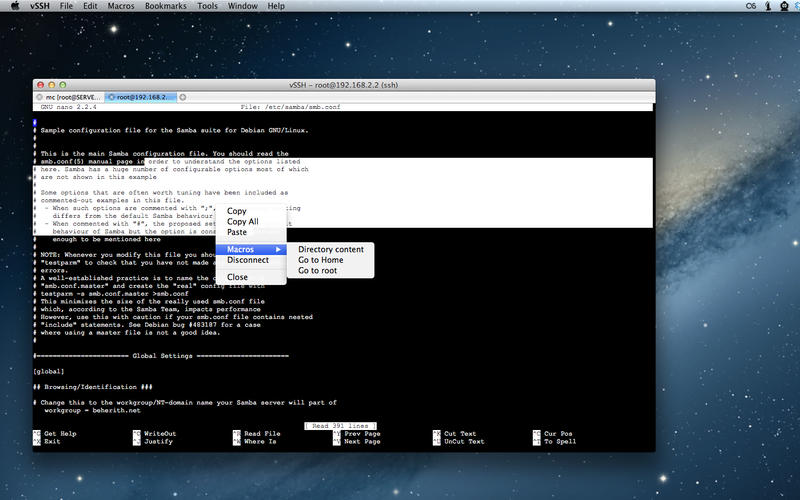
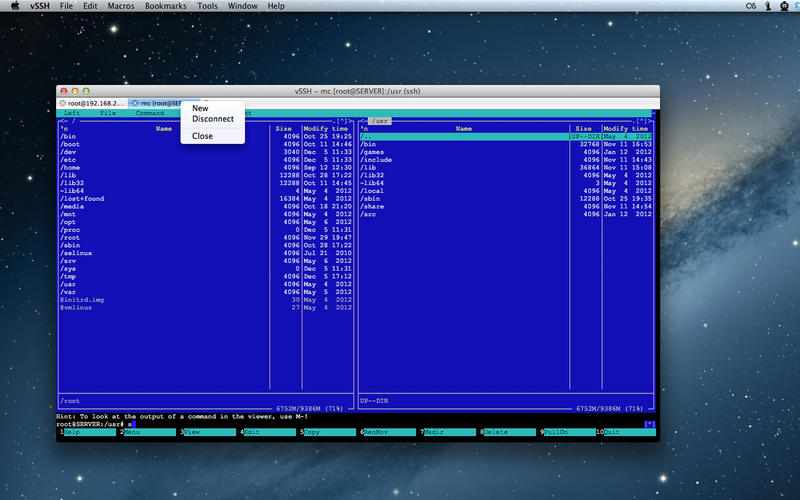
Screenshots

Frequently asked questions
How do I install the app?
Mount the image, drag the app into the "Applications" folder and launch it. If the system blocks the launch, allow it in "System Settings → Privacy & Security".
The app is damaged or won't launch
Reinstalling from a fresh image usually helps. Make sure your macOS version matches the one listed in the compatibility specs.
How do I update?
Download the new version from the site and install it over the current one — your settings will be preserved.
The download link doesn't work
Try a mirror or a download manager. For large files the browser often drops the connection.
How do I completely remove the app?
Use an uninstaller utility — it cleans up the service files that remain after moving the app to the trash.
VersionvSSH
DeveloperVelestar Private Enterprise
CompatibilityOS X 10.7 or later, 64-bit processor
LanguageEnglish, Italian, Russian
IncludesPre-K'ed




Information
Visitors in the group Guests cannot leave comments on this publication.
Choose a download source
vSSH 1.10 · 3.07 MB