VisualDiffer 1.7.0
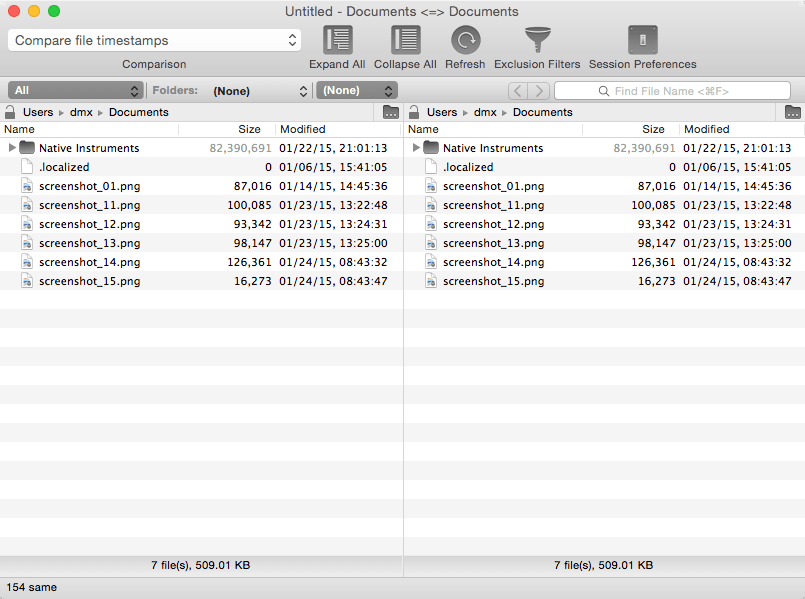
VisualDiffer compares folders and files side-by-side using colors to visually show differences. From the Folder view it's possible to make operations on folders and files like copying or deleting.
It's possible to compare directories quickly choosing base folders from the context menu. Using the File Filter feature, it is possible to hide specific files like .git, .svn directories, or the omnipresent .DS_Store files from visualization.
Folder comparison can be done using different techniques from the fastest "compare only date and size," to the fine-grained byte-by-byte comparison. File comparison is done using the UNIX diff command. This choice makes the result quick, standard, and reliable.
It's possible to save work sessions, then quickly reopen them to compare directories hierarchies or two specific files.
WHAT’S NEW
Version 1.7.0:
- Bug fixes
SCREENSHOTS
Frequently asked questions
How do I install the app?
Mount the image, drag the app into the "Applications" folder and launch it. If the system blocks the launch, allow it in "System Settings → Privacy & Security".
The app is damaged or won't launch
Reinstalling from a fresh image usually helps. Make sure your macOS version matches the one listed in the compatibility specs.
How do I update?
Download the new version from the site and install it over the current one — your settings will be preserved.
The download link doesn't work
Try a mirror or a download manager. For large files the browser often drops the connection.
How do I completely remove the app?
Use an uninstaller utility — it cleans up the service files that remain after moving the app to the trash.
VersionVisualDiffer 1.7.0
DeveloperDavide Ficano
CompatibilityOS X 10.10 or later, 64-bit processor
LanguageEnglish
IncludesK'ed by TNT




Information
Visitors in the group Guests cannot leave comments on this publication.
Choose a download source
VisualDiffer 1.7.0 · 4.88 MB