Enpass Password Manager 5.6.3

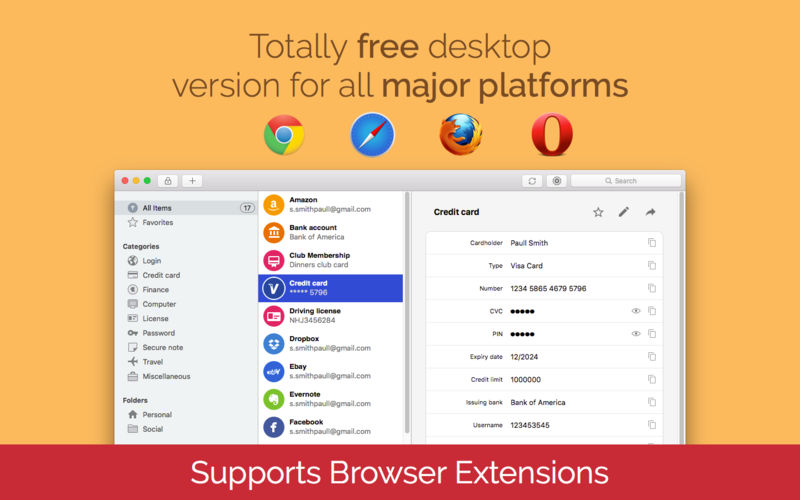
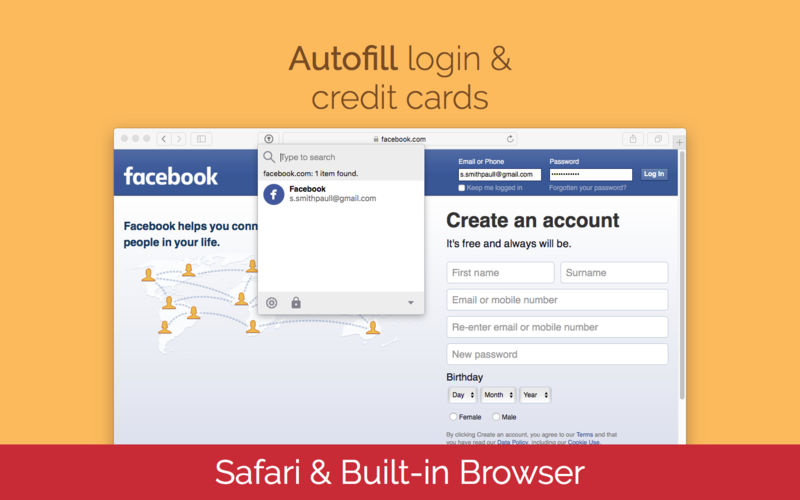
Enpass offers you freedom from remembering too many passwords and other important credentials. It secures them in one place by your master password and makes them accessible anywhere and everywhere - on your smartphones, tablets, or desktops.
ENPASS IS UNBEATABLE
- Full Featured Desktop Version Is Free For Mac And Others.
- No Subscription Charges Or Sign-up Required
- Available For All Major Desktop And Smartphone Platforms
- Import Data From Other Softwares With Desktop Version
- Stores everything- Vast range of selected templates to store every kind of information.
FOR ENPASS, SECURITY IS PARAMOUNT
- Military grade encryption- Enpass secures your data by SQLCIPHER which is transparent and open-source AES-256 encryption to ensure highest level of security. All protection mechanism is done locally (offline) at your device. Read more at http://enpass.io/security/
- No online signup required- Instead of our servers, your data is secured in your device or your cloud.
- Strong password generator- Built-in password generator lets you create strong and unique passwords for logins.
- Password Audit- Quick scan to find old, weak and duplicate passwords.
- Auto-locking - Automatically locks itself when not in use.
- Auto clear clipboard- Clears clip board automatically (Optional).
ENPASS IS FOR EVERYONE
- Cross platform compatibility- Available for all major desktop and smartphone platforms.
- Cloud sync- Syncs securely across your devices through Dropbox, iCloud, Google Drive, OneDrive, ownCloud/WebDAV and Box.
- Import from other popular password managers.
FULLY LOADED, YET ECONOMIC
- Free desktop version- Full featured desktop version is Free for MAC and others.
- Backup/Restore.
- Fully customizable.
- Folder support.
Version 5.6.3:
New
New
- Autocopy the TOTP to Clipboard: Signing into your online accounts that require TOTP has never been easier, as Enpass will now auto-copy the TOTP from the item to clipboard after autofilling your login details. You just have to paste it into the required field and go!
- Autofill in basic auth dialogs: Yes, with this update you'll be able to autofill the HTTP authentication dialogs in Chrome and Opera browsers.
- The new systemwide shortcut to access Enpass: You can now access your Enpass data from anywhere in your system by just creating a system wide shortcut, the hotkey, from the Enpass settings.
- Fixed an issue where few of you guys were facing the app crash on the app startup or even while syncing with the cloud account
- Fixed an issue where you were facing the problem in importing your items saved in non-English characters from the Roboform and Lastpass password managers
- Other minor fixes
Frequently asked questions
How do I install the app?
Mount the image, drag the app into the "Applications" folder and launch it. If the system blocks the launch, allow it in "System Settings → Privacy & Security".
The app is damaged or won't launch
Reinstalling from a fresh image usually helps. Make sure your macOS version matches the one listed in the compatibility specs.
How do I update?
Download the new version from the site and install it over the current one — your settings will be preserved.
The download link doesn't work
Try a mirror or a download manager. For large files the browser often drops the connection.
How do I completely remove the app?
Use an uninstaller utility — it cleans up the service files that remain after moving the app to the trash.
VersionEnpass Password Manager 5.6.3
DeveloperSinew Software Systems
CompatibilityOS X 10.10.0 or later, 64-bit processor
LanguageMultilangual
IncludesFree


Information
Visitors in the group Guests cannot leave comments on this publication.
Choose a download source
Enpass Password Manager 5.6.3 · 34.85 MB