Boom Recorder Pro 8.7.2
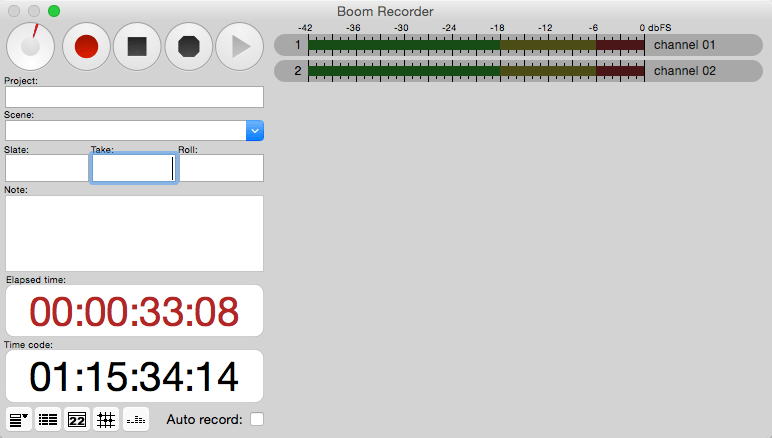
Boom Recorder is a multitrack field recorder. It has been designed to be used during the high stress production of a tv/film shoot, a concert, or a live stage performance. Boom Recorder has many metadata fields that is are used during a film production, making it easy to keep track of the many audio files in post production. For concerts and live stage performances it is possible to record up to 128 (Boom Recorder Pro) tracks continuously for many hours.
Features
- Boom Recorder is a multitrack field recorder. It has been designed to be used during the high stress production of a tv/film shoot, a concert, or a live stage performance. Boom Recorder has many metadata fields that is are used during a film production, making it easy to keep track of the many audio files in post production. For concerts and live stage performances it is possible to record up to 128 (Boom Recorder Pro) tracks continuously for many hours.
- Features
- 16-bit, 24-bit integer, and 32-bit float sample formats.
- 48 kHz, 96 kHz, 192 kHz, and other sample rates, with optional fake pull up for each.
- Broadcast WAVE Format (BFW) audio file format; compatible with most digital audio and video editing workstations.
- Can either jam or continuous sync against timecode signal read from any audio channel, or use wall clock time in cases where no timecode signal is available.
- Long recordings are continued over multiple 2 GB audio files.
- multi-polyphonic file handling; allows multiple copies of audio in mono, stereo, and polyphonic audio files.
- Stores metadata such as project, scene, take, roll, date, and track names in the iXML chunk and in the sound reports.
- Solution for reading BWF files into Final Cut Pro with timecode.
SCREENSHOTS
Frequently asked questions
How do I install the app?
Mount the image, drag the app into the "Applications" folder and launch it. If the system blocks the launch, allow it in "System Settings → Privacy & Security".
The app is damaged or won't launch
Reinstalling from a fresh image usually helps. Make sure your macOS version matches the one listed in the compatibility specs.
How do I update?
Download the new version from the site and install it over the current one — your settings will be preserved.
The download link doesn't work
Try a mirror or a download manager. For large files the browser often drops the connection.
How do I completely remove the app?
Use an uninstaller utility — it cleans up the service files that remain after moving the app to the trash.
VersionBoom Recorder Pro 8.7.2
DeveloperVOSGAMES
CompatibilityOS X 10.7.5 or later, 64-bit processor
LanguageEnglish, French
IncludesPre-K'ed




Information
Visitors in the group Guests cannot leave comments on this publication.
Choose a download source
Boom Recorder Pro 8.7.2 · 6.49 MB