
Home Inventory 3.8.6


Home Inventory makes keeping an up-to-date catalog of your possessions simple and fast so you can stay organized and always prepared. Called "Quick and easy to use" by the New York Times and "Spectacularly user-friendly" by Mac Format.
- Document and organize everything that's important to you with ease, speed, and accuracy using Home Inventory. Build a complete catalog of your valuables and store important details about your items such as make, model, serial number, purchase price, value, and much more.
- Get rid of the clutter. Stay organized and store unlimited photos, receipts, product manuals, warranties, and dated notes all in one place.
- If you have an iPhone or camera enabled iPad or iPod Touch, you can use the free helper app, Home Inventory Photo Remote, to wander your home and build out your inventory. The app includes a built-in barcode scanner to quickly add books, CDs, DVDs and other items with barcodes to your inventory.
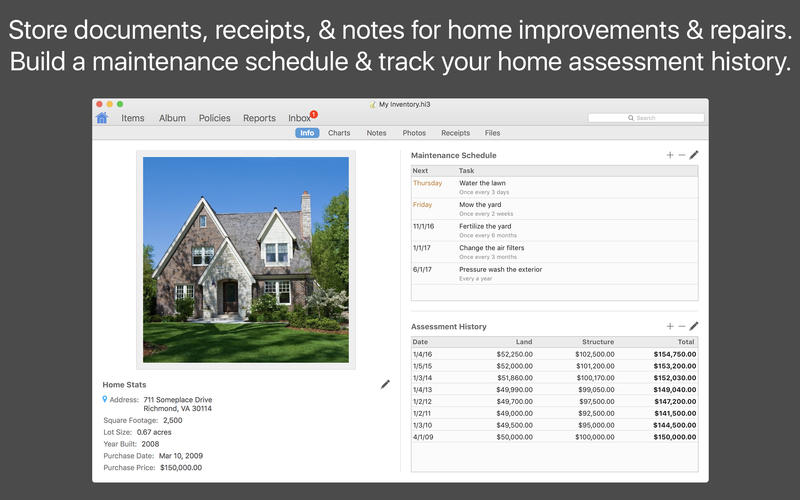
- Stay on top of your home's upkeep with a maintenance schedule of routine tasks such as cleaning the gutters and aerating the lawn. If you are running OS X 10.8 Mountain Lion or later, you can add tasks to Calendar and Reminders.
- Find out if you are adequately insured. With our built-in coverage analysis report you will know if you are over-insured, under-insured, or if your coverage is just right.
- Take your inventory with you on your iPhone, iPad, or iPod Touch with out free helper app, Home Inventory Mobile Backup.
Other Noteworthy Features
- Use your scanner to add photos and receipts
- Customizable fields and field layouts
- Built-in currency conversion
- Multiple currency support
- Robust and flexible reporting options
- Password protection
- Import and export CSV data
- Track property assessments
- Warranty expiration tracking
- Property insurance coverage alerts
- Track and value collections
- Keep multiple inventories
- Support for Retina displays
- Full-screen support
- Sandboxed app for increased security
Version 3.8.6:
- Fixed an issue with importing photos and receipts referenced from a CSV file.
Frequently asked questions
How do I install the app?
Mount the image, drag the app into the "Applications" folder and launch it. If the system blocks the launch, allow it in "System Settings → Privacy & Security".
The app is damaged or won't launch
Reinstalling from a fresh image usually helps. Make sure your macOS version matches the one listed in the compatibility specs.
How do I update?
Download the new version from the site and install it over the current one — your settings will be preserved.
The download link doesn't work
Try a mirror or a download manager. For large files the browser often drops the connection.
How do I completely remove the app?
Use an uninstaller utility — it cleans up the service files that remain after moving the app to the trash.
VersionHome Inventory 3.8.6
DeveloperBinary Formations, LLC.
CompatibilitymacOS 10.12 or later, 64-bit processor
LanguageEnglish
IncludesK'ed by TNT





Information
Visitors in the group Guests cannot leave comments on this publication.
Choose a download source
Home Inventory 3.8.6 · 24.32 MB
Previous versions
Home Inventory 3.8.6
Previous versions are available to registered users.