
Bee 2.4.12
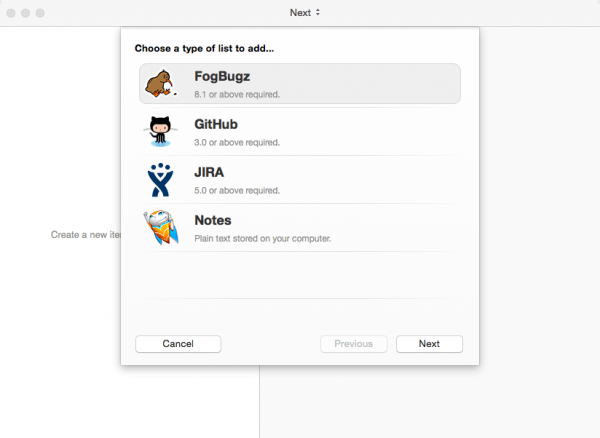
Bee syncs with GitHub Issues, JIRA, and FogBugz. You can also use Bee to keep track of your plain text notes.
Features
- Flight Path. Flight Path lives in your menu bar and helps you by intelligently selecting the task you should be working on next.
- Notifications. Bee uses Notification Center to inform you of new comments and new tasks coming in from your teammates.
- Smart Groups. Create your own live filters for filtering your tasks and viewing them the way you want.
- Timing. Bee fills in your timesheet for you and automatically uploads it. (FogBugz and JIRA.) Never worry about keeping that browser window open just to start and stop your tasks.
- Workflow. All your workflow needs are covered. A one-click workflow button for the most common action. Or you can pick and choose the most appropriate transition for your task.
- Progress Bar. Scrub through your completed tasks and view your progress at a glance.
- Live Search. To search, just start typing anywhere.
- Drag-and-Drop. Drag an item over another to create a sub-item. Drag an item onto a milestone to assign it that milestone. (You already know how to use Bee.)
- QuickLook. Examine linked images and file attachments directly within comments and descriptions.
- Built-In Browser. View everything you need inside Bee, without being kicked out to your web browser. (GitHub only.)
WHAT’S NEW
Version 2.4.12:
- [New] JIRA, support for Atlassian ID - you can now login using your email address
SCREENSHOTS
Frequently asked questions
How do I install the app?
Mount the image, drag the app into the "Applications" folder and launch it. If the system blocks the launch, allow it in "System Settings → Privacy & Security".
The app is damaged or won't launch
Reinstalling from a fresh image usually helps. Make sure your macOS version matches the one listed in the compatibility specs.
How do I update?
Download the new version from the site and install it over the current one — your settings will be preserved.
The download link doesn't work
Try a mirror or a download manager. For large files the browser often drops the connection.
How do I completely remove the app?
Use an uninstaller utility — it cleans up the service files that remain after moving the app to the trash.
VersionBee 2.4.12
Developer© Neat.io Pty Ltd
CompatibilityOS X 10.8 or later, 64-bit processor
LanguageEnglish
IncludesPre-K'ed





Information
Visitors in the group Guests cannot leave comments on this publication.
Choose a download source
Bee 2.4.12 · 14.38 MB