
Pacifist 4.1.4


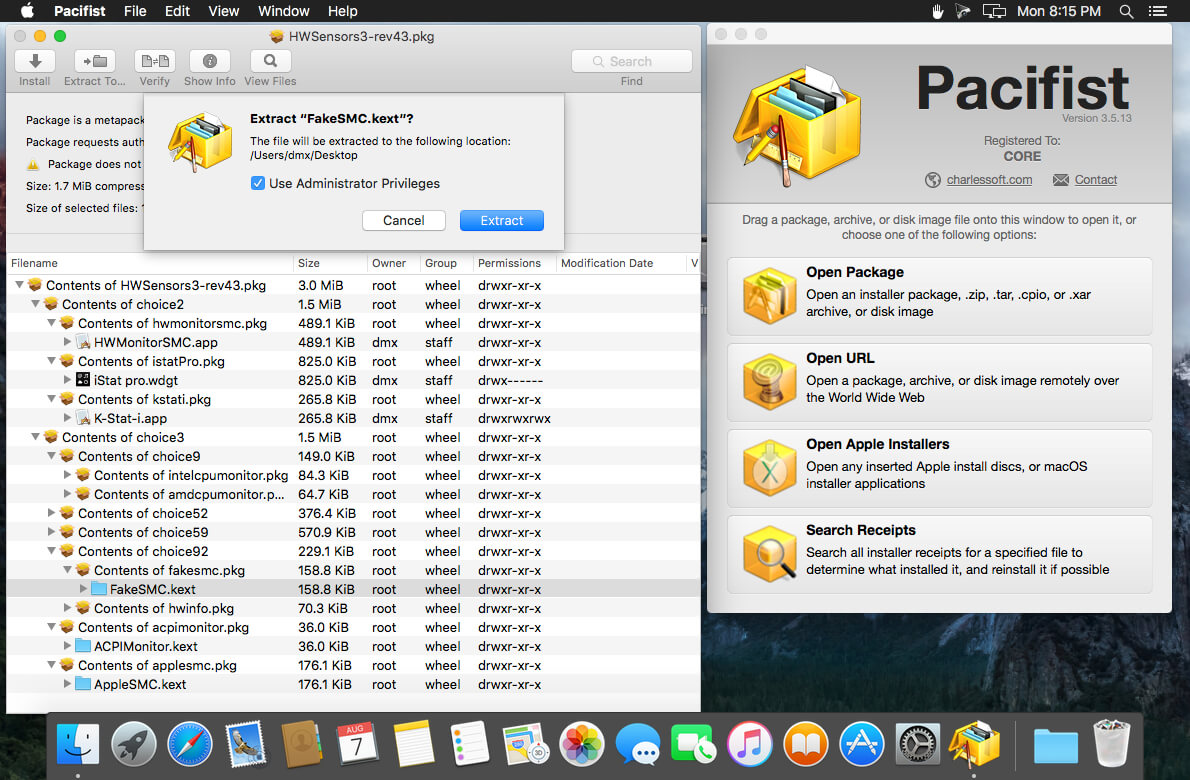
Pacifist opens up .pkg installer packages, .dmg disk images, .zip, .tar. tar.gz, .tar.bz2, .pax, and .xar archives and more, and lets you extract or install individual files out of them. This is useful if you need to install just one file out of a package instead of the entire package (for example, if you deleted your Preview application and need to reinstall it, but not the whole operating system), or if you want to inspect a downloaded package to see what it will do before installing it. Pacifist can also load some archive types over HTTP, in case you want to extract just a single file from a large .zip archive without waiting for the entire archive to download. Finally, Pacifist can examine the kernel extensions installed in your system to let you see what installer installed them, and whether the installer was made by Apple or a third-party.
Version 4.1.4
- Updated for macOS Tahoe
- Improved accuracy when parsing and extracting images from asset catalogs
- Miscellaneous bug fixes
Frequently asked questions
How do I install the app?
Mount the image, drag the app into the "Applications" folder and launch it. If the system blocks the launch, allow it in "System Settings → Privacy & Security".
The app is damaged or won't launch
Reinstalling from a fresh image usually helps. Make sure your macOS version matches the one listed in the compatibility specs.
How do I update?
Download the new version from the site and install it over the current one — your settings will be preserved.
The download link doesn't work
Try a mirror or a download manager. For large files the browser often drops the connection.
How do I completely remove the app?
Use an uninstaller utility — it cleans up the service files that remain after moving the app to the trash.





Choose a download source
Pacifist 4.1.4 · 41.08 MB
Previous versions
Pacifist 4.1.4
Previous versions are available to registered users.