CleanMyPhone 3.9.2
CleanMyPhone comes with a simple but powerful solution to keep your iOS devices such as iPhone, iPad, or iPod touch clean. It not only cleans your iOS devices but also improves the performance by removing the unnecessary files or data.
This useful app contains many functional features such as App Cleaner, System Cleanup, Find Large Files, Device Manager, One-Click-Copy, iOS Ads Remover, Removal of Document & Data, and many more.
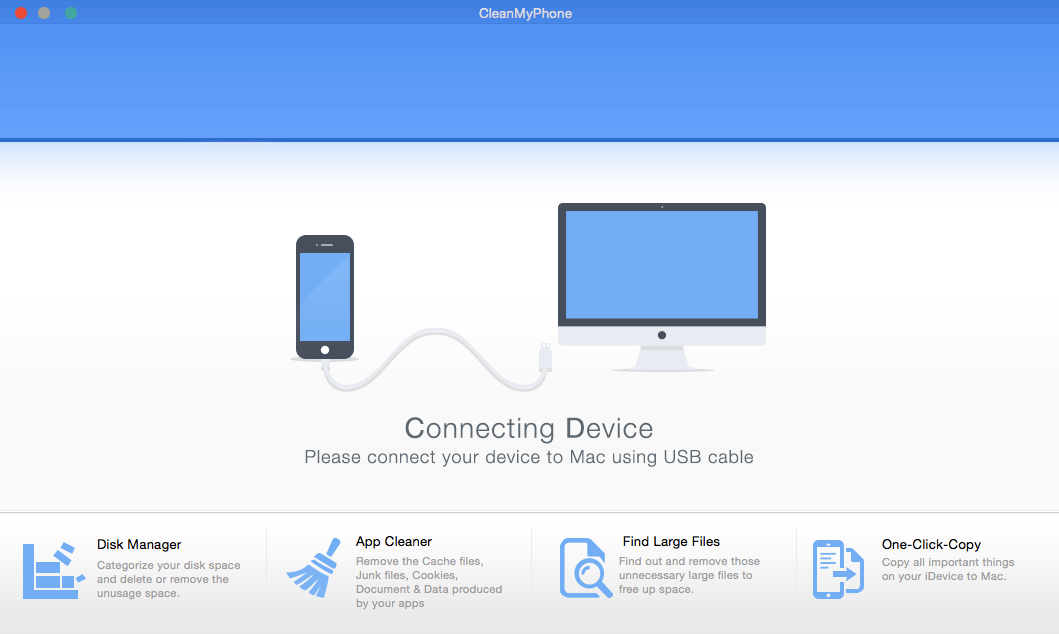
Device Manager of CleanMyPhone shows your device’s main details and helps to configure, organize and manage files & apps on your iPhone, iPad or iPod touch. You can browse, preview, export and delete all the files in each category from a straightforward detailed view mode.
With the help of App Cleaner, you can find out and delete documents & data, app caches, cookies and junk files from your iOS device with ease.
In the Find Large Files module, you can view which files are occupying big chunks of disk space. This function is also designed to help you clear up space on the memory of your device.
The One-Click-Copy feature makes it easy to create backups of your photos, music, messages, call logs (and more) with a simple click.
Ads Remover analyzes and detects the ads of your iPhone, iPad apps, you can remove these internal floating ads, pop-up ads, flashing and blinking banner ads with ease. It helps to stop annoying ads while enjoy the free apps.
WHAT’S NEW
Version 3.9.2:
- Added support for 64-bit Intel processors
SCREENSHOTS
Frequently asked questions
How do I install the app?
Mount the image, drag the app into the "Applications" folder and launch it. If the system blocks the launch, allow it in "System Settings → Privacy & Security".
The app is damaged or won't launch
Reinstalling from a fresh image usually helps. Make sure your macOS version matches the one listed in the compatibility specs.
How do I update?
Download the new version from the site and install it over the current one — your settings will be preserved.
The download link doesn't work
Try a mirror or a download manager. For large files the browser often drops the connection.
How do I completely remove the app?
Use an uninstaller utility — it cleans up the service files that remain after moving the app to the trash.
VersionCleanMyPhone 3.9.2
DeveloperFireebok Studio
CompatibilityOS X 10.7 or later, 64-bit processor
LanguageEnglish
IncludesSerial



Information
Visitors in the group Guests cannot leave comments on this publication.
Choose a download source
CleanMyPhone 3.9.2 · 8.19 MB