Screens 5.9
Screens: VNC remote desktop software for secure Mac access


Streamlined and powerful VNC utility designed to provide you with all the tools you need to remotely connect to your devices from your Mac
Accessing your devices from anywhere in the world is surely great, especially if you need to perform some last minute modifications to a project or copy a certain file. This can be done from any computer that can access your device's network using the VNC desktop sharing system.
KEY FEATURES
Curtain Mode
Keep your Mac desktop hidden while accessing it.
File Transfers
Share files between Macs via drag and drop.
Connect Safely
Screens can connect back to your computer through a secured connection.
Connect from Everywhere
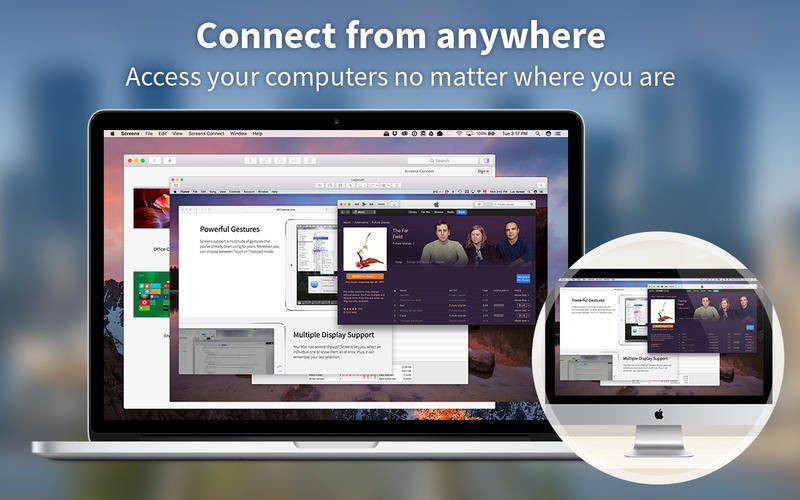
Install Screens Connect on your Mac or Windows PC and make it easily reachable from anywhere in the world.
Session Selection
Connect as yourself or share a session with another Mac user.
Multiple Display Support
Your Mac has several displays? Screens lets you select an individual one or show them all at once.
Clipboard Sharing
Exchange rich text, URLs, images and more via your local or the remote clipboard. Screens can also keep them in sync.
Touch Bar Support
Adaptive and handy shortcuts accessible right at your fingertips.
Groups
Gather your saved screens as groups and keep everything in order.
Help Out Your Friends, Relatives or Colleagues
Have them download our free Screens Express utility and gain access their Mac to help them troubleshoot issues, update apps, etc.
MORE FEATURES
- One Click User Password
- Synchronize your content via iCloud or Dropbox
- Adaptive Quality
- URL Schemes Support (RFC 2396)
- SSH Key support
- Observe and Control Modes
- Hot Corners Support
- Send commands to your computer before disconnecting
- And so much more!
Version 5.9:
Screens 5.9 is ready for ioS and iPados 27, with new ways to connect, improved controls, and refinements throughout the app.
Connect with Siri, Shortcuts & Spotlight
Launch saved connections using Siri, Shortcuts, Spotlight, and other system features with the new "Connect to Computer with Screens" action.
Quick Connect Widget
Connect to your computers right from your Home Screen with the new Screens widget.
Improved Drag Gestures
On-screen drag gestures are now faster and customizable, with a new three-finger gesture for middle-button dragging.
Better Mouse & Trackpad Controls
You can now perform right-button drags with a mouse or trackpad, as well as middle-button drags with a mouse.
Custom Grid Ordering
Arrange your connections exactly how you want them by dragging them around the grid.
AirPlay Is Back
Stream your remote computer's display to a TV or other AirPlay-compatible display. Requires iOS or iPadOS 27.
Per-Computer Settings
More connection settings can now be configured individually for each computer.
Other Improvements
- Added Low (8-bit) colour depth for PC connections.
- Added folder support for links.
- Fixed an issue where Shared Clipboard could disable itself on iPad.
- Improved connection progress to provide clearer feedback while connecting.
- Improved the grid layout on iPhone.
- Improved handling when Local Network access has been denied.
- Added a Touch-and-Hold Drag Delay setting and made dragging more responsive by default.
- Improved the drag indicator.
- Fixed a dead zone that could occur on iPhone in landscape orientation.
- Added a manual port mapping option.
- Improved the support form.
- Fixed numerous Ul glitches and other issues throughout the app.
Frequently asked questions
How do I install the app?
Mount the image, drag the app into the "Applications" folder and launch it. If the system blocks the launch, allow it in "System Settings → Privacy & Security".
The app is damaged or won't launch
Reinstalling from a fresh image usually helps. Make sure your macOS version matches the one listed in the compatibility specs.
How do I update?
Download the new version from the site and install it over the current one — your settings will be preserved.
The download link doesn't work
Try a mirror or a download manager. For large files the browser often drops the connection.
How do I completely remove the app?
Use an uninstaller utility — it cleans up the service files that remain after moving the app to the trash.

Choose a download source
Screens 5.9 · 46.86 MB
Previous versions
Screens 5.9
Previous versions are available to registered users.