PhotoGUN 1.0
PhotoGUN is a powerful app that makes it possible to process thousands of photos at once! No more time consuming repetitive work! Simply drag and drop one, hundreds or thousands of photos, you need to process, to the drop-window and select one or multiple operations you want to apply to them. Click the button and “here it is”, all processed photo-files are stored to the separate output folder.
You can:
- Resize to make the photos more suitable for email, blog or any other web, personal or marketing use,
- Adjust Brightness, Contrast and Saturation to enhance the light and colour balance,
- Add the professional touch to your photos and apply “Vignetting”, a creative effect, to draw attention to the center of the frame,
- Add watermark to prevent unauthorised usage, adding copyright text or company logo with a customizable transparency level and other parameters. You can also use this operation to merge the photos,
- Crop to cut away not needed image parts,
- Rotate to change the image orientations,
- Mirror to flip the image vertically and horizontally,
- Blur to hide some levels of the details of your photos,
- Add the Borders for perfect look using the different frame thicknesses and colours,
- Swap the RGB-channels,
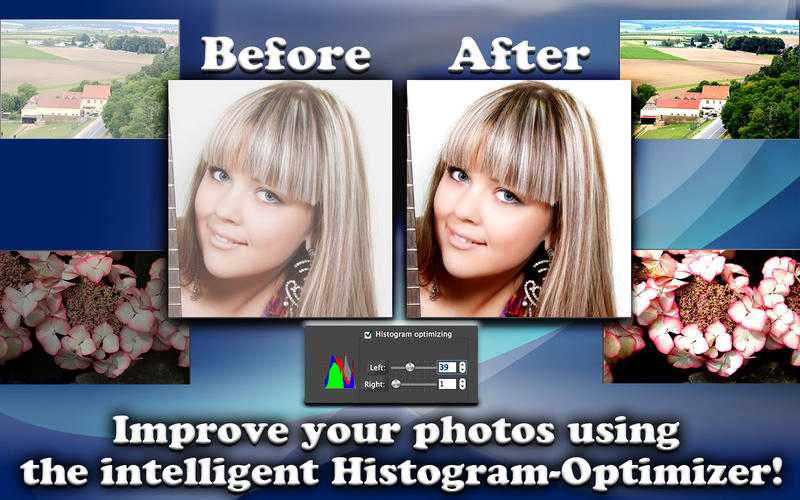
- Apply the Histogram optimisation for automagically improvement of the photos which were token under the similar conditions,
- Binarize the images using the threshold value and produce the monochromatic results,
- Grayscale to do convert the colour images into black/gray/white representation,
- Invert the photos,
- Convert the file format to/from JPEG, PNG, TIFF, BMP, XPM, PPM. Including the full range quality compression of JPEG ranging from 1% to 100%,
- Give new names to your photos and use flexible choice which allows adding at end of the filenames odd, even and all digits,
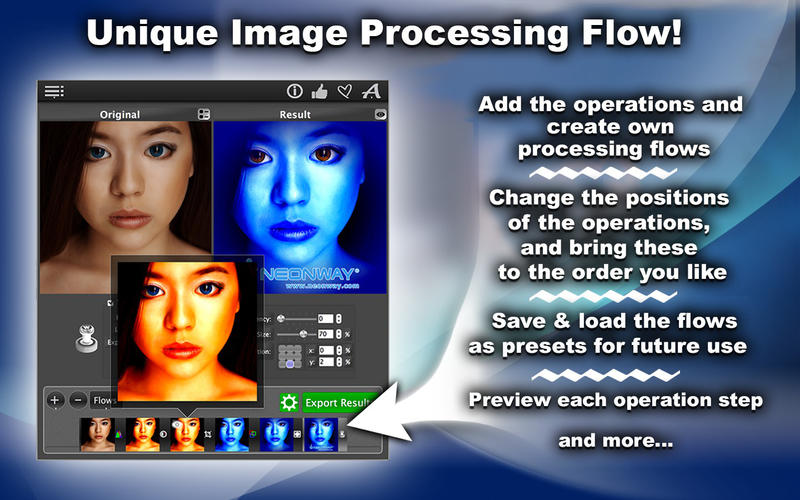
- Change the order of the operations and achieve to optimal result,
- Save the operation-flows as presets that you’ll need over and over again.
The App has the realtime photo editing preview with retina-ready graphics.
- preview all images on each stage of the applied operations by clicking the eye-symbol on the flow-thumbnails,
- preview resulted photo in the small window as well in the embedded previewer using the original image size,
- preview the resulted photos during creation process in the batch-dialog.
Screenshots

Frequently asked questions
How do I install the app?
Mount the image, drag the app into the "Applications" folder and launch it. If the system blocks the launch, allow it in "System Settings → Privacy & Security".
The app is damaged or won't launch
Reinstalling from a fresh image usually helps. Make sure your macOS version matches the one listed in the compatibility specs.
How do I update?
Download the new version from the site and install it over the current one — your settings will be preserved.
The download link doesn't work
Try a mirror or a download manager. For large files the browser often drops the connection.
How do I completely remove the app?
Use an uninstaller utility — it cleans up the service files that remain after moving the app to the trash.
VersionPhotoGUN 1.0
DeveloperMax Schlee © Neonway
CompatibilityOS X 10.7 or later, 64-bit processor
LanguageEnglish
IncludesPre-K'ed

Information
Visitors in the group Guests cannot leave comments on this publication.
Choose a download source
PhotoGUN 1.0 · 39.08 MB