QCart 1.2.3
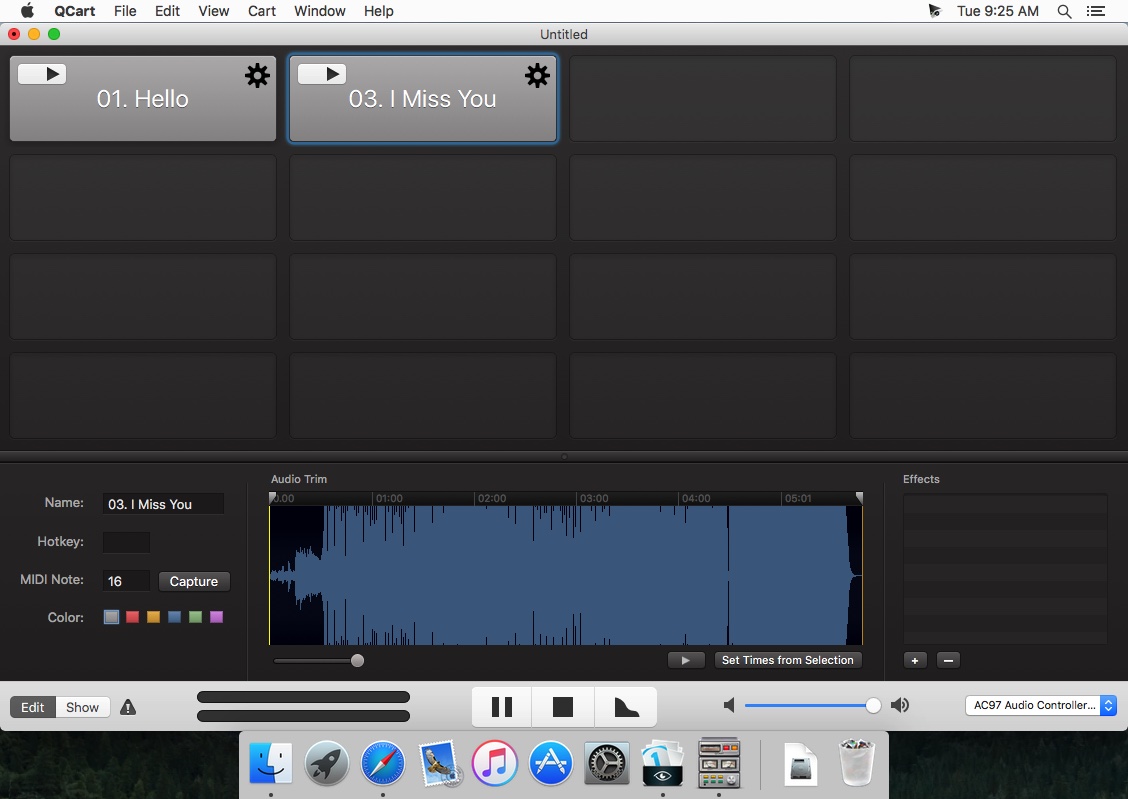
QCart turns your Mac into a professional audio cart machine. Use it for sports, podcasting, radio production, corporate events, or anywhere you need rock-solid audio playback at the push of a button.
QCart is a new kind of audio cart. With a simple and beautiful interface, we think it will be the best audio cart you've ever used. It offers our battle-tested, low-latency audio engine, custom keyboard shortcuts, and MIDI triggers, so all your audio is there exactly when you need it.
Features
- Clean, simple interface
- Trigger cues via mouse, keyboard, or MIDI
- Level meter for currently selected audio output
- Lock your cart to put it in show mode
- Apply Audio Units to each sound
- Waveform editor for fast, non-destructive trimming
- Change the color of each button
- Loop and hold options for each cue
- Multiple tabs/carts per document
- Supports OS X 10.7's full-screen mode
WHAT’S NEW
Version 1.2.3:
- [Fixed] A significant security vulnerability in the framework QCart uses to check for updates.
Screenshots
Frequently asked questions
How do I install the app?
Mount the image, drag the app into the "Applications" folder and launch it. If the system blocks the launch, allow it in "System Settings → Privacy & Security".
The app is damaged or won't launch
Reinstalling from a fresh image usually helps. Make sure your macOS version matches the one listed in the compatibility specs.
How do I update?
Download the new version from the site and install it over the current one — your settings will be preserved.
The download link doesn't work
Try a mirror or a download manager. For large files the browser often drops the connection.
How do I completely remove the app?
Use an uninstaller utility — it cleans up the service files that remain after moving the app to the trash.
VersionQCart 1.2.3
DeveloperFigure 53, LLC
CompatibilityOS X 10.6.8 or later, 64-bit processor
LanguageEnglish
IncludesPre-K'ed





Information
Visitors in the group Guests cannot leave comments on this publication.
Choose a download source
QCart 1.2.3 · 2.53 MB