PhotoDesk for Instagram Pro 4.1.6
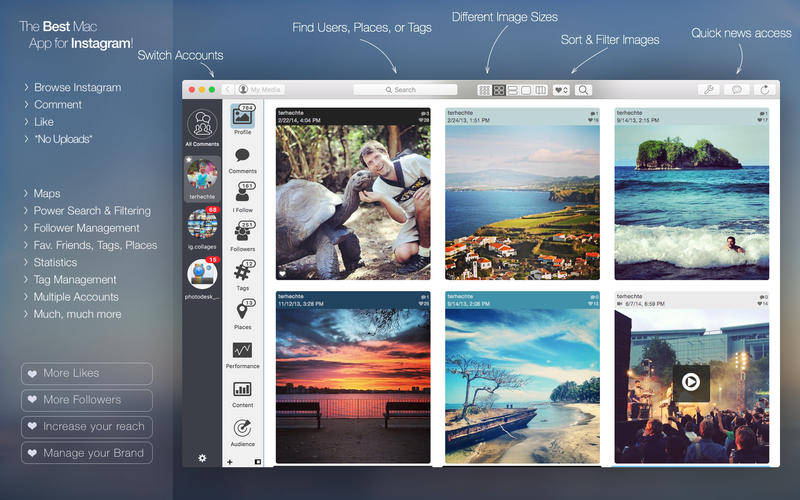


Video Support
- See Pictures on a Map
- Search for Places
- Search for Tags
- Statistics & Analytics (Requires in-app purchase)
- Sophisticated Comment Management
- Sophisticated Account Management
- Fantastic, modern UI, optimized for Mac OS X Yosemite & El Capitan
- See which comments you replied to, star comments, search within comments, and much more.
- See all comments for all images from multiple accounts in one screen
- Quickly reply to comments
- See which comments you already replied to
Receive News and Notifications
- See when you get new comments, likes, or followers
- Bookmark Tags
- Bookmark Places
- Bookmark Users
- Bookmark Images
- Place Bookmarks in folders
- Place favorite tags in the sidebar, automatically see if there're new images tagged with that tag.
- Search tags, save favorite tags, see related tags
- See all most recently posted comments or
- See all comments posted since you last started Photodesk
- Search for specific comments
- Group comments by image or author
- Sort comments by image, author, date, and more
- Star comments and remember which one you already replied to
- Print comments on paper for archival and more
- Export comments as JSON
Version 4.1.6:
- Fixed a major bug which caused PhotoDesk to not work correctly for many users. This was related to the Touch Bar change as well as to some Instagram changes. This version works again, it does so, however, by temporarily disabling TouchBar support.
Frequently asked questions
How do I install the app?
Mount the image, drag the app into the "Applications" folder and launch it. If the system blocks the launch, allow it in "System Settings → Privacy & Security".
The app is damaged or won't launch
Reinstalling from a fresh image usually helps. Make sure your macOS version matches the one listed in the compatibility specs.
How do I update?
Download the new version from the site and install it over the current one — your settings will be preserved.
The download link doesn't work
Try a mirror or a download manager. For large files the browser often drops the connection.
How do I completely remove the app?
Use an uninstaller utility — it cleans up the service files that remain after moving the app to the trash.
VersionPhotoDesk for Instagram Pro 4.1.6
DeveloperBenedikt Terhechte
CompatibilityOS X 10.9 or later, 64-bit processor
LanguageEnglish
IncludesK'ed by TNT




Information
Visitors in the group Guests cannot leave comments on this publication.
Choose a download source
PhotoDesk for Instagram Pro 4.1.6 · 17.31 MB