El Capitan Cache Cleaner 10.0.5
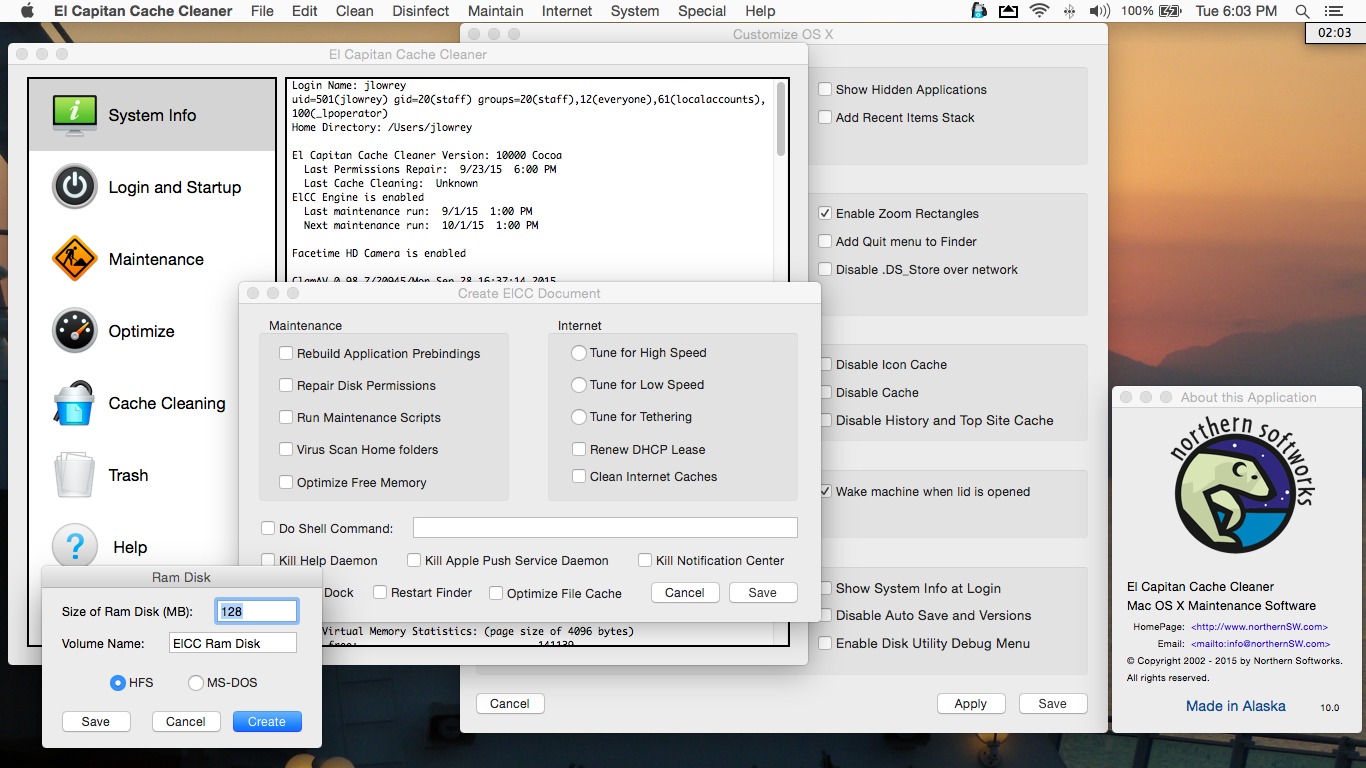
El Capitan Cache Cleaner is an award-winning general purpose tool for OS X. ElCC makes system maintenance simple with an easy point-and-click interface to many OS X functions. Novice and expert users alike will appreciate the powerful toolset ElCC provides. El Capitan Cache Cleaner is one of the world's leading maintenance tools, with millions of downloads around the globe.
Features
- Maintenance. El Capitan Cache Cleaner is a one-stop solution for all of your OS X maintenance needs. Intel or PPC, Tiger or El Capitan, ElCC has the tools to keep your system running at its best.
- Optimization. El Capitan Cache Cleaner can improve system performance by tuning Internet and file cache settings, implementing RAM disks, and cleaning out various cached and stale data.
- Customization. El Capitan Cache Cleaner lets you control your OS X experience. Turn off Spotlight or Dashboard, or turn on a Login Items folder.
- Disaster Planning. El Capitan Cache Cleaner lets you create a bootable installer USB drive from your El Capitan download that will boot and install El Capitan on any supported machine.
- Antivirus. El Capitan Cache Cleaner helps protect your system from malware. ElCC adds three additional layers of malware protection to Lion, and ships with the powerful ClamAV antivirus built in.
WHAT’S NEW
Version 10.0.5:
- Adds ability to disable Photos auto launch when connecting devices
- Improves OS X customization
- Updates ClamAV to 0.99.2
- Updated for OS X 10.11.5
- Minor optimizations and improvements
Screenshots
Frequently asked questions
How do I install the app?
Mount the image, drag the app into the "Applications" folder and launch it. If the system blocks the launch, allow it in "System Settings → Privacy & Security".
The app is damaged or won't launch
Reinstalling from a fresh image usually helps. Make sure your macOS version matches the one listed in the compatibility specs.
How do I update?
Download the new version from the site and install it over the current one — your settings will be preserved.
The download link doesn't work
Try a mirror or a download manager. For large files the browser often drops the connection.
How do I completely remove the app?
Use an uninstaller utility — it cleans up the service files that remain after moving the app to the trash.
VersionEl Capitan Cache Cleaner 10.0.5
DeveloperNorthernSW
CompatibilityOS X 10.7 or later, 64-bit processor
LanguageEnglish
IncludesK


Information
Visitors in the group Guests cannot leave comments on this publication.
Choose a download source
El Capitan Cache Cleaner 10.0.5 · 58.57 MB