
BlogTouch for Blogger 2.1.0
The #1 Blogger editor for your Mac, iPhone and iPad!
BlogTouch is the most powerful Blogger/Blogspot desktop editor.
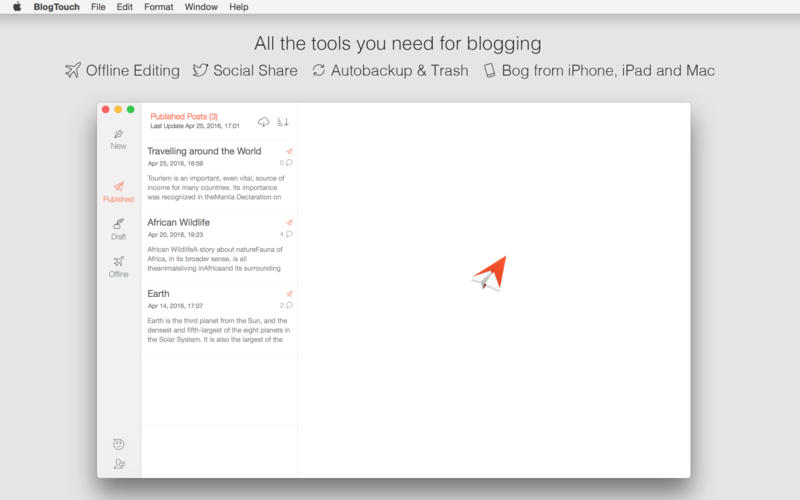
It’s equipped with everything you need to manage your blogs: write, publish, update or share posts and moderate comments.
MAIN FEATURES
[list=1]
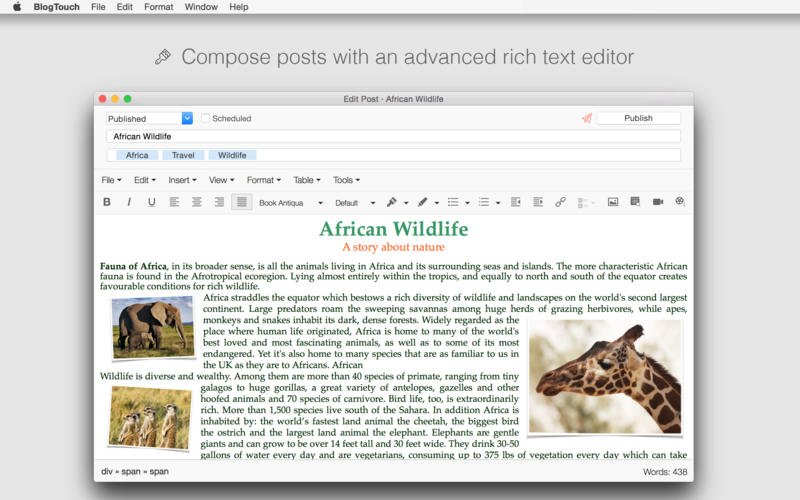
RICH TEXT EDITOR
- Format text (bold, italics, underline, strikethrough, super/sub script), change fonts, text color and style or alignment
- Add pictures from the Web or from your Mac
- Control picture size live by click and drag
- Embed video from Youtube or any other platform
- Add tables, lists, links or horizontal lines
- View and edit HTML code
- All objects (including images, links, tables, videos) can be controlled easily (add, edit properties, delete)
Screenshots

Frequently asked questions
How do I install the app?
Mount the image, drag the app into the "Applications" folder and launch it. If the system blocks the launch, allow it in "System Settings → Privacy & Security".
The app is damaged or won't launch
Reinstalling from a fresh image usually helps. Make sure your macOS version matches the one listed in the compatibility specs.
How do I update?
Download the new version from the site and install it over the current one — your settings will be preserved.
The download link doesn't work
Try a mirror or a download manager. For large files the browser often drops the connection.
How do I completely remove the app?
Use an uninstaller utility — it cleans up the service files that remain after moving the app to the trash.
VersionBlogTouch for Blogger 2.1.0
DeveloperDenk Alexandru
CompatibilityOS X 10.9 or later, 64-bit processor
LanguageEnglish
IncludesPre-K'ed


Information
Visitors in the group Guests cannot leave comments on this publication.
Choose a download source
BlogTouch for Blogger 2.1.0 · 5.42 MB