
External Editors For Photos 1.1
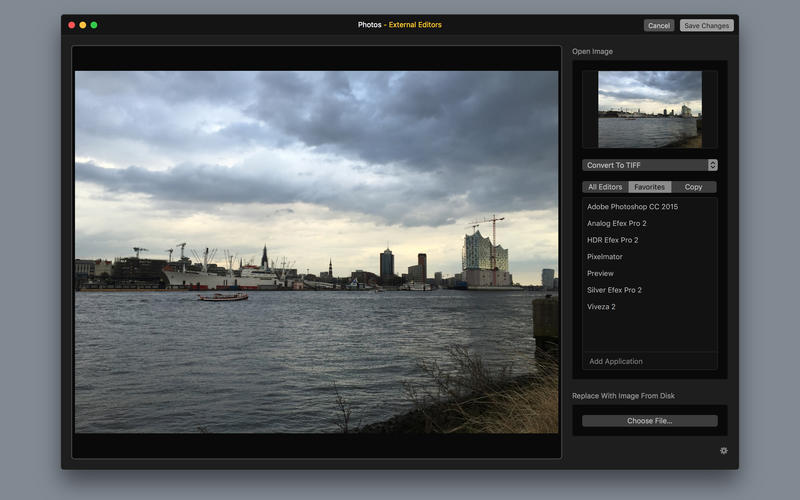
External Editors For Photos adds an extension to the OS X Photos application that allows you to edit your photos with any image editor on your Mac. To see how it works watch the screencast on my website.
Features:
- Edited images are saved back to Photos immediately and your original photos are updated in place.
- All metadata will be preserved.
- Open your imported RAW files with your favorite RAW-Converter and replace it with an.
- No data lost: You can always revert back to your original files.
- Works even in your book-projects.
- Edited Photos will sync across all your devices.
Usage:
- To use the extension find a picture in Photos and double-click
- Click the Edit button in the upper right window corner
- Select the Extensions from the icon bar on the right.
Tipp:
- Pressing Enter in the photo overview is a shortcut to switch directly into Photos edit mode.
- Also, you can paste or drag any image into the picture frame within the extension.
WHAT’S NEW
Version 1.1
- Manage your own list of favorite image editors and add any editor you like
- Convert images to TIFF or JPEG before opening, so you can edit your RAW images with more editors
- Copy images to a folder on your disk and use it as the starting point for your custom workflow
- Replace images with files from your disk with a single click
Screenshots
Frequently asked questions
How do I install the app?
Mount the image, drag the app into the "Applications" folder and launch it. If the system blocks the launch, allow it in "System Settings → Privacy & Security".
The app is damaged or won't launch
Reinstalling from a fresh image usually helps. Make sure your macOS version matches the one listed in the compatibility specs.
How do I update?
Download the new version from the site and install it over the current one — your settings will be preserved.
The download link doesn't work
Try a mirror or a download manager. For large files the browser often drops the connection.
How do I completely remove the app?
Use an uninstaller utility — it cleans up the service files that remain after moving the app to the trash.
VersionExternal Editors For Photos 1.1
DeveloperKarsten Bruns
CompatibilityOS X 10.11 or later, 64-bit processor
LanguageEnglish
IncludesPre-K'ed





Information
Visitors in the group Guests cannot leave comments on this publication.
Choose a download source
External Editors For Photos 1.1 · 3.64 MB