KeyKey 2.9.31
Typing tutor for Mac: learn touch typing with real words
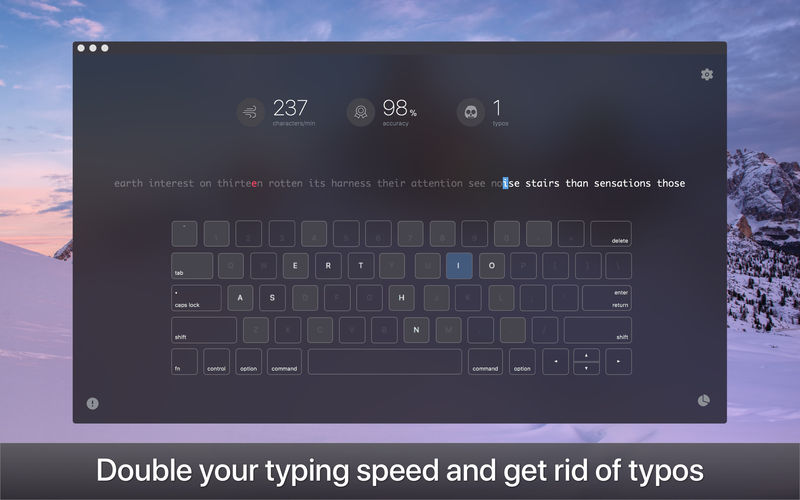

KeyKey is a typing tutor that helps you master touch typing and build speed you can rely on. Whether you're a complete beginner or already typing blind, KeyKey adapts to your level and helps you keep improving.
- Lessons for every skill level
- Real-time feedback and progress tracking
- Customizable practice sessions
- Support for many languages and keyboard layouts
PRACTICE WITH REAL WORDS
Instead of random letter strings, KeyKey builds lessons from real words in your language. You practice the letter combinations you actually use, so your new skills carry over to everyday typing right away.
FIX YOUR WEAK SPOTS
KeyKey highlights your mistakes as you type and finds the letters that trip you up most. Focused repetition helps you break bad habits and turn accuracy into speed.
TRAINING THAT GROWS WITH YOU
Lesson difficulty adjusts to your performance automatically. Ready for more? Add capital letters, numbers, and punctuation to raise the challenge.
WATCH YOUR PROGRESS
Track your speed, accuracy, and errors session by session, across every language and layout you practice. Clear charts show how far you've come, and three stars in each lesson give you something to aim for.
A VIRTUAL KEYBOARD THAT GUIDES YOU
On-screen hints show which finger to use and where the next key is, so you can build proper technique without glancing down.
LEARN IN YOUR OWN LANGUAGE
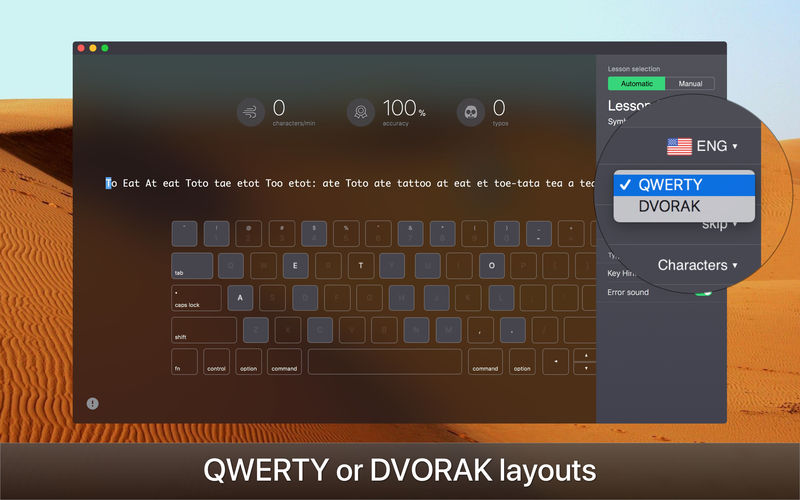
Practice in the language you actually write in, on the layout you actually use, from QWERTY to Colemak and Dvorak.
SUPPORTED LANGUAGES AND LAYOUTS
- English: QWERTY, Colemak, Dvorak, AZERTY, QWERTZ (Swiss), QGMLWY, Neo
- Spanish: QWERTY, QWERTY ISO
- Portuguese: Brazilian (ABNT2, Pro), Portuguese
- French: AZERTY, AZERTY PC, BÉPO, QWERTY Canada, QWERTZ Swiss
- German: QWERTZ, QWERTZ Swiss, Neo
- Italian: Italian, Italian Typewriting
- Turkish: Turkish Q, Turkish F
- Greek: Greek
- Russian: Russian, Russian PC, Typewriting
- Ukrainian: Ukrainian, Ukrainian PC
- Mongolian: Mongol 1, Mongol 2
Download KeyKey and start typing as fast as you think.
Version 2.9.31
- Updated for macOS 27 Golden Gate
- The practice text now spans two rows in a larger font
- Key and hands hints now light up on the on-screen keyboard as you type
- Typos now play a mechanical key-click sound
Frequently asked questions
How do I install the app?
Mount the image, drag the app into the "Applications" folder and launch it. If the system blocks the launch, allow it in "System Settings → Privacy & Security".
The app is damaged or won't launch
Reinstalling from a fresh image usually helps. Make sure your macOS version matches the one listed in the compatibility specs.
How do I update?
Download the new version from the site and install it over the current one — your settings will be preserved.
The download link doesn't work
Try a mirror or a download manager. For large files the browser often drops the connection.
How do I completely remove the app?
Use an uninstaller utility — it cleans up the service files that remain after moving the app to the trash.

Choose a download source
KeyKey 2.9.31 · 51.29 MB
Previous versions
KeyKey 2.9.31
Previous versions are available to registered users.