Nuance Dragon for Mac 5.0.5
Whether you’re creating documents, spreadsheets or presentations, sending emails, filling out forms or simply looking to reduce typing stress, Dragon for Mac drives productivity at work. Dictate and transcribe documents with a fully customizable experience that optimizes speed and accuracy. Even connect to the soon-to-be released Dragon Anywhere mobile app for iOS or Android for an end-to-end voice productivity solution that helps you work smarter and faster wherever your job takes you.
Powerful documentation
Get documentation tasks done faster
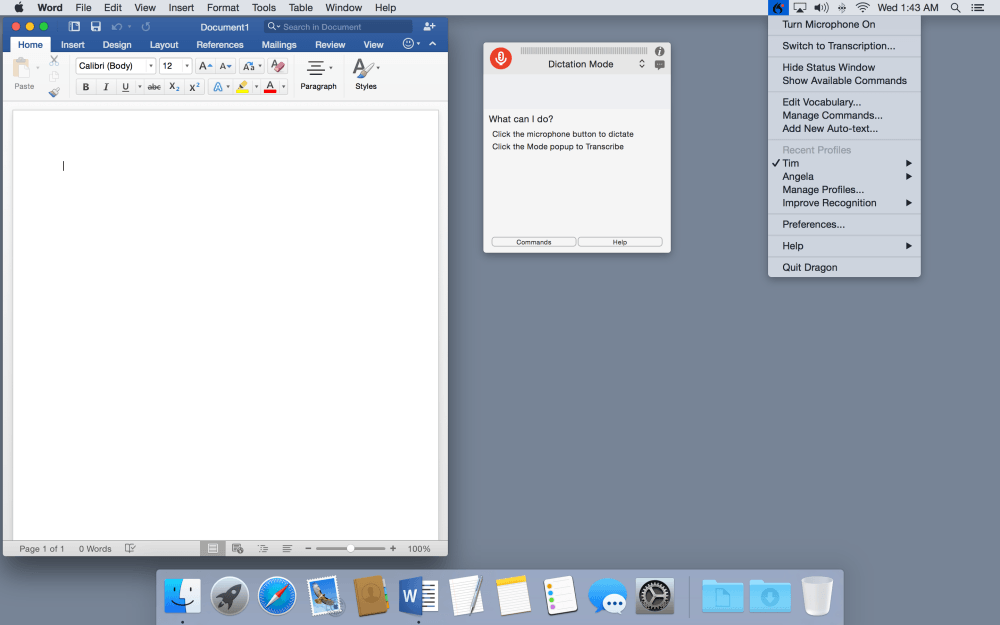
Most people can talk faster than they can type, so why not use your voice to quickly dictate and edit documents? Dragon for Mac lets you customize words for the terms you use every day, insert frequently-used text or graphics and create command short cuts for repetitive tasks, so you can complete documentation faster than ever before.
Speed through document creation 3x faster than typing
Enjoy increased accuracy as Dragon adapts to your voice
Supports latest applications, including Microsoft Word 2016 with Full Text Control
Give your wrists a rest and reduce repetitive stress injuries
Powerful transcription
Turn voice files into text—instantly
With Dragon for Mac, you can transcribe voice memos from a smartphone or portable voice recorder, podcasts or audio files of any single speaker’s voice to text quickly, easily and accurately.
Transcribe from .mp3 aif, .aiff , .wav, .mp4, .m4a, .m4v.
Capture notes for accurate transcription
Transcribe audio file of any single speaker’s voice
Manage multiple sources for easy transition between personal dictation and other files
Mobile productivity
Stay productive wherever you go
Continue creating and editing documents—even when work takes you away from the office. With the separate, cloud-based Dragon Anywhere mobile app you can dictate and edit documents of any length by voice directly on your mobile device to maximize productivity at the office or on the road.
*Dragon Anywhere is now available on Android. iOS is not yet available and is coming soon. Subscription is required for the Dragon Anywhere app.
Works with Android devices
Syncs documents, preferences and customizations with your Dragon desktop so you can continue your work seamlessly wherever you go
Easy customization
Works the way you do
Imagine saying “Insert Signature” and Dragon fills in your contact details or dictating industry-specific terminology and Dragon types every word correctly—every time. With advanced customization and personalization features, Dragon for Mac intelligently adapts to the way you work to deliver big productivity gains.
Screenshots
Frequently asked questions
How do I install the app?
Mount the image, drag the app into the "Applications" folder and launch it. If the system blocks the launch, allow it in "System Settings → Privacy & Security".
The app is damaged or won't launch
Reinstalling from a fresh image usually helps. Make sure your macOS version matches the one listed in the compatibility specs.
How do I update?
Download the new version from the site and install it over the current one — your settings will be preserved.
The download link doesn't work
Try a mirror or a download manager. For large files the browser often drops the connection.
How do I completely remove the app?
Use an uninstaller utility — it cleans up the service files that remain after moving the app to the trash.
VersionNuance Dragon for Mac 5.0.5
DeveloperNuance
CompatibilityOS X 10.9 or later, 64-bit processor
LanguageEnglish
IncludesK



Information
Visitors in the group Guests cannot leave comments on this publication.
Choose a download source
Nuance Dragon for Mac 5.0.5 · 2.36 GB