
JixiPix Simply HDR 3.2.20
HDR photo editor for detailed, expressive images.
Screenshots
Click to enlarge

Description
Create an HDR image from a single photo, with more detail in its brightest and darkest areas. Simply HDR offers styles and creative controls for shaping your image, whether you prefer a realistic look or a more artistic finish.
Shape your HDR style
Start with a one-touch setting, use it as is, or adjust the controls to create a look of your own. Save a preset to apply your settings to future projects.
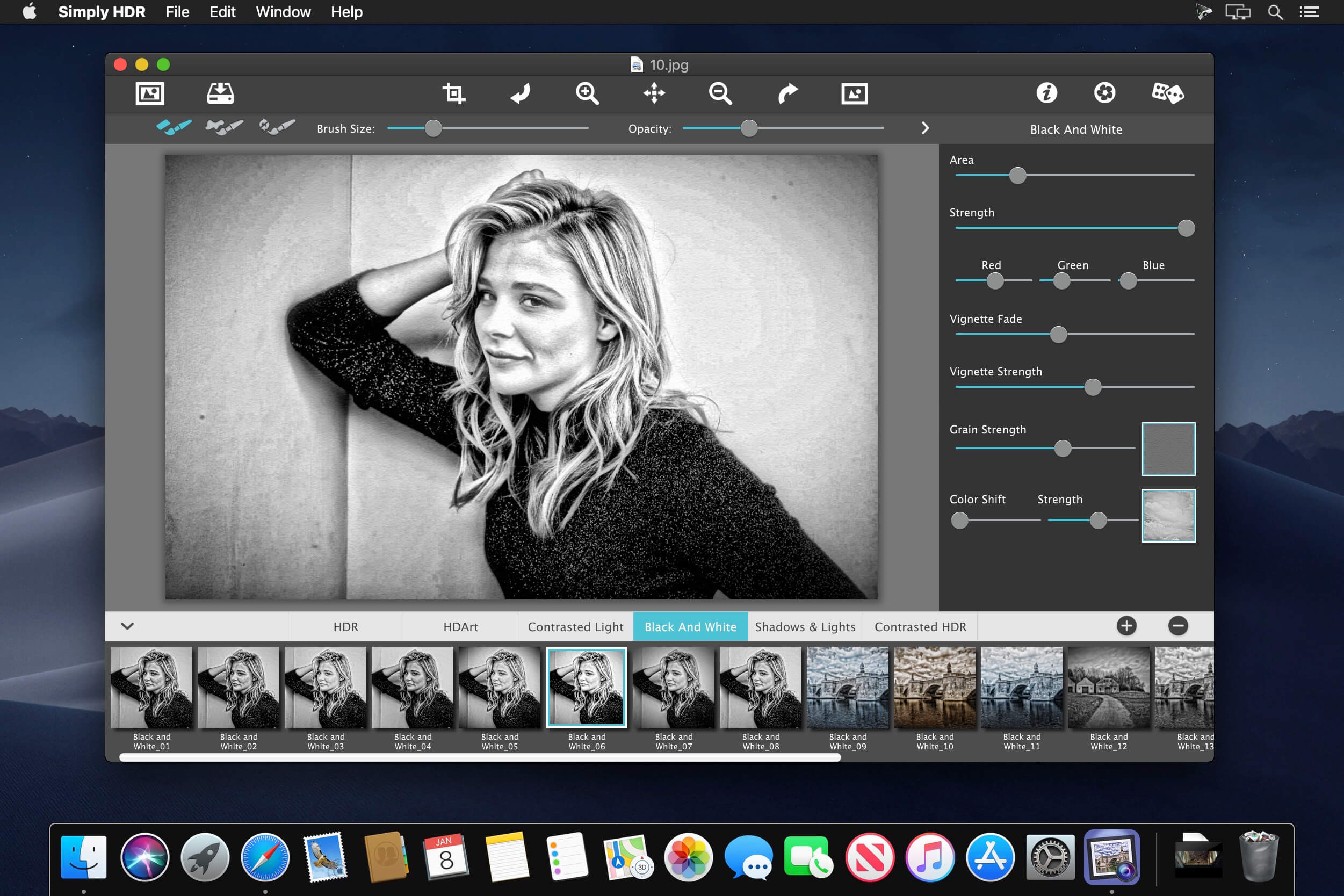
- Six HDR styles: Choose from High Dynamic Range, HD Art, Black & White HDR, Contrasted HDR, Shadows & Light, and Contrasted Light.
- Detail controls: Adjust the detail area and strength.
- Smoothing and restore brushes: Make corrections to areas of your image.
- Creative finishing tools: Use adjustable vignettes and film grain.
- Color filters and gradients: Explore 45 options for adjusting the look of your image.
- Artistic finishes: Choose from 70 finishes for HD Art.
- One-touch settings: Start with one of 100 settings, then customize it if you like.
- Save presets: Keep settings you’ve created for future projects.
Explore the styles and create an HDR image that feels like your own.
Comments
No comments yet. Be the first.
Information
Visitors in the group Guests cannot leave comments on this publication.