DriveDx 1.12.1
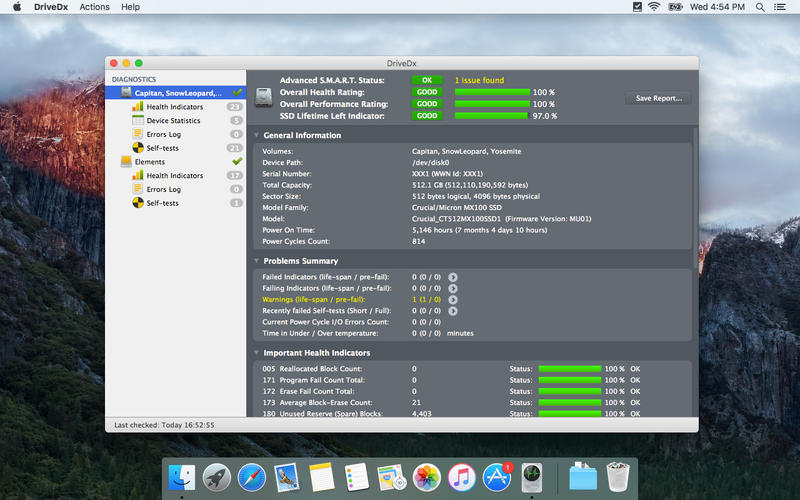

DriveDx is advanced drive health diagnostic and monitoring utility. Save yourself the data loss and downtime that is associated with unexpected drive failures. Don't worry about losing your important data, music, and photographs.
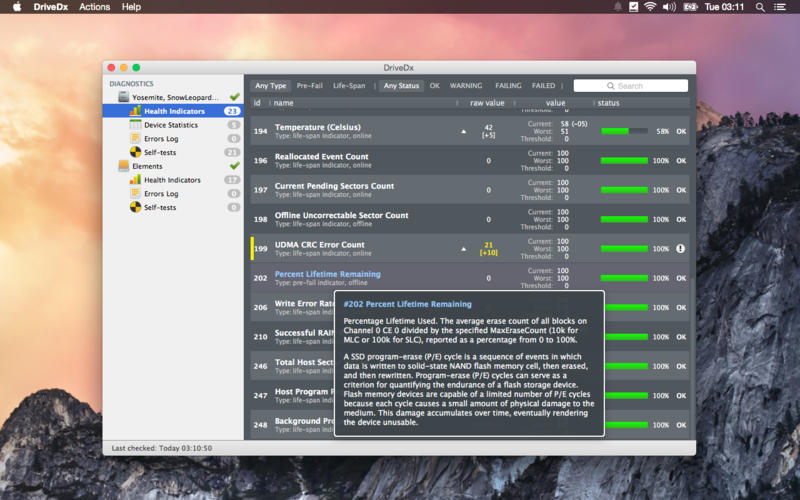
Unlike most drive utilities, DriveDx does not only monitor the drive’s built-in S.M.A.R.T. status, but also analyzes the changes of all drive health indicators that are closely related to SSD or HDD failures (like SSD wear out / endurance, reallocated bad sectors, offline bad sectors, pending sectors, I/O errors and more) and alerts the user immediately if anything goes wrong. Our drive health diagnostics algorithms are based on the recent researches in this field. The application provides access to all sufficient drive diagnostic data to satisfy any system administrator. DriveDx is the first utility of its kind to have a real user-friendly Mac-style interface.
Key features:
- support of modern SSDs and HDDs
- real-time SSD/HDD health status monitoring
- pre-failure state early detection - DriveDx supports 3 drive health statuses: Ok, Failing (pre-failure) and Failed. (Most of drive utilities support only "Ok" and "Failed")
- drive failure prediction based on health indicators that are closely related to SSD or HDD failures
- multi-tier warning system that will inform the user about deviations from the normal state of drive attributes
- drive overall health rating
- drive overall performance rating (if drive supports this subset of indicators)
- SSD lifetime left indicator
- support of drive short and full (extended) self-tests
- save drive(s) health report to file
- automatic drive health reports by email (automatic email reports)
- human-readable drive health indicators (attributes) representation
- different routines for SSD and HDD health evaluation
- drive temperature monitoring
- drive free space monitoring
- history-based drive health evaluation
- S.M.A.R.T. error log
- Growl notifications
- user friendly and intuitive UI
- Retina displays support
Version 1.12.1:
- Fixed: crash on old macOS's (10.9 - 10.13) when sending email report via SMTP,
- Fixed: driver installer now doesn't require Rosetta 2,
- Improved: drive diagnostic algorithms and heuristics,
- Improved: support of Patriot P200 SSDs,
- Added: minor tweaks and fixes.
Frequently asked questions
How do I install the app?
Mount the image, drag the app into the "Applications" folder and launch it. If the system blocks the launch, allow it in "System Settings → Privacy & Security".
The app is damaged or won't launch
Reinstalling from a fresh image usually helps. Make sure your macOS version matches the one listed in the compatibility specs.
How do I update?
Download the new version from the site and install it over the current one — your settings will be preserved.
The download link doesn't work
Try a mirror or a download manager. For large files the browser often drops the connection.
How do I completely remove the app?
Use an uninstaller utility — it cleans up the service files that remain after moving the app to the trash.
Choose a download source
DriveDx 1.12.1 · 25.29 MB
Previous versions
DriveDx 1.12.1
Previous versions are available to registered users.
Comments 1