Aurora HDR Pro 1.2.7
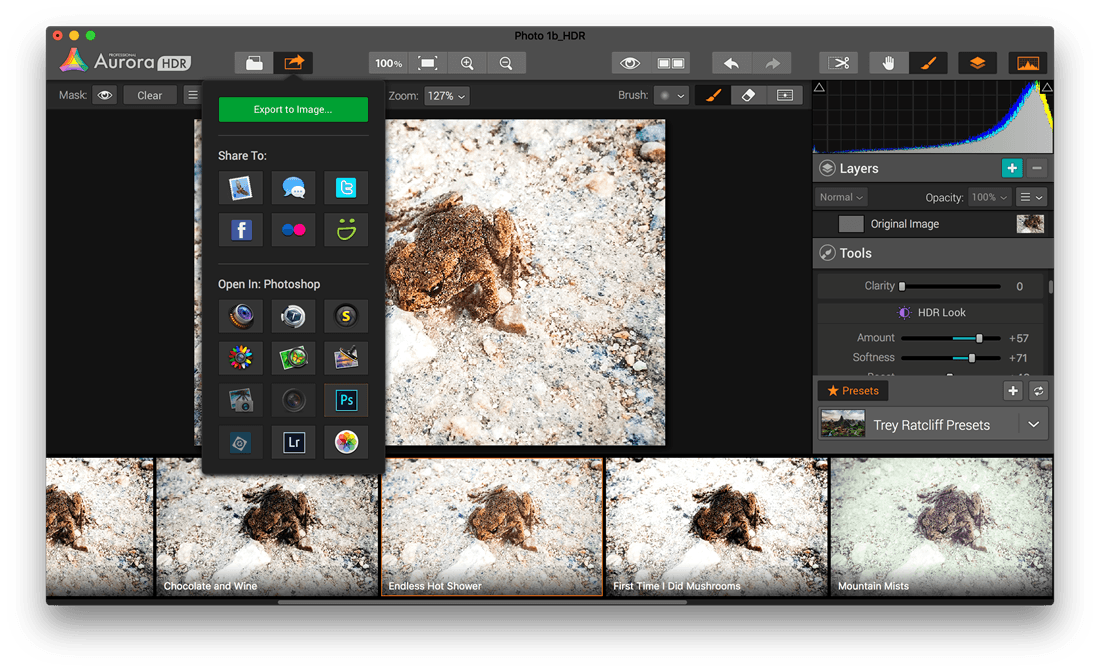
Aurora HDR, perfect for photographers of all skill levels, provides a comprehensive set of state-of-the-art tools for HDR photography. It’s one of the most complete and powerful HDR apps in the world. A joint project between Macphun and Trey Ratcliff, one of the world’s pre-eminent HDR photographers with over 14 million fans online, Aurora HDR can help photographers of all skill levels create amazing images.
Features
- Revolutionary HDR algorithms make possible the entire spectrum of HDR looks, from natural to highly stylized.
- Total HDR editing experience with the most complete set of tools available.
- Powerful one-click presets, including Signature Pro presets by Trey Ratcliff, yield fantastic results instantly.
- Layers, masking, and brushes provide the ultimate in selective editing.
- Unique Radiance controls and custom texture-blending for creative versatility.
- Detail enhancement to increase drama in images.
- Extensive color and toning controls for vibrant color combinations.
- Approachable user interface makes for a comfortable, understandable experience.
- Built-in sharing supports popular photo communities and social networks.
- Support for RAW, JPG, TIFF, and other popular formats for the greatest flexibility.
- Workflow tailored to any style, with support for use as a standalone app or as a plug-in for popular host applications.
WHAT’S NEW
Added RAW Support
- Canon 80D, 1300D, 1DX MkII
- Leica M (Typ 262)
- Nikon D5
- Olympus Pen F, SH-3
- Panasonic DMC-GX80/85, DMC-TZ80/81/85/ZS60, DMC-TZ100/101/ZS100
- Samsung Galaxy S7 (SM-G935F)
- Sony ILCA-68, ILCE-6300, RX1R II, RX10 III
- DxO ONE Digital Camera
- Fujifilm X-Pro2
Bug Fixes and Improvements
- Improved performance as Photos extension
- Fixed Crash with Alignment case
- Fixed Luminosity histogram
- Sync Favorites presets between Aurora HDR Pro and Aurora HDR Pro extension
- Fixed preview on Layer
Screenshots


Frequently asked questions
How do I install the app?
Mount the image, drag the app into the "Applications" folder and launch it. If the system blocks the launch, allow it in "System Settings → Privacy & Security".
The app is damaged or won't launch
Reinstalling from a fresh image usually helps. Make sure your macOS version matches the one listed in the compatibility specs.
How do I update?
Download the new version from the site and install it over the current one — your settings will be preserved.
The download link doesn't work
Try a mirror or a download manager. For large files the browser often drops the connection.
How do I completely remove the app?
Use an uninstaller utility — it cleans up the service files that remain after moving the app to the trash.
VersionAurora HDR Pro 1.2.6
DeveloperMacPhun Software
CompatibilityOS X 10.9 or later, 64-bit processor
LanguageEnglish
IncludesPre-K'ed

Information
Visitors in the group Guests cannot leave comments on this publication.
Choose a download source
Aurora HDR Pro 1.2.7 · 112.39 MB