
Total Video Tools 1.2.3

Total Video Tools = Video Editor (Trim/Cut/Rotate/Merge/Extract…) + Screen/Voice Recorder + HD Video/Audio Converter + Video Player
Total Video Tools is the most powerful all-in-one essential video and audio toolset to edit movie, capture screen, convert, merge, compress, and play any video and audio on Mac.
Key Features:
1 Lossless Screen/Voice Recorder
- Support long recording of screen and camera and output lossless videos.
- Support audio inputs by microphone and record your voice with the screen synchronized.
- Usage scenario: web-based instructional videos recording, software tutorial videos recording, game videos recording, game commentary videos recording, favorite online video clips recording...
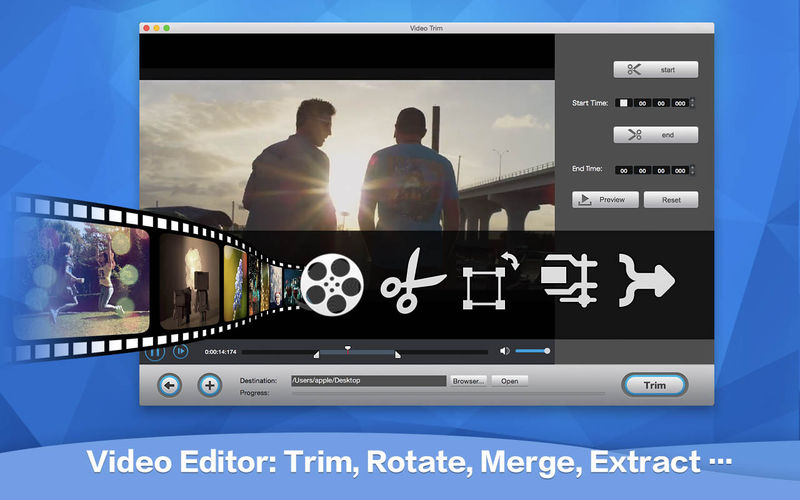
- Video Trimming: Trim any video to get the most wanted clip for saving and sharing.
- Audio Trimming: Freely trim audio files of any format.
- Rotation: It offers real-time preview for 4 rotation modes: flip horizontal, flip vertical, rotation 90 degrees clockwise and counterclockwise!
- Merging Tool: Merge multiple video clips and convert them to any format.
- Video Mux: Combine videos and audios. Add or change the background music to the videos.
- Audio Removal: Remove the original audio tracks to extract soundless video streams.
- Audio Extraction: Extract lossless song or audio.
- Audio Normalization: Batch analyze audio files to the same volume level.
- Video Compression: Compress videos in a batch with 4 kinds of compression ratio.
- Audio Compression: All popular audio formats are supported.
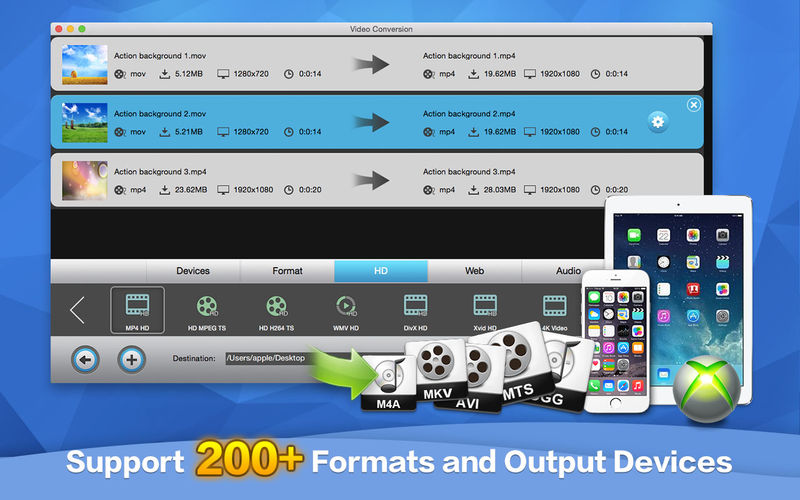
- Enjoy 30X conversion speed between 200+ formats breakthrough hardware acceleration technology.
- Support HEVC (H.265) codecs and improve image quality.
- Convert to 4K videos (H.265, H.264, etc.) regardless of input device or format.
- Cut down conversion time with Lossless batch conversion.
- Preset the best format & resolution of each output device.
- Support 160+ devices: iPhone, iPad, PSP, Apple TV, Xbox…
- Smoothly play 200+ multimedia formats like MTS, MKV, VOB, MP4, AVI, MP3, OGG, M4A and more.
- Intelligently detect and display the media information of each file.
- Play video files frame-by-frame without missing any detail.
Version 1.2.3
- Release notes were unavailable when this listing was updated.
Frequently asked questions
How do I install the app?
Mount the image, drag the app into the "Applications" folder and launch it. If the system blocks the launch, allow it in "System Settings → Privacy & Security".
The app is damaged or won't launch
Reinstalling from a fresh image usually helps. Make sure your macOS version matches the one listed in the compatibility specs.
How do I update?
Download the new version from the site and install it over the current one — your settings will be preserved.
The download link doesn't work
Try a mirror or a download manager. For large files the browser often drops the connection.
How do I completely remove the app?
Use an uninstaller utility — it cleans up the service files that remain after moving the app to the trash.
VersionTotal Video Tools 1.2.3
DeveloperXiuYing Zhu
CompatibilityOS X 10.6 or later, 64-bit processor
LanguageEnglish
IncludesK'ed by TNT





Information
Visitors in the group Guests cannot leave comments on this publication.
Choose a download source
Total Video Tools 1.2.3 · 39.93 MB
Previous versions
Total Video Tools 1.2.3
Previous versions are available to registered users.