
iText Pro - OCR Tool 1.2.8
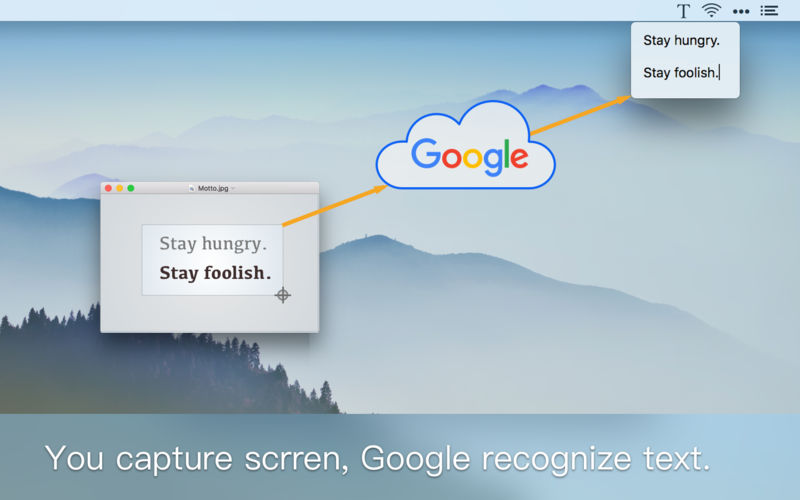
Text could recognize text from any image.
You can use iText to extract text from PDF, document in paper, page in a book and any other images.
It's so easy to take image.
- Use iText's built-in tool to capture any screen.
- Drag an image to iText's icon in menu bar.
- Select an image file.
The recognition result is very accurate.
- Powered by Google online OCR service, support 50+ languages.
- Auto detect paragraphs, optimize layout.
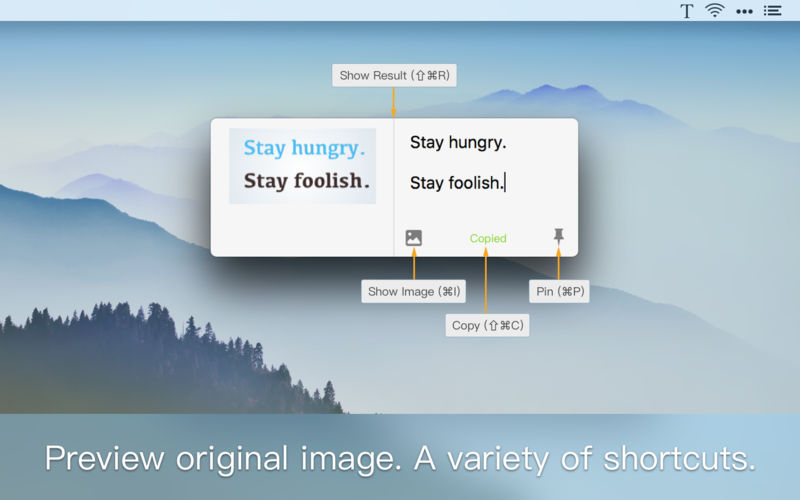
- Could preview the original picture for easy proofing.
Simple and efficient:
- No Dock needed, only exists in the menu bar.
- Support a variety of shortcuts, easy to operate.
You can recognize 20 images for free each month, or subscribe iText Pro to unlimitedly recognize. The subscription will be auto-renew which can be stopped 1 day before the end of the current period.
Version 1.2.8
- Support external monitor.
- Optimize the format of URLs, emails and other texts.
Frequently asked questions
How do I install the app?
Mount the image, drag the app into the "Applications" folder and launch it. If the system blocks the launch, allow it in "System Settings → Privacy & Security".
The app is damaged or won't launch
Reinstalling from a fresh image usually helps. Make sure your macOS version matches the one listed in the compatibility specs.
How do I update?
Download the new version from the site and install it over the current one — your settings will be preserved.
The download link doesn't work
Try a mirror or a download manager. For large files the browser often drops the connection.
How do I completely remove the app?
Use an uninstaller utility — it cleans up the service files that remain after moving the app to the trash.
VersioniText Pro - OCR Tool 1.2.8
DeveloperJINGSEN ZHENG
CompatibilityOS X 10.10 or later, 64-bit processor
LanguageEnglish, Simplified Chinese
IncludesK'ed by TNT



Information
Visitors in the group Guests cannot leave comments on this publication.
Choose a download source
iText Pro - OCR Tool 1.2.8 · 9 MB