
CheckBook Pro 2.7.32

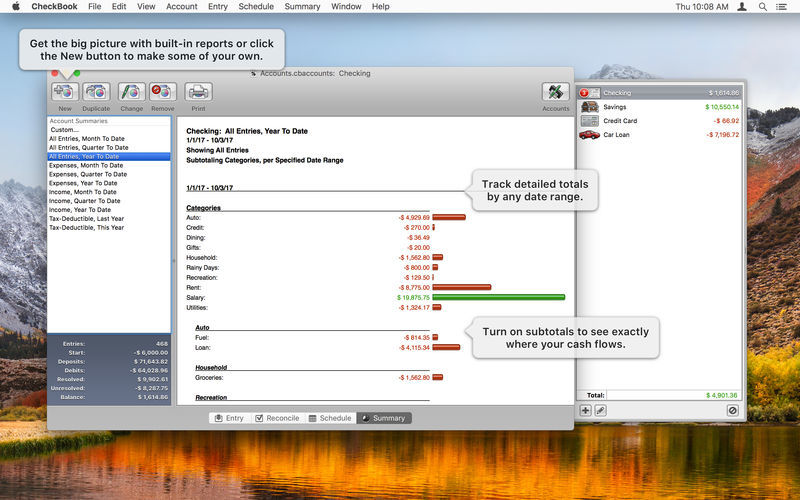
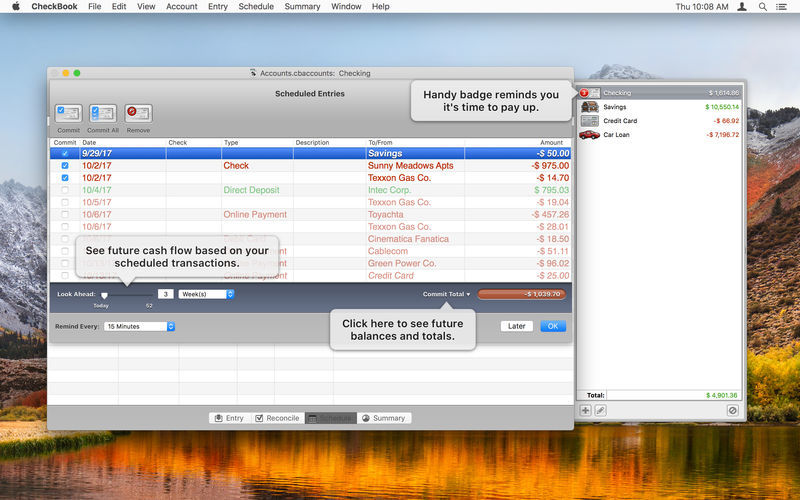
With CheckBook, easily and simply manage your personal checking accounts.
A paper check register can't categorize your transactions or report cash flow over time, and it'll never balance itself. That's where we come in. Introducing CheckBook 2, the powerfully simple personal finance manager.
Precisely manage your finances:
- Find transactions with simple searches or dozens of powerful criteria
- Reconcile your accounts to the penny
- Schedule transactions that repeat periodically, like monthly bills and paychecks
- Track cash flow over time with customizable reports so you can see where your money came from and where it's going
Import from other personal finance apps or your bank:
- Strong support for OFX, QFX, QIF, CSV, and Text
- Import from Quicken Essentials for Mac
- Share and sync your dаta:
- Sync with other users on a local network
- Sync with iCloud, when used on OS X Mountain Lion
And more:
- Manage accounts in multiple currencies
- Transfer funds between accounts without creating two transactions
Version 2.7.30
- Nixes a glitch when you’re deleting the name of a subcategory in a split line item.
- Prevents a crash as you manage split line items in the Import Preview.
- Includes several user interface fixes and tweaks.
Frequently asked questions
How do I install the app?
Mount the image, drag the app into the "Applications" folder and launch it. If the system blocks the launch, allow it in "System Settings → Privacy & Security".
The app is damaged or won't launch
Reinstalling from a fresh image usually helps. Make sure your macOS version matches the one listed in the compatibility specs.
How do I update?
Download the new version from the site and install it over the current one — your settings will be preserved.
The download link doesn't work
Try a mirror or a download manager. For large files the browser often drops the connection.
How do I completely remove the app?
Use an uninstaller utility — it cleans up the service files that remain after moving the app to the trash.





Choose a download source
CheckBook Pro 2.7.32 · 39.58 MB
Previous versions
CheckBook Pro 2.7.32
Previous versions are available to registered users.