Money (with sync) 6.6.15
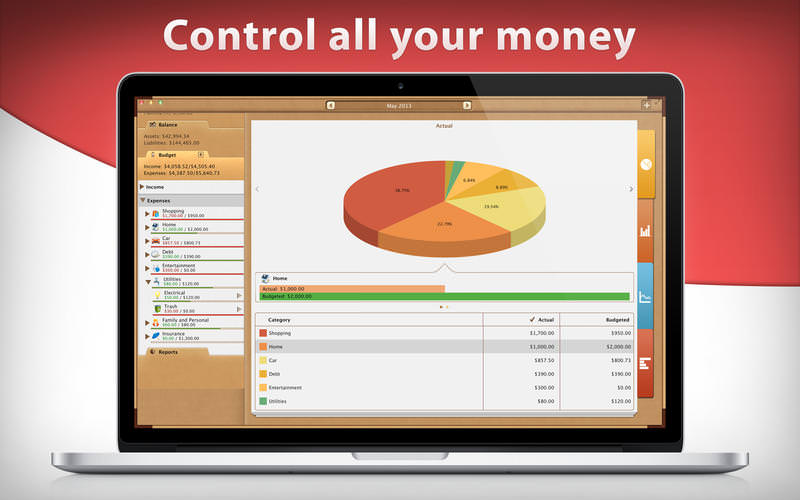

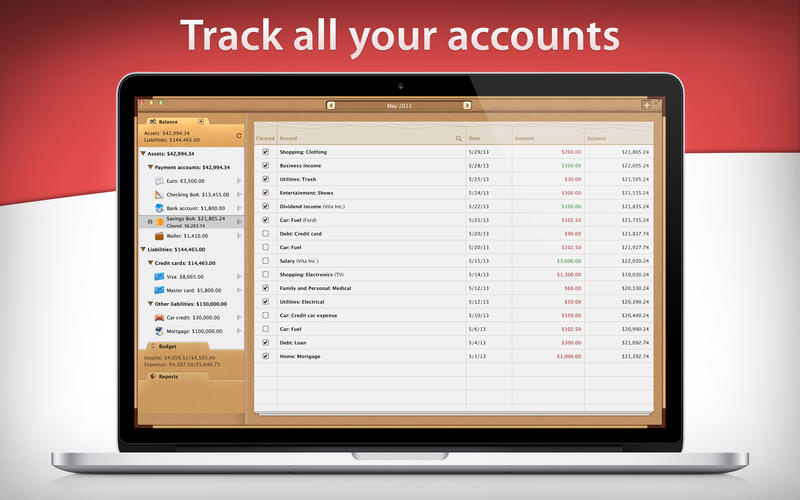
Manage your personal finances in the most comprehensive manner with Money. Track all your accounts, organize bills, budget your income and expenses, and keep full control over your personal finances.
With Money you will:
- BUDGET INCOME AND EXPENSES WITH EASE. Just plan your income and expenses using detailed categories and input data when you actually spend money; once you analyze the difference between real and budgeted expenditures, you'll find ways to save more.
- PAY BILLS ON TIME. A whole system of reminders and alerts showing a number of upcoming bills won't let you ever miss a bill payment.
- TRACK EVERY ACCOUNT (credit cards, checking, savings account, etc.). It doesn't matter how many accounts you have. Download your financial data from your bank through OFX import and keep it always up-to-date with a single tap of your finger.
- CONTROL ALL YOUR MONEY timely and totally by analyzing a number of sophisticated reports, graphs and diagrams.
- USE ADVANTAGES OF THE INTEGRATED APPROACH. A bill paid from the bank account will automatically change the account balance and influence your budget. Using your own credit card when paying for business travel expenses you can keep separate accounting for your personal and business expenditures.
- KEEP YOUR DATA IN SYNC on all your devices: iPhone, iPad and Mac.
TRANSACTIONS
- Income, Expenses, Transfers between accounts
- Bills planning
- Calendar with a view of all planned/paid/overdue expenses
- Recurring and automatic bills
- Alerts for bills, which close to due dates or overdue
- Additional fields for organizing your records including payee, description, check #, class (personal/business travel expenses)
- Attachment of receipt photos and voice comments
- Search
- Unlimited number of accounts in one place (checking, savings, credit card, etc.)
- Import of bank statements (OFX files)
- Automatic categorization based on previous transactions
- Multiple currencies support & automatic update of exchange rates
- Accounts reconciliation (balance and cleared balance)
- Balance change history
- Custom budget periodicity (weekly, biweekly, monthly, etc.)
- Recurring and non-recurring budgets (different budget amounts for every set period if needed)
- Categories & subcategories
- Multiple budgets
- Visual indicators for budget overspending
- Budget progress report
- Budget progress within each category and as a whole
- Budget trend chart in time
- Budgeted/Actual
- Cash flow
- Transactions
- Assets/Liabilities
- Projected balance
- Reports by accounts, classes, payees, transaction types, etc.
- Automatic iCloud synchronization (iPad, iPhone, Mac)
- Totally secure
- Retina displays support
- Print and Export to PDF, QIF, CSV formats
- Password protection
- Backups of your data
- Several financial profiles in one app (f.e. personal profile, business profile)
- Built-in calculator
- 25 languages available
Version 6.6.14
- Bug fixes
Frequently asked questions
How do I install the app?
Mount the image, drag the app into the "Applications" folder and launch it. If the system blocks the launch, allow it in "System Settings → Privacy & Security".
The app is damaged or won't launch
Reinstalling from a fresh image usually helps. Make sure your macOS version matches the one listed in the compatibility specs.
How do I update?
Download the new version from the site and install it over the current one — your settings will be preserved.
The download link doesn't work
Try a mirror or a download manager. For large files the browser often drops the connection.
How do I completely remove the app?
Use an uninstaller utility — it cleans up the service files that remain after moving the app to the trash.
VersionMoney (with sync) 6.6.15
DeveloperiBear LLC
CompatibilityOS X 10.7 or later, 64-bit processor
LanguageMultilingual
IncludesK'ed by TNT


Information
Visitors in the group Guests cannot leave comments on this publication.
Choose a download source
Money (with sync) 6.6.15 · 115.98 MB