
Pixologic ZBrush 4R7
ZBrush is a digital sculpting and painting program that has revolutionized the 3D industry with its powerful features and intuitive workflows. Built within an elegant interface, ZBrush offers the world's most advanced tools for today's digital artists. With an arsenal of features that have been developed with usability in mind, ZBrush creates a user experience that feels incredibly natural while simultaneously inspiring the artist within. With the ability to sculpt up to a billion polygons, ZBrush allows you to create limited only by your imagination.
Designed around a principle of circularity, the menus in ZBrush work together in a non-linear and mode-free method. This facilitates the interaction of 3D models, 2D images and 2.5D Pixols in new and unique ways.
ZBrush gives you all of the tools needed to quickly sketch out a 2D or 3D concept and then take that idea all the way to completion. You can create realistic renders directly in ZBrush with lighting and atmospheric effects. With the many powerful export options, you can easily prepare your model for 3D printing or use within any other digital application.
Because ZBrush users are enabled by its powerful software processing, you can sculpt and paint with millions of polygons with out having to worry about purchasing expensive graphics cards. It is for this reason why ZBrush is used by everyone from art enthusiast to major film and games studios.
Leave technical hurdles and steep learning curves behind, as you sculpt and paint with familiar brushes and tools.
WHAT’S NEW
This newer Patch includes a few more items but is especially focused on ZBrush's various plugins.
All of the following have received updates in P3:
- ZRemesher
- UVMaster
- Decimation Master
- 3D Print Exporter
- FBX ExportImport
- ZAppLink
- SubTool Master
- Noise Plugin
- GoZ
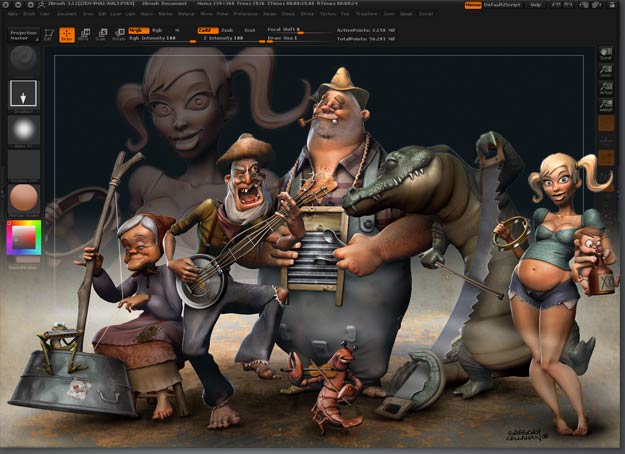
Screenshots
Frequently asked questions
How do I install the app?
Mount the image, drag the app into the "Applications" folder and launch it. If the system blocks the launch, allow it in "System Settings → Privacy & Security".
The app is damaged or won't launch
Reinstalling from a fresh image usually helps. Make sure your macOS version matches the one listed in the compatibility specs.
How do I update?
Download the new version from the site and install it over the current one — your settings will be preserved.
The download link doesn't work
Try a mirror or a download manager. For large files the browser often drops the connection.
How do I completely remove the app?
Use an uninstaller utility — it cleans up the service files that remain after moving the app to the trash.
VersionPixologic ZBrush 4R7
DeveloperPxologic
CompatibilityOS X 10.7 or later, 64-bit processor
LanguageEnglish
IncludesPre-K'ed


Information
Visitors in the group Guests cannot leave comments on this publication.
Choose a download source
Pixologic ZBrush 4R7 · 802.97 MB