
Flinto 26.0.5
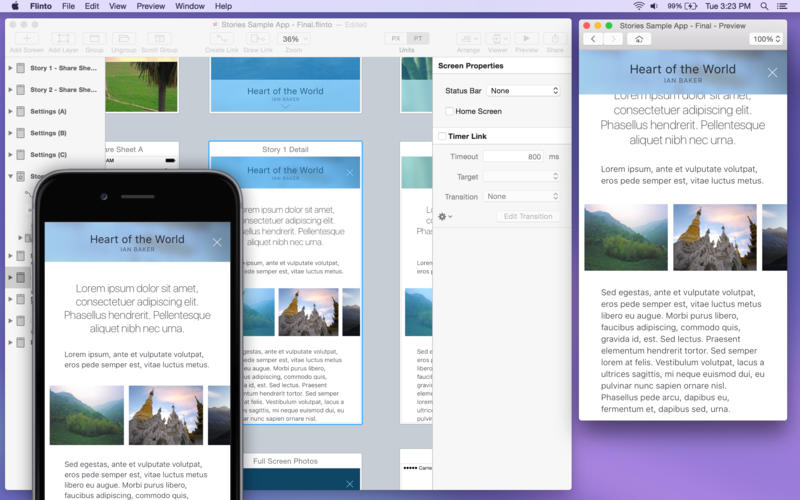

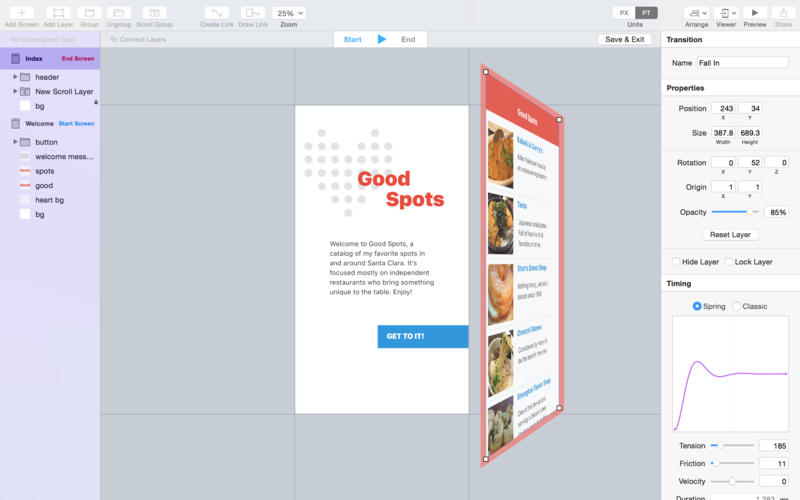
Flinto is a comprehensive app prototyping tool that allows you to create anything from simple tap-through prototypes, to comprehensive prototypes with impressive interactions. We've carefully designed Flinto to minimize complexity. There's no programming or timelines. It's the prototyping tool designers have been waiting for.
If you can use a graphics app, you can use Flinto for Mac.
- Design your own custom animated transitions and interactions.
- Navigate your app prototype with direct manipulation gestures.
- Add scroll areas. Vertical, horizontal, nested, paging, even scroll-based animations.
- View your work live on device with our free companion iOS app.
- Import screen designs directly from Sketch, or drag and drop assets made in any graphics app.
- Send Flinto files to anyone, all they need is our free iOS viewer app.
Version 25.2:
- Release notes were unavailable when this listing was updated.
Frequently asked questions
How do I install the app?
Mount the image, drag the app into the "Applications" folder and launch it. If the system blocks the launch, allow it in "System Settings → Privacy & Security".
The app is damaged or won't launch
Reinstalling from a fresh image usually helps. Make sure your macOS version matches the one listed in the compatibility specs.
How do I update?
Download the new version from the site and install it over the current one — your settings will be preserved.
The download link doesn't work
Try a mirror or a download manager. For large files the browser often drops the connection.
How do I completely remove the app?
Use an uninstaller utility — it cleans up the service files that remain after moving the app to the trash.
VersionFlinto 26.0.5
DeveloperFlinto, LLC
CompatibilityOS X 10.10 +
LanguageEnglish, French, German, Japanese, Korean, Russian, Simplified Chinese, Spanish, Traditional Chinese
IncludesK'ed by TNT




Choose a download source
Flinto 26.0.5 · 19.58 MB
Comments 7