
FTP Server 1.2.1
FTP Server provides a simple way to share / exchanges files between your computers and other devices.
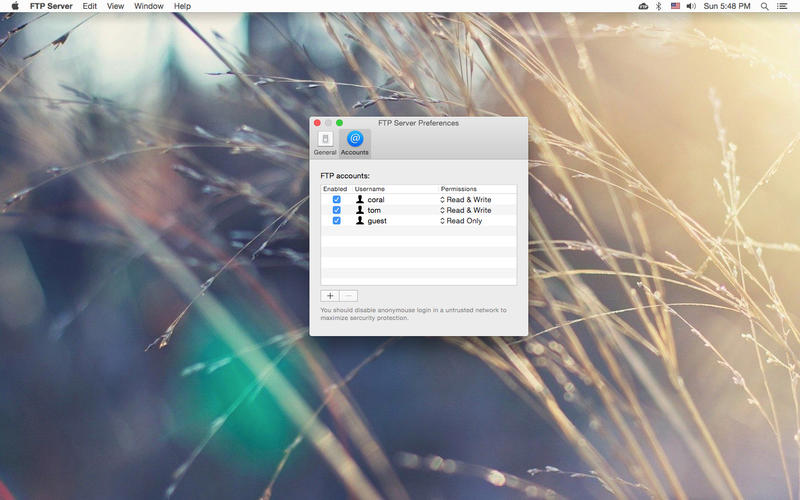
FTP Server comes with its own password authentication, so you don't need to expose your user account to other people nor do you need to create a system user for the authentication purpose.
Features:
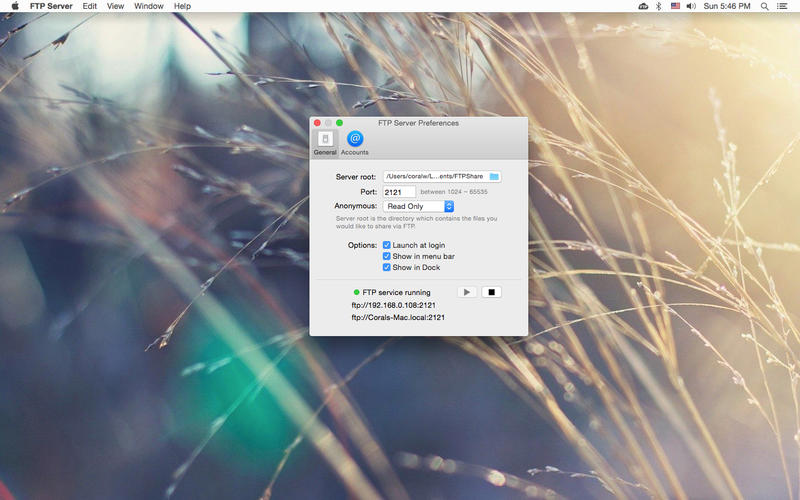
- Easy to use: you can simply start the FTP service without any additional configuration.
- Configurable: server root, port, anonymous access options are available.
- Built-in authentication.
- Lightweight: FTP Server requires very little resources to run and the app size is relatively small.
- All kinds of regular files supported: folders, documents, photos, movies, apps, backups and other files.
WHAT’S NEW
Version 1.2.1
- Show IP address for VPN connections
SCREENSHOTS
Frequently asked questions
How do I install the app?
Mount the image, drag the app into the "Applications" folder and launch it. If the system blocks the launch, allow it in "System Settings → Privacy & Security".
The app is damaged or won't launch
Reinstalling from a fresh image usually helps. Make sure your macOS version matches the one listed in the compatibility specs.
How do I update?
Download the new version from the site and install it over the current one — your settings will be preserved.
The download link doesn't work
Try a mirror or a download manager. For large files the browser often drops the connection.
How do I completely remove the app?
Use an uninstaller utility — it cleans up the service files that remain after moving the app to the trash.
VersionFTP Server 1.2.1
DeveloperCoral Wu
CompatibilityOS X 10.7.3 or later, 64-bit processor
LanguageEnglish
IncludesPre-K'ed




Information
Visitors in the group Guests cannot leave comments on this publication.
Choose a download source
FTP Server 1.2.1 · 1.8 MB