
AppBolish 1.0.4
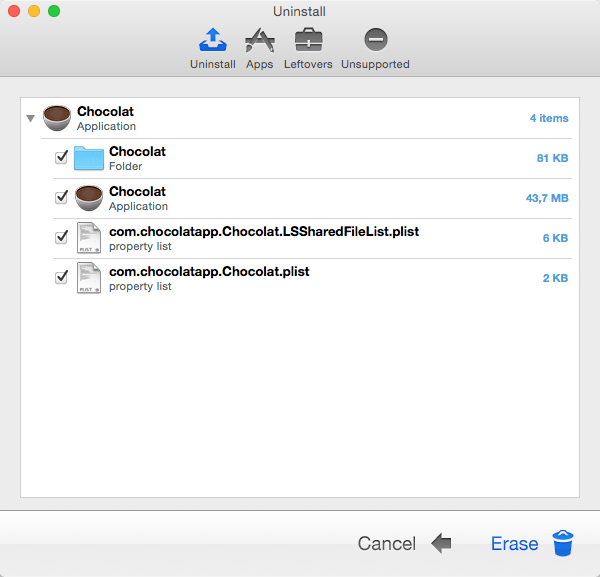
AppBolish is the ultimate solution for correctly uninstalling apps, plugins, widgets, and screen savers! Dragging these to the Trash can leave numerous caches, logs, and support files littered all over the hard drive. This clogs up valuable disk space!
Every app is analyzed, after-which AppBolish begins to deeply scan the computer for all related items and presents a final list for review before removal.
Features:
- Smart Engine: Automatically determines an apps' related files.
- Secure Deletion: Optionally securely delete files in the app.
- App Scanner: Deeply scan the computer for a list of all apps.
- Optimized: Thoroughly optimized for maximum performance and accuracy.
- Leftovers: Scan for files left behind by apps deleted in the past.
- Unsupported Apps: Locate apps that will not run on the computer.
- Customizability: Hand-pick which files to remove when uninstalling.
- User Friendly: Everything just makes sense - no manual required!
WHAT’S NEW
- Updated to latest core classes.
Screenshots
Frequently asked questions
How do I install the app?
Mount the image, drag the app into the "Applications" folder and launch it. If the system blocks the launch, allow it in "System Settings → Privacy & Security".
The app is damaged or won't launch
Reinstalling from a fresh image usually helps. Make sure your macOS version matches the one listed in the compatibility specs.
How do I update?
Download the new version from the site and install it over the current one — your settings will be preserved.
The download link doesn't work
Try a mirror or a download manager. For large files the browser often drops the connection.
How do I completely remove the app?
Use an uninstaller utility — it cleans up the service files that remain after moving the app to the trash.
VersionAppBolish
DeveloperKoingo Software
CompatibilityOS X 10.7 or later
LanguageEnglish
IncludesKG





Information
Visitors in the group Guests cannot leave comments on this publication.
Choose a download source
AppBolish 1.0.4 · 13.72 MB