MailTab for Gmail 1.0
Better, faster and more convenient way to use Gmail on your Mac.
New! Set up custom password, so no one else can access your MailTab, but you. Secure as never before.
New! You can also access Google+ and Google Photos.
Enjoy unique and extra features that are not available anywhere else.
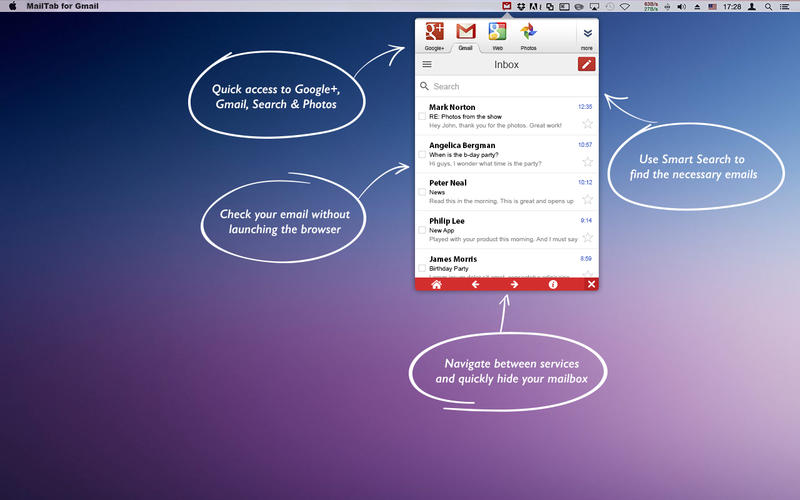
- Securely login to your email without launching the browser
- Send and receive emails from your friends, family and everyone else
- Built-in access to Google+, Photos and other services
- Minimalistic stylish design that doesn't clutter your screen
- Start a new message without launching any email clients or browsers
- Built-in smart search that quickly finds the necessary emails
- Upload attachments faster than doing it from the web
- Upload and share both big and small attachments
- Access Google+ without launching the browser
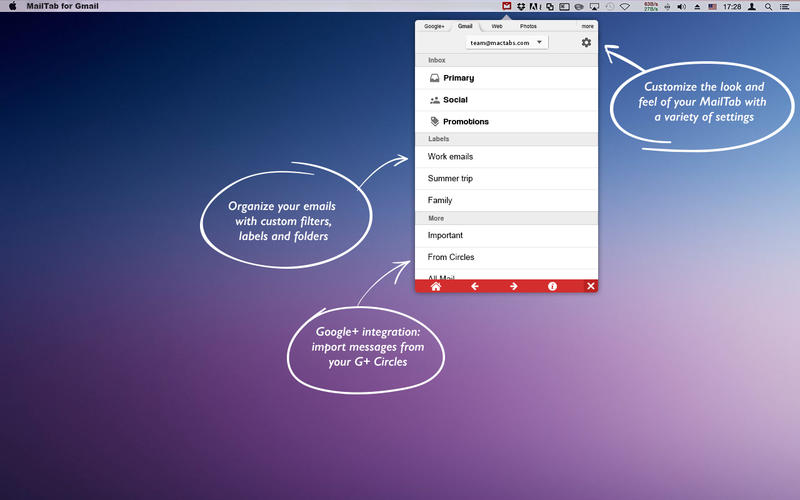
- Create new folders, filters and labels to better organize your mailbox
- Import messages from your Google+ circles
- Sync your contacts to find and add them faster
- And much more
SCREENSHOTS

Frequently asked questions
How do I install the app?
Mount the image, drag the app into the "Applications" folder and launch it. If the system blocks the launch, allow it in "System Settings → Privacy & Security".
The app is damaged or won't launch
Reinstalling from a fresh image usually helps. Make sure your macOS version matches the one listed in the compatibility specs.
How do I update?
Download the new version from the site and install it over the current one — your settings will be preserved.
The download link doesn't work
Try a mirror or a download manager. For large files the browser often drops the connection.
How do I completely remove the app?
Use an uninstaller utility — it cleans up the service files that remain after moving the app to the trash.
VersionMailTab for Gmail 1.0
DeveloperMcTabs OU
CompatibilityOS X 10.11 or later, 64-bit processor
LanguageEnglish
IncludesPre-K'ed

Information
Visitors in the group Guests cannot leave comments on this publication.
Choose a download source
MailTab for Gmail 1.0 · 10.26 MB