Triumph 2.5.11
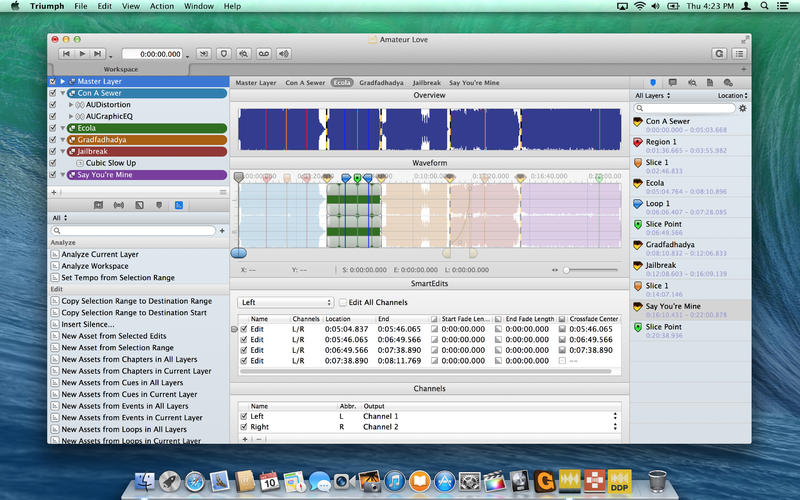
Triumph is a pioneering audio editor and post-production tool developed by musicians and engineers for musicians and engineers. From weekend podcast polishing to video game and motion picture sound design, professional mastering to workflow automation, Triumph is built to make your design and post-production more inspiring, expressive and efficient. Triumph organizes everything you need into one beautifully designed interface that stays out of your way, allowing your to focus on what you do best: designing audio.
Master more confidently
Red Book CD burning, our reliable DDP player, incredible SRC and dither from Goodhertz, Inc.™ and much more.
Design more inspired sound
Triumph’s patented Layers technology lets you create, combine and visualize audio in completely new ways.
Streamline your studio’s workflow
Fully automate even the most complex engineering tasks using Triumph’s library of over 200 Actions, or use AppleScript to write your own.
Polish up your podcasts
Triumph’s SmartEdits™ offer flexible and intuitive editing for dialogue and music. Smooth the fades. Automate your effects. EQ the interviews. Make it perfect!
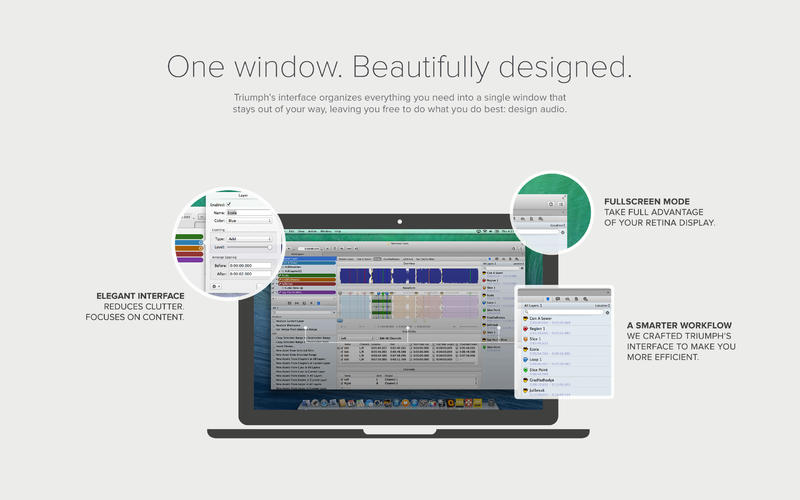
One window. Beautifully designed.
Triumph’s interface organizes everything you need into a single window that stays out of your way, leaving you free to do what you do best: design audio.
Multi-task like a pro
Client thinking about changing the track order halfway through the mastering session? Have a bunch of different sound design ideas for those video game titles? No problem! Triumph gives you the ability to create multiple Workspaces within your project, all referencing the same underlying audio assets. Utilizing multiple Workspaces along with Layers helps keep your project and audio assets organized while letting you experiment and compare effects settings, edits and CD layouts.
Source/destination editing, Triumph-style
Triumph’s Destination Bar in combination with Destination Actions offer the easiest and most efficient approach to source/destination editing available today. No modes. No mess. Just set it and go.
SmartEdits™
Triumph’s SmartEdits offer more flexible editing with fully adjustable properties like fade in and out, fade length and shape, name, color, and much more.
Shapes
Craft all your fades and Effects automations using Triumph’s full set of Segmented, Logarithmic, Quadratic and Cubic Shapes.
Effects
Triumph fully supports Audio Units plug-ins. It also includes iZotope’s restoration tools, our acclaimed FHX™ headphone processor and more.
Meters
Loaded with 8 beautifully designed meters including Level, VU, Lissajous, Correlation and Spectrogram.
Actions & AppleScript
Triumph’s Actions are AppleScript-based and infinitely customizable. Use our incredibly powerful bundled Actions or create and customize your own.
Metadata & Analysis
Triumph provides metadata input for nearly every audio format, a comprehensive audio analysis tool, with analog simulation, and more.
Goodhertz DSP
Triumph is the first audio app to include the new Goodhertz mastering-quality sample rate conversion and noise-shaping dither algorithms. Read more here.
FHX™
The FHX™ processor creates a more spacious, natural soundstage over headphones—enabling an exceptional listening experience for the fastidious masterer and casual listener alike.
Render & Ship
The new Render Assistant allows you to render multiple formats simultaneously and quickly render a DDP set for CD duplication, all within your Triumph project
SoundCloud
Publish your music and podcasts to SoundCloud, directly from Triumph.
Gobbler
Backup to Gobbler for secure file storage, directly from your Triumph project.
Powered by iZotope™
Triumph includes iZotope’s Declick, Denoise, Declip and Dehum repair tools.
Version 2.5.11:
- Release notes were unavailable when this listing was updated.
Frequently asked questions
How do I install the app?
Mount the image, drag the app into the "Applications" folder and launch it. If the system blocks the launch, allow it in "System Settings → Privacy & Security".
The app is damaged or won't launch
Reinstalling from a fresh image usually helps. Make sure your macOS version matches the one listed in the compatibility specs.
How do I update?
Download the new version from the site and install it over the current one — your settings will be preserved.
The download link doesn't work
Try a mirror or a download manager. For large files the browser often drops the connection.
How do I completely remove the app?
Use an uninstaller utility — it cleans up the service files that remain after moving the app to the trash.
VersionTriumph 2.5.11
DeveloperAudiofile Engineering, LLC
CompatibilityOS X 10.10 or later, 64-bit processor
LanguageEnglish
IncludesPre-K'ed



Information
Visitors in the group Guests cannot leave comments on this publication.
Choose a download source
Triumph 2.5.11 · 39.11 MB