Set for MS Office 3.0.2
Set for MS Office is the ultimate bundle of all designs for Word, PowerPoint, and Excel for Mac offered by Jumsoft. It gives numerous options for producing professional and exciting content ranging from striking themes for your slideshows to smart multi-layout templates for brochures and catalogs. Set for MS Office will make your work more streamlined and its outcomes more enjoyable.
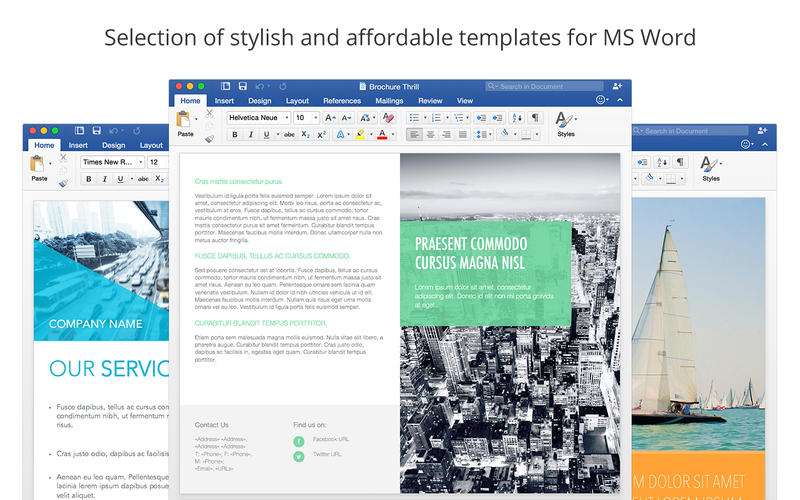
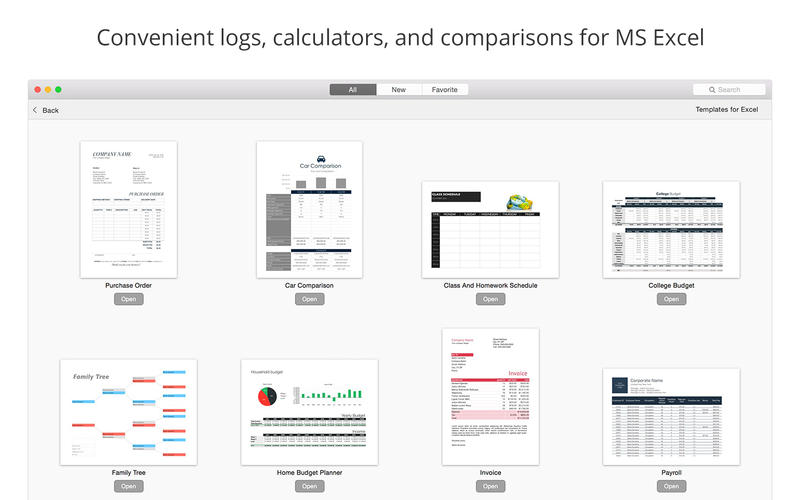
Set for MS Office contains a total of 7 sets of templates: 1,713 designs for Word, 178 themes for PowerPoint, and 180 spreadsheets for Excel.
Once you have downloaded the application, you can open the included items in Word, PowerPoint, or Excel with just one click. Most objects in the templates and themes can be edited without difficulty. You can type or paste your own text, add and remove text boxes, and change the fonts as well as drag your photos or videos to replace the placeholders.
* Requires MS Office for Mac 2011 or later
WHAT’S NEW
Version 3.0.2:
- Issue with the database loading fixed
- Fixed buggs
- New interface design
- Tag-based search
- Full macOS Sierra compatibility
- Calendar templates updated for 2017
- New content:
* 277 templates for Word
* 23 themes for PowerPoint
SCREENSHOTS

Frequently asked questions
How do I install the app?
Mount the image, drag the app into the "Applications" folder and launch it. If the system blocks the launch, allow it in "System Settings → Privacy & Security".
The app is damaged or won't launch
Reinstalling from a fresh image usually helps. Make sure your macOS version matches the one listed in the compatibility specs.
How do I update?
Download the new version from the site and install it over the current one — your settings will be preserved.
The download link doesn't work
Try a mirror or a download manager. For large files the browser often drops the connection.
How do I completely remove the app?
Use an uninstaller utility — it cleans up the service files that remain after moving the app to the trash.
VersionSet for MS Office 3.0.2
DeveloperJumsoft
CompatibilityOS X 10.10 or later, 64-bit processor
LanguageEnglish
IncludesPre-K'ed
Related posts



Choose a download source
Set for MS Office 3.0.2 · 4.25 GB
Comments 2