
FileSumo 1.1.1
File Sumo is a handy must try utility app for a price of coffee, and we are sure, you wont regret it. We are happy to hear from you. Let the world know what is good and let us know what is bad in the app.
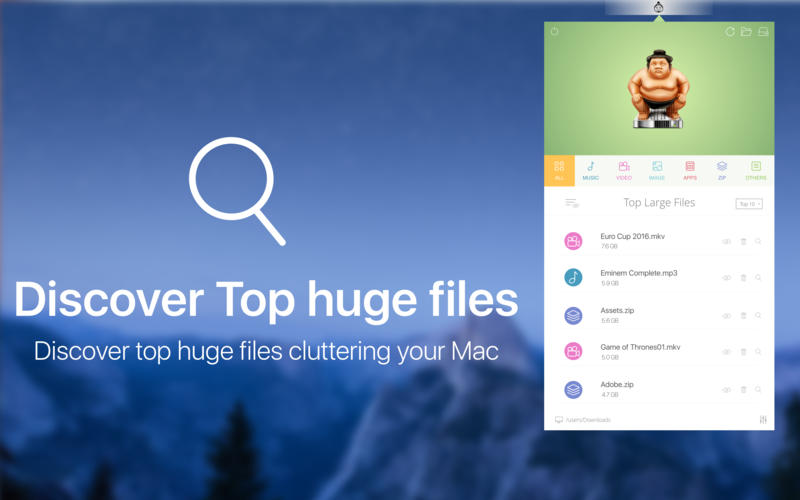
Find Top 100 Huge Files
FileSumo provides the list of top 100 huge files and their sizes along with the options to view each file in finder, add the file to an exception list or delete the file directly from the app. Top 10 Files are free and on in app purchase you can find 100 top files.
Find Huge Files in Seconds
FileSumo searches for huge files in your Mac within seconds. The app has very finetuned search logics and algorithms to ensure that identify the huge files instantly.
Search Whole Mac or a Specific Folder or an External Drive
FileSumo provides the option to search for top huge files in the whole Mac or within a selected folder( in app purchase ) or an external drive ( in app purchase ). Easily toggle between both the modes in a single click.
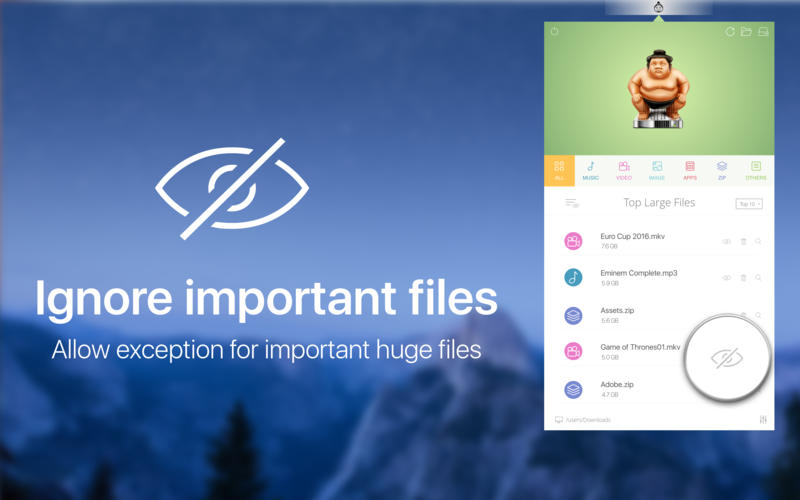
Exception to Important Files
FileSumo provides an option to ignore a huge file in the top 100 list and add it to a exception list. You can access the exception file list anytime to remove the exception.
View in Finder or Instant Delete
FileSumo provides the option to view any huge file in the list in the finder for review or delete the file permanently from within the app itself.
Filter Huge Files by Category
The app also provides the ability to easily filter the huge files by type. The current categories available are Music, Video, Image, App, Zip and Others.
Launch on Start
You can configure the FileSumo app to launch on start so that the app is launched automatically everytime the system starts is ready in the menubar.
WHAT’S NEW
Version 1.1.1
- Minor Bug Fixes.
- Improvements in User Interface.
SCREENSHOTS

Frequently asked questions
How do I install the app?
Mount the image, drag the app into the "Applications" folder and launch it. If the system blocks the launch, allow it in "System Settings → Privacy & Security".
The app is damaged or won't launch
Reinstalling from a fresh image usually helps. Make sure your macOS version matches the one listed in the compatibility specs.
How do I update?
Download the new version from the site and install it over the current one — your settings will be preserved.
The download link doesn't work
Try a mirror or a download manager. For large files the browser often drops the connection.
How do I completely remove the app?
Use an uninstaller utility — it cleans up the service files that remain after moving the app to the trash.
VersionFileSumo 1.1.1
DeveloperGeorge Sargunaraj C
CompatibilityOS X 10.7 or later, 64-bit processor
LanguageEnglish
IncludesPre-K'ed




Information
Visitors in the group Guests cannot leave comments on this publication.
Choose a download source
FileSumo 1.1.1 · 49.03 MB