
Parrot v2.0.1
Parrot is a developer tool designed to improve development efficiency.
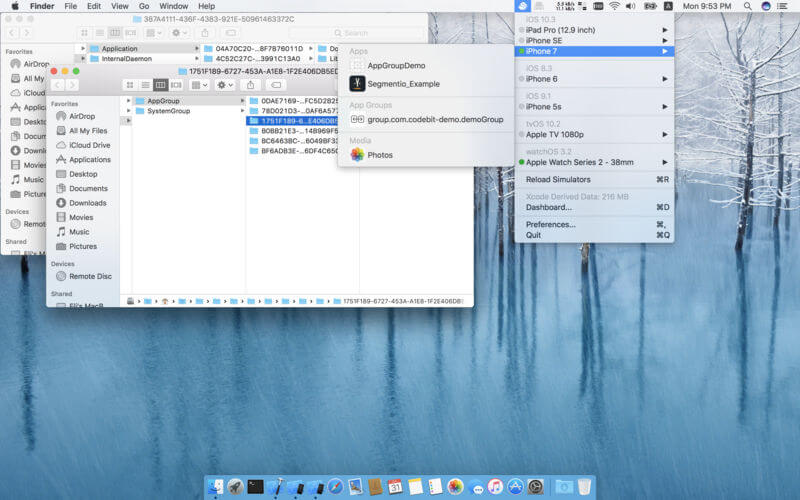
- List all available iOS simulators, watchOS simulators, and tvOS simulators with their status
- Quick access to the app's Sandbox container, app group directory which installed on the simulators for debug information
- Quick access to the simulator's media directory.
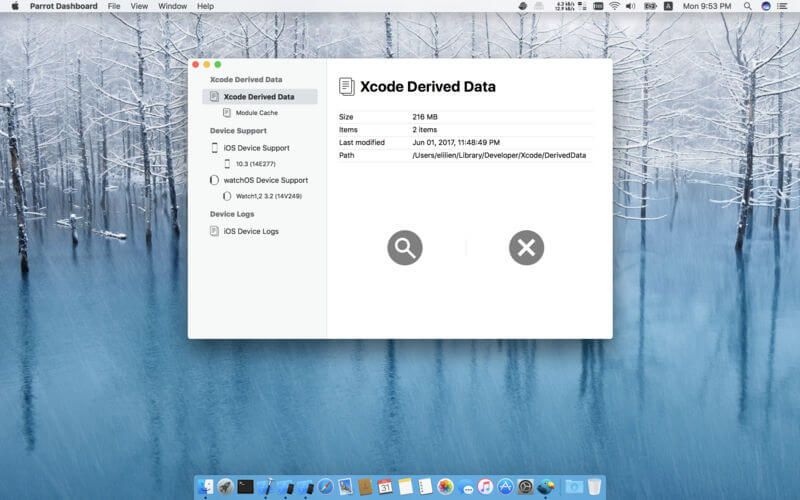
- List all Xcode derived data, module cache, device support and device logs directories with Parrot Dashboard, simply clean them with Touch Bar support
Version 2.0.1:
- Fixes an issue that may cause the Parrot Preferences pane to crash
- Stability improvements
Frequently asked questions
How do I install the app?
Mount the image, drag the app into the "Applications" folder and launch it. If the system blocks the launch, allow it in "System Settings → Privacy & Security".
The app is damaged or won't launch
Reinstalling from a fresh image usually helps. Make sure your macOS version matches the one listed in the compatibility specs.
How do I update?
Download the new version from the site and install it over the current one — your settings will be preserved.
The download link doesn't work
Try a mirror or a download manager. For large files the browser often drops the connection.
How do I completely remove the app?
Use an uninstaller utility — it cleans up the service files that remain after moving the app to the trash.
VersionParrot v2.0.1
DeveloperCODEBIT, LLC
CompatibilitymacOS 10.11 or later
LanguageEnglish
IncludesK'ed by TNT



Information
Visitors in the group Guests cannot leave comments on this publication.
Choose a download source
Parrot v2.0.1 · 19.06 MB