Imagenomic Plug-in for Photoshop, Aperture 3 and Lightroom
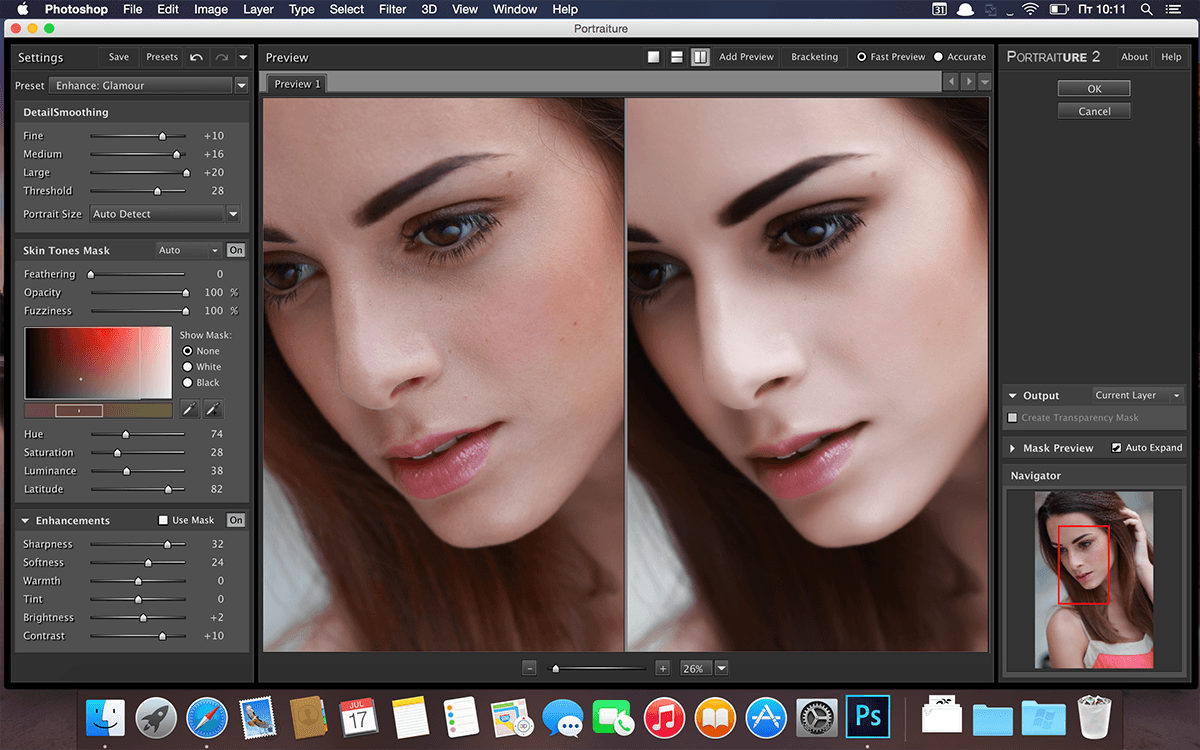
Portraiture - an indispensable filter that will transform your photo into a glamorous picture, avoiding time-consuming procedures pixel image retouching to remove image defects. By virtue of its technology in the application of intellectual dithering, amateurs will be able to completely remove the defects without affecting image detail, including the texture of the skin, hair, eyebrows, eyelashes, and others.
Includes:
- Professional Plugin Suite for Adobe Photoshop CC 2015.5/CC 2017 and Photoshop Elements 14/15 build 1414u7 NEW
Mac OS X 10.10.x (Yosemite)/10.11.x (El Capitan)/10.12.x (Sierra), 1GB RAM, 100MB HDD, 1280x800 min resolution - Professional Plugin Suite for Adobe Photoshop CS5/CS6/CC/CC 2014/CC 2015 and Photoshop Elements 11/12/1build 1414
Mac OS X 10.9.x/10.10.x/10.11.x, 1GB RAM, 100MB HDD, 1280x800 min resolution, - Professional Plugin Suite for Apple Aperture build 1409
Mac OS X 10.7.x/10.8.x/10.9.x/10.10.x, 2GB RAM, 100MB HDD, 1280x800 min resolution, Aperture 3 (64bit only) - Portraiture Plugin for Adobe Photoshop CC 2015.5/CC 2017 and Photoshop Elements 14/15 v.2.3.5 build 2352u7 NEW
Mac OS X 10.10.x (Yosemite)/10.11.x (El Capitan)/10.12.x (Sierra), 1GB RAM, 100MB HDD, 1280x800 min resolution - Portraiture Plugin for Adobe Photoshop CS5/CS6/CC/CC 2014/CC 2015 and Photoshop Elements 11/12/13 v.2.3.5 build 2352
Mac OS X 10.7.x/10.8.x/10.9.x/10.10.x, 1GB RAM, 100MB HDD, 1280x800 min resolution, Photoshop CS5/CS6/CC/CC 2014/CC 2015 or Elements 11/12/13 - Portraiture Plugin for Adobe Photoshop CS4 and Photoshop Elements 8/9/10 v.2.3 build 2309u1
Mac OS X 10.6.x/10.7.x/10.8.x, 1GB RAM, 100MB HDD, 1280x800 min resolution, Photoshop CS4 or Elements 8/9/10 - Portraiture Plugin for Adobe Photoshop Lightroom v.2.3.4 build 2342
Mac OS X 10.6.x/10.7.x/10.8.x/10.9.x/10.10.x/10.12.x, 1GB RAM, 100MB HDD, 1280x800 min resolution, Adobe Photoshop Lightroom 5/6/CC/CC2015 - Portraiture Plugin for Apple Aperture v.2.3.4 build 2341
Mac OS X 10.6.x/10.7.x/10.8.x/10.9.x/10.10.x, 2GB RAM, 100MB HDD, 1280x800 min resolution, Aperture 3 (64bit only) - Noiseware Plugin for Adobe Photoshop CC 2015.5/CC 2017 and Photoshop Elements 14/15 v.5.0.3 build 5033u7 NEW
Mac OS X 10.10.x (Yosemite)/10.11.x (El Capitan)/10.12.x (Sierra), 1GB RAM, 100MB HDD, 1280x800 min resolution - Noiseware Plugin for Adobe Photoshop CS4 and Photoshop Elements 8/9/10 v.5.0 build 5007
Mac OS X 10.6.x/10.7.x/10.8.x, 1GB RAM, 100MB HDD, 1280x800 min resolution, Photoshop CS4 or Elements 8/9/10 - Noiseware Plugin for Apple Aperture v.5.0.3 build 5031
Mac OS X 10.6.x/10.7.x/10.8.x/10.9.x/10.10.x, 2GB RAM, 100MB HDD, 1280x800 min resolution, Aperture 3 (64 bit only) - Realgrain Plugin for Adobe Photoshop CC 2015.5/CC 2017 and Photoshop Elements 14/15 v.2.0.1 build 2013u7 NEW
- Mac OS X 10.10.x (Yosemite)/10.11.x (El Capitan)/10.12.x (Sierra), 256MB RAM, 10MB HDD, 1024x768 min resolution
- Realgrain Plugin for Adobe Photoshop CS4 and Photoshop Elements 8/9/10 v.1.1 build 1103u3
Mac OS X 10.6.x/10.7.x/10.8.x, 256MB RAM, 10MB HDD, 1024x768 min resolution, Photoshop CS4 or Elements 8/9/10 - Realgrain Plugin for Apple Aperture v.2.0.1 build 2011
Mac OS X 10.7.x/10.8.x/10.9.x/10.10.x, 2GB RAM, 100MB HDD, 1280x800 min resolution, Aperture 3 (64 bit only)
Screenshots
Frequently asked questions
How do I install the app?
Mount the image, drag the app into the "Applications" folder and launch it. If the system blocks the launch, allow it in "System Settings → Privacy & Security".
The app is damaged or won't launch
Reinstalling from a fresh image usually helps. Make sure your macOS version matches the one listed in the compatibility specs.
How do I update?
Download the new version from the site and install it over the current one — your settings will be preserved.
The download link doesn't work
Try a mirror or a download manager. For large files the browser often drops the connection.
How do I completely remove the app?
Use an uninstaller utility — it cleans up the service files that remain after moving the app to the trash.
VersionImagenomic Plug-in for Photoshop, Aperture 3 and Lightroom (update 19.11.2016)
DeveloperImagenomic
CompatibilityOS X 10.9 or later, 64-bit processor
LanguageEnglish
IncludesK
Related posts
-
 Imagenomic Portraiture for PS 4.5 Build 4501
Mac Apps65.55 MB
Imagenomic Portraiture for PS 4.5 Build 4501
Mac Apps65.55 MB
-
 Imagenomic Plug-in for Photoshop, Aperture 3 and Lightroom (update 15.09.2019)
Photography26.31 MB
Imagenomic Plug-in for Photoshop, Aperture 3 and Lightroom (update 15.09.2019)
Photography26.31 MB
-
 Imagenomic Professional Plugin Suite For Adobe Photoshop 1708
Photography13.21 MB
Imagenomic Professional Plugin Suite For Adobe Photoshop 1708
Photography13.21 MB
-
 Imagenomic Professional Plugin Suite For Adobe Photoshop 2027
Photography71.05 MB
Imagenomic Professional Plugin Suite For Adobe Photoshop 2027
Photography71.05 MB
-
 Imagenomic Portraiture 3.5.1 Build 3518
Photography7.21 MB
Imagenomic Portraiture 3.5.1 Build 3518
Photography7.21 MB
Information
Visitors in the group Guests cannot leave comments on this publication.
Choose a download source
Imagenomic Plug-in for Photoshop, Aperture 3 and Lightroom · 81.5 MB