
TunePat Tidal Media Downloader 1.5.4


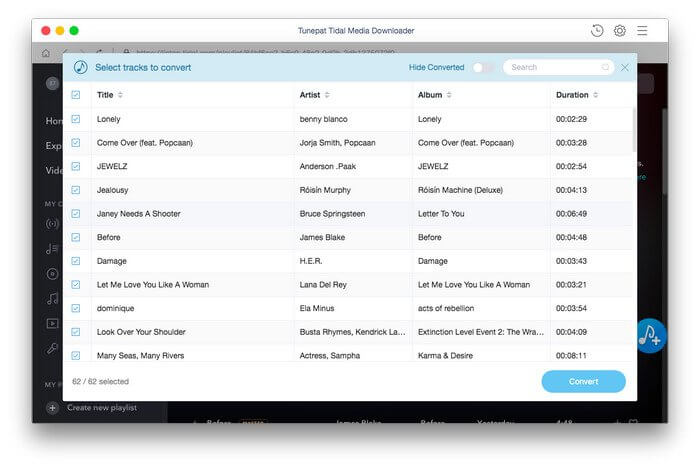
TunePat Tidal Media Downloader is a comprehensive audio downloader and converter which supports converting Tidal music to popular formats, including MP3, AAC, WAV, or FLAC format. With Tidal Media Downloader, you can easily transfer Tidal tracks between devices, even play Tidal music on the unsupported applications and players at any time.
Support Download HiFi Music
The most popular part of Tidal is the Hi-Fi audio quality, which has been promoted for quite a while. With the TunePat Tidal Media Downloader, you are provided with the original audio quality downloaded from Tidal, you will have the exact same listening experience on downloaded music as you normally listen on the Tidal player.
Fastest Conversion Speed
You know there is an averaging 3 minutes duration for a single track, but remember, it doesn’t cost you that long with TunePat.
TunePat Tidal Media Downloader works at a maximum of 10X faster downloading speed than the original duration of a song. You can have an MP3 file downloaded to your local drive within just 30-40 seconds if your network connection is strong enough. Besides, no Tidal desktop application is required for the process, all you need is a Tidal account and the program is ready for you to use.
Choose any Format from MP3/AAC/WAV/FLAC
MP3 is not the only audio format you can download. TunePat Tidal Media Downloader is a comprehensive audio downloader that supports converting Tidal music to MP3, AAC, WAV, or FLAC. You can select your desired format in the setting window. After downloading, you can play the downloaded music on any of your devices including MP3 Player, Fitbit Versa series, Android devices and more for enjoying.
Version 1.4.0:
- Optimize conversion parameters by adding sampling rate option.
- Optimize the interface and functions of the program.
Frequently asked questions
How do I install the app?
Mount the image, drag the app into the "Applications" folder and launch it. If the system blocks the launch, allow it in "System Settings → Privacy & Security".
The app is damaged or won't launch
Reinstalling from a fresh image usually helps. Make sure your macOS version matches the one listed in the compatibility specs.
How do I update?
Download the new version from the site and install it over the current one — your settings will be preserved.
The download link doesn't work
Try a mirror or a download manager. For large files the browser often drops the connection.
How do I completely remove the app?
Use an uninstaller utility — it cleans up the service files that remain after moving the app to the trash.



Choose a download source
TunePat Tidal Media Downloader 1.5.4 · 120.85 MB