Super Eraser 1.2.8
Super Eraser magically remove unwanted elements and instantly fix your photos. Powered by the latest revolutionary image restoration algorithm, Super Eraser performs the best among all other retouching apps that ruin your photos, including professional image processing softwares. A variety of experiments shows the intelligent Super Eraser will give you better and more natural, amazing results than any similar tools.
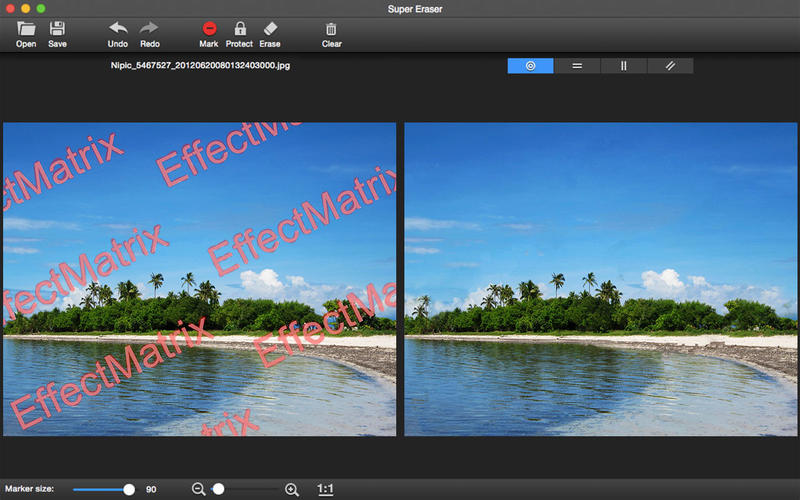
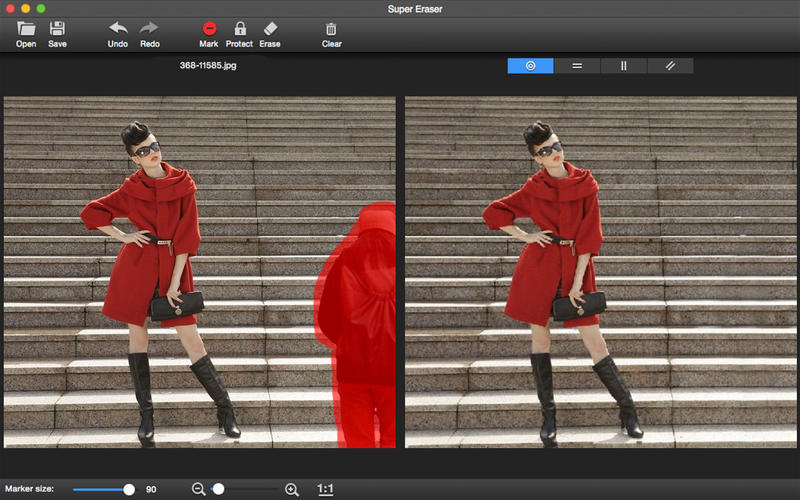
Super Eraser quickly deletes unwanted objects such as logo, text, data stamp, watermark, acnes, people... and instantly fix the images automatically as if they were never there. Retouch, improve and repair your photos. Get the magical images done in seconds-to-minutes instead of minutes-to-hours. People all over the world use Super Eraser every day to beautify their photos. Try it out today to be more creativity!
Top Reasons to Install Super Eraser:
Amazing Realistic Result:
Super Eraser has the ability to handle complex scenes or irregular shaped hole with highly textured objects and reconstruct missing or damaged patch from pixels around the selection to create a seamless repair of an image.
- Remove watermark, logo, signature, date stamp, text etc.
- Delete unwanted objects , such as wires, buildings, garbage bins, etc.
- Erase skin blemishes,acnes ...
- Get rid of image objects, pedestrians, tourists.
Very Fast Speed:
Get the magical images done in seconds-to-minutes instead of minutes-to-hours. It is time to say goodbye to Photoshop.
Intuitive User Interface:
Easy to use and completely non-technical. Just select the Brush or Lasso tool to mark unwanted objects with red color, Super Eraser will do the rest for you.
Precision Tool:
The only tool for making red/green marks for extremely fast separation without sacrificing quality.
Live Preview:
Instant Preview effect and make necessary revision. Redo immediately if you are dissatisfied with the result.
Supported formats:
All popular image formats: JPG, PNG, GIF, BMP, TIFF ...
WHAT’S NEW
Version 1.2.8
- Bug fixed
SCREENSHOTS

Frequently asked questions
How do I install the app?
Mount the image, drag the app into the "Applications" folder and launch it. If the system blocks the launch, allow it in "System Settings → Privacy & Security".
The app is damaged or won't launch
Reinstalling from a fresh image usually helps. Make sure your macOS version matches the one listed in the compatibility specs.
How do I update?
Download the new version from the site and install it over the current one — your settings will be preserved.
The download link doesn't work
Try a mirror or a download manager. For large files the browser often drops the connection.
How do I completely remove the app?
Use an uninstaller utility — it cleans up the service files that remain after moving the app to the trash.
VersionSuper Eraser 1.2.8
DeveloperXiuXia Yang
CompatibilityOS X 10.7 or later, 64-bit processor
LanguageEnglish
IncludesPre-K'ed




Information
Visitors in the group Guests cannot leave comments on this publication.
Choose a download source
Super Eraser 1.2.8 · 7.77 MB