
Passenger for Uber 1.0.7
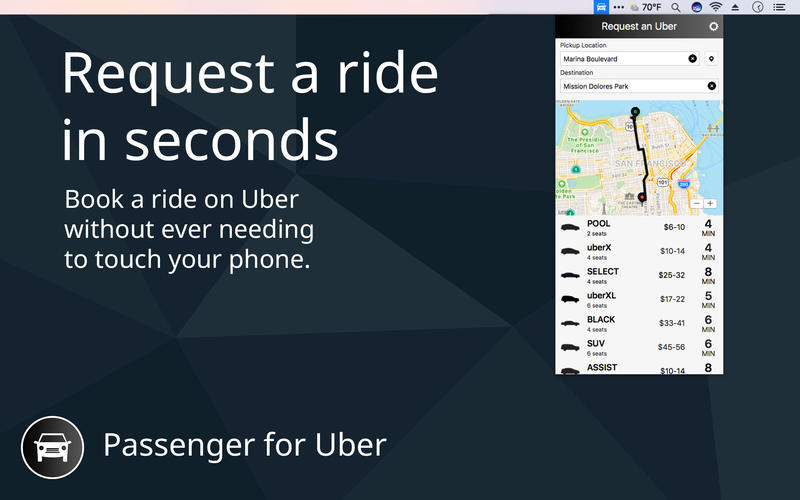
With Passenger, you can now get a ride from your Mac, without needing your phone at all! Passenger stays in your menu bar, and can quickly be brought up with a keyboard shortcut, keeping ride estimates just a tap away.
Passenger supports the full Uber experience, and is powered by the official Uber API.
You can:
- See all the available ride types in your area, and how far away they are. We'll even keep the nearest ETA in your menu bar so you know when it's a good time to request a ride.
- Enter a destination, or use recent destinations, to get cost estimates.
- Get an upfront pricing estimate, choose your payment method and request a ride.
- Get an ETA on your pickup time right in your menu bar, as well as notifications in your Notification Center so you know when to leave.
- Track your drivers progress on a map to stay up to date.
Passenger works in tandem with the Uber app on your phone, and seamlessly transitions between them.
Passenger also supports Touch Bar to make it even simpler to request a ride, without even needing to touch a mouse or trackpad!
SCREENSHOTS

Frequently asked questions
How do I install the app?
Mount the image, drag the app into the "Applications" folder and launch it. If the system blocks the launch, allow it in "System Settings → Privacy & Security".
The app is damaged or won't launch
Reinstalling from a fresh image usually helps. Make sure your macOS version matches the one listed in the compatibility specs.
How do I update?
Download the new version from the site and install it over the current one — your settings will be preserved.
The download link doesn't work
Try a mirror or a download manager. For large files the browser often drops the connection.
How do I completely remove the app?
Use an uninstaller utility — it cleans up the service files that remain after moving the app to the trash.
VersionPassenger for Uber 1.0.7
DeveloperReal Casual Games, LLC
CompatibilityOS X 10.10 or later, 64-bit processor
LanguageEnglish
IncludesK'ed by TNT




Information
Visitors in the group Guests cannot leave comments on this publication.
Choose a download source
Passenger for Uber 1.0.7 · 2.66 MB