
Universal Studio - Templates for iWork 1.3
Universal Studio – Templates for iWork is the perfect tool for users of iWork who desires quickly and easy create high-quality Banners, Headers, Infographics or Twitter and Facebook covers. This set offers over 200 templates and textures.
Focus on content - leave design for us. Just in minutes create professional looking works!
FEATURES:
Professional
Universal Studio templates are high-quality designed by experienced designers who seek the newest trends, so your creation will be modern and professional looking.
Wide choice
You can choose between 7 categories of templates for iWork: Banners, Facebook covers, Twitter Covers, Headers, Posters, Infographics and Textures. Pick your wanted category, choose a template and start customize!
Styles variety
Universal Studio contains a selection of designs, from elegant looking to clean minimal styles. Choose style that match your needs!
Easy-to-use
Templates are well structured, layered and can be quickly edited - it is easy to change the text, images and colors to match your own, business or your organization style. All images and illustrations can be effortlessly replaced and edited.
Size matter
- Covers are perfectly created for Facebook and Twitter sizes requirements.
- Banners category includes 10 sub-categories with different Banners sizes from 120x240 to 720x300.
- Headers comes with 1024x768 resolution.
Requirements: iWork (sold separately)
WHAT’S NEW
Version 1.3
- Added 10 new Templates.
SCREENSHOTS


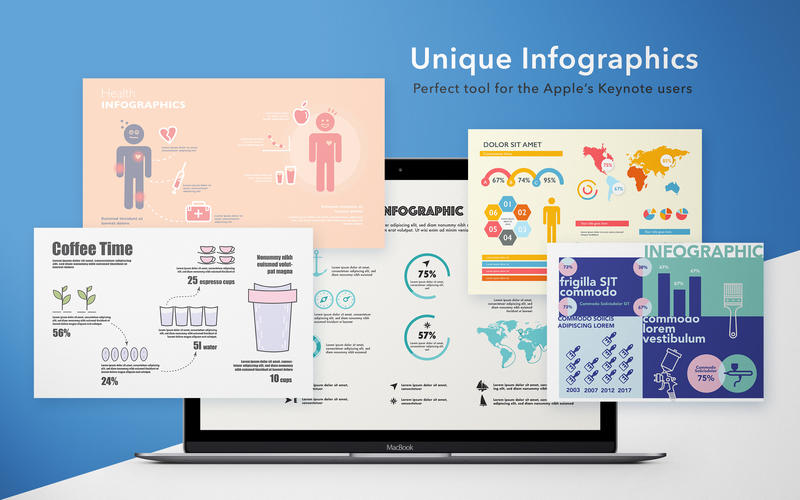
Frequently asked questions
How do I install the app?
Mount the image, drag the app into the "Applications" folder and launch it. If the system blocks the launch, allow it in "System Settings → Privacy & Security".
The app is damaged or won't launch
Reinstalling from a fresh image usually helps. Make sure your macOS version matches the one listed in the compatibility specs.
How do I update?
Download the new version from the site and install it over the current one — your settings will be preserved.
The download link doesn't work
Try a mirror or a download manager. For large files the browser often drops the connection.
How do I completely remove the app?
Use an uninstaller utility — it cleans up the service files that remain after moving the app to the trash.
VersionUniversal Studio - Templates for iWork 1.3
DeveloperGraphic Node
CompatibilityOS X 10.10 or later, 64-bit processor
LanguageEnglish
IncludesK'ed by TNT
Related posts
-
 GN Templates Bundle for iWork 1.6
Productivity332.57 MB
GN Templates Bundle for iWork 1.6
Productivity332.57 MB
-
 Universal Kit Mill - Templates for iWork 1.2
Productivity282.05 MB
Universal Kit Mill - Templates for iWork 1.2
Productivity282.05 MB
-
 Templates for Pixelmator by GN 1.4
Productivity525.19 MB
Templates for Pixelmator by GN 1.4
Productivity525.19 MB
-
 Templates for Photoshop by GN 1.5
Productivity26.5 MB
Templates for Photoshop by GN 1.5
Productivity26.5 MB
-
 Templates Bundle for iWork - Alungu Designs 4.0
Productivity1.94 GB
Templates Bundle for iWork - Alungu Designs 4.0
Productivity1.94 GB
Information
Visitors in the group Guests cannot leave comments on this publication.
Choose a download source
Universal Studio - Templates for iWork 1.3 · 286.66 MB