DiapoSheet 1.3.0
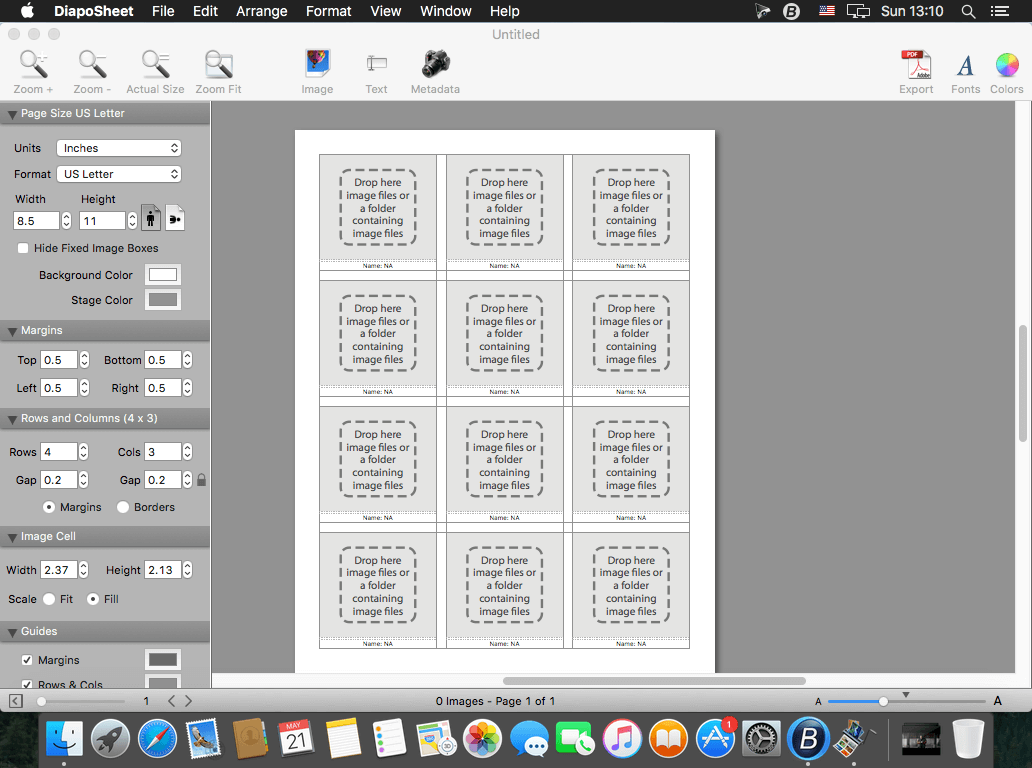
DiapoSheet lets you quickly layout your photographs with EXIF metadata and get a professional contact sheet in PDF format. Drag image files or a folder containing image files onto the main window and you are done. You can easily change the number of rows and columns, their gaps, the margins, the page size and format, add your custom logo and company description, add your watermark, turn on and display the EXIF metadata info below each image using your favorite font, color, and label. Then export to PDF, TIFF, PNG, or JPG at the resolution chosen. Even when exporting to PDF, you can choose the resolution (ppi) of the images. Save your layout to a file and reuse it later on.
WHAT’S NEW
Version 1.3.0:
- Release notes were unavailable when this listing was updated.
SCREENSHOTS
Frequently asked questions
How do I install the app?
Mount the image, drag the app into the "Applications" folder and launch it. If the system blocks the launch, allow it in "System Settings → Privacy & Security".
The app is damaged or won't launch
Reinstalling from a fresh image usually helps. Make sure your macOS version matches the one listed in the compatibility specs.
How do I update?
Download the new version from the site and install it over the current one — your settings will be preserved.
The download link doesn't work
Try a mirror or a download manager. For large files the browser often drops the connection.
How do I completely remove the app?
Use an uninstaller utility — it cleans up the service files that remain after moving the app to the trash.
VersionDiapoSheet 1.3.0
DeveloperSoftobe
CompatibilityOS X 10.7 or later
LanguageEnglish
IncludesPre-K'ed



Information
Visitors in the group Guests cannot leave comments on this publication.
Choose a download source
DiapoSheet 1.3.0 · 7.46 MB